पैकेज, रिपॉज़िटरी और ऐप श्रेणियाँ खोजें

multiple_search_selection कवर
पैकेज विवरणv3.0.0

multiple_search_selection

एक अत्यधिक कस्टमाइज़ेबल बहु-चयन विजेट जिसमें फज़ी सर्च कार्यक्षमता है।

AndroidiOSWebmacOSWindowsLinux
30-दिन डाउनलोड
1.5 हज़ार
लाइक
73
Pub अंक
150

पैकेज इंस्टॉल करें

flutter pub add multiple_search_selection

पैकेज अवलोकन

सार्वजनिक जानकारी से बना चयन मार्गदर्शन। केवल संदर्भ हेतु।

एक अत्यधिक कस्टमाइज़ेबल मल्टीपल सेलेक्शन विजेट जिसमें फज़ी सर्च कार्यक्षमता शामिल है, जिससे उपयोगकर्ता बड़े डेटासेट से एक से अधिक आइटम को प्रभावी ढंग से चुन सकते हैं। यह बुद्धिमान मैचिंग के साथ रियल-टाइम फ़िल्टरिंग समर्थन करता है, जिससे यह फॉर्म, टैग या फ़िल्टर में उपयोगकर्ता को कई विकल्प चुनने के लिए आदर्श है। विजेट को प्लेटफॉर्म के अनुसार चिकनी प्रदर्शन के लिए डिज़ाइन किया गया है और शैली और व्यवहार के लिए व्यापक कस्टमाइज़ेशन प्रदान करता है। Flutter के साथ बनाया गया है, जो एंड्रॉइड, iOS, वेब, macOS, Windows और Linux के लिए लक्षित ऐप्स में बिना किसी दिक्कत के एकीकृत होता है।

उपयोग

  • बहुविकल्पीय फॉर्म इनपुट
  • टैग चयन इंटरफेस
  • डायनामिक सर्च वाले फ़िल्टरिंग प्रणाली
  • उपयोगकर्ता प्राथमिकता चयन
  • खोज के साथ डायनामिक ड्रॉपडाउन
  • प्रशासन पैनल में बहु-चयन

मुख्य विशेषताएँ

  • लचीले मेलिंग के लिए फज़ी खोज
  • कस्टमाइज़ेबल यूआई और स्टाइलिंग
  • बड़े डेटासेट का समर्थन
  • प्लेटफॉर्म के अनुकूलता
  • रियल-टाइम सर्च फ़िल्टरिंग
  • स्पष्ट प्रतिक्रिया के साथ बहु-चयन

इनके लिए उपयुक्त

  • जटिल फॉर्म घटक बनाने वाले विकासकर्ता
  • कुशल बहु-आइटम चयन की आवश्यकता वाले एप्स
  • ड्रॉपडाउन में स्मार्ट खोज की आवश्यकता वाले प्रोजेक्ट
  • क्रॉस-प्लेटफॉर्म सुसंगतता को प्राथमिकता देने वाली टीमें
  • हल्का लेकिन शक्तिशाली चयन विकल्प वाले उपयोगकर्ता

विचार योग्य बातें

  • बहुत बड़े डेटा सेट के लिए ट्यूनिंग की आवश्यकता हो सकती है
  • कस्टमाइजेशन विकल्प प्रारंभिक सेटअप को जटिल बना सकते हैं
  • प्रदर्शन आइटम रेंडरिंग अनुकूलन पर निर्भर करता है
  • सीमित निर्मित वैधता सुविधाएं
  • एकल चयन उपयोग केस के लिए उपयुक्त नहीं

मूल README

संबंधित सोर्स रिपॉज़िटरी के मूल README का स्नैपशॉट। नवीनतम सामग्री के लिए रिपॉज़िटरी देखें।

Version Version

Show some love by dropping a ⭐ at GitHub
HTML tutorial

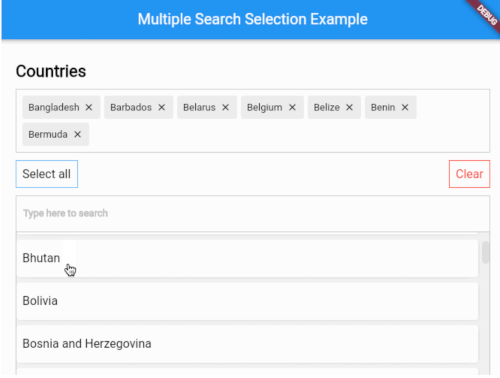
A highly customizable multiple selection widget with fuzzy search functionality
// Use this controller to adjust the behaviour of the widget
// 1. getAllItems
// 2. getPickedItems
// 3. searchItems
// 4. clearSearchField
// 5. clearAllPickedItems
// 6. selectAllItems
// 7. minCharsToShowItems
// 8. allowDuplicateSelection
// 9. isSelectable
MultipleSearchController controller = MultipleSearchController();
MultipleSearchSelection<Country>(
  // The TextField that is used to search items.
  //
  // You can use this to customize the search field.
  // The `onChanged` of the `searchField` is used internally to search items,
  // so you can use the `onSearchChanged` callback to get the search query.
  searchField: TextField(
    decoration: InputDecoration(
      hintText: 'Search countries',
      border: OutlineInputBorder(
        borderRadius: BorderRadius.circular(6),
        ),
      ),
    ),
  onSearchChanged: (text) {
    print('Text is $text');
  },
  items: countries, // List<Country>
  fieldToCheck: (c) {
    return c.name; // String
  },
  itemBuilder: (country,index,isPicked) {
    return Padding(
      padding: const EdgeInsets.all(6.0),
      child: Container(
        decoration: BoxDecoration(
          borderRadius: BorderRadius.circular(6),
          color: Colors.white,
        ),
        child: Padding(
          padding: const EdgeInsets.symmetric(
            vertical: 20.0,
            horizontal: 12,
          ),
          child: Text(country.name),
        ),
      ),
    );
  },
  pickedItemBuilder: (country) {
    return Container(
      decoration: BoxDecoration(
        color: Colors.white,
        border: Border.all(color: Colors.grey[400]!),
      ),
      child: Padding(
        padding: const EdgeInsets.all(8),
        child: Text(country.name),
      ),
    );
  },
  onTapShowedItem: () {},
  onPickedChange: (items) {},
  onItemAdded: (item) {},
  onItemRemoved: (item) {},
  sortShowedItems: true,
  sortPickedItems: true,
  fuzzySearch: FuzzySearch.jaro,
  itemsVisibility: ShowedItemsVisibility.alwaysOn,
  title: Text(
    'Countries',
    style: kStyleDefault.copyWith(
      fontSize: 22,
      fontWeight: FontWeight.bold,
    ),
  ),
  showSelectAllButton: true,
  maximumShowItemsHeight: 200,
)
MultipleSearchSelection<T>.creatable

MultipleSearchSelection<T>.creatable constructor can now create new item when search result does not return any results. It takes a new required parameter, createOptions e.g :

// [T] here is [Country]
createOptions: CreateOptions<Country>(
    // You need to create and return the item you want to add since [T] is not always [String].
    create: (text) {
        return Country(name: text, iso: text);
    },
    // A callback when the item is succesfully created.
    onCreated: (c) => print('Country ${c.name} created'),
    // Create item Widget that appears instead of no results.
    createBuilder: (text) => Align(
        alignment: Alignment.centerLeft,
            child: Padding(
                padding: const EdgeInsets.all(8.0),
                child: Text('Create "$text"'),
            ),
        ),
    // Whether you want to pick the newly created item or just add it to your list. Defaults to false.
    pickCreated: true,
),
Creatable
Showed items visibility

itemsVisibility behaviour for the default & creatable constructors

ShowedItemsVisibility.alwaysOn ShowedItemsVisibility.onType ShowedItemsVisibility.toggle
Always On On type Toggle

Issues / Features

Found a bug or want a new feature? Open an issue in the Github repository of the project.

श्रेणियाँ

निर्भरताएँ

निर्भरता सूची 1 आइटम

सोर्स रिपॉज़िटरी

इस पैकेज का उपयोग करने वाले प्रोजेक्ट

अभी कोई डेटा उपलब्ध नहीं है।