

 v0.1.6
card_stack_widget
Flutter एप्लिकेशन के लिए एक लंबवत डिस्मिसिबल और कस्टमाइज़ किया गया कार्ड स्टैक
88लाइक 28630-दिन डाउनलोड160Pub अंक
AndroidiOSWebmacOSWindowsLinux
Dart+Flutter में बनाई गई कार्ड की ढेरी

यह अंग्रेज़ी मूल स्नैपशॉट है। नवीनतम सामग्री GitHub पर देखें।
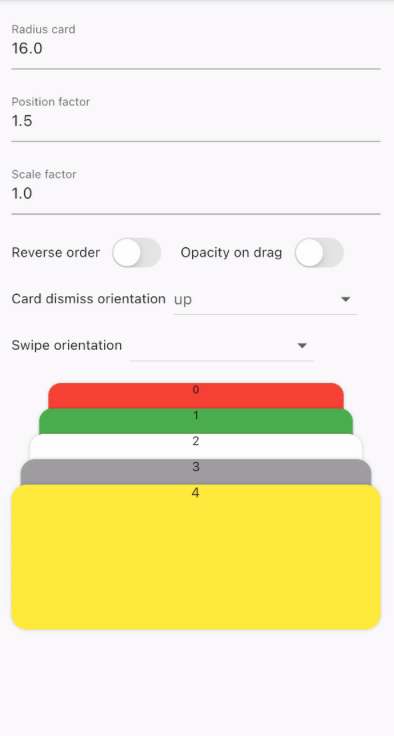
A vertical dismissible and customizable stack of cards for a Flutter application.
CardStackWidget requires a list of CardModel, in order to create a stack of cards. You can
customize their swipe or dismiss orientation, change the scale or the position factor. You can also
apply an opacity, that change on drag movement.
Below, you can find an example of the usage of CardStackWidget and CardModel:
CardStackWidget _buildCardStackWidget(BuildContext context) {
  final mockList = _buildMockList(context, size: 4);

  return CardStackWidget(
    opacityChangeOnDrag: true,
    swipeOrientation: CardOrientation.both,
    cardDismissOrientation: CardOrientation.both,
    positionFactor: 3,
    scaleFactor: 1.5,
    alignment: Alignment.center,
    reverseOrder: true,
    animateCardScale: true,
    dismissedCardDuration: const Duration(milliseconds: 150),
    cardList: mockList,
  );
}

/// Create a mock list of `CardModel` to use inside `CardStackWidget`
_buildMockList(BuildContext context, {int size = 0}) {
  final double containerWidth = MediaQuery
      .of(context)
      .size
      .width - 16;

  var list = <CardModel>[];
  for (int i = 0; i < size; i++) {
    var color = Color((Random().nextDouble() * 0xFFFFFF).toInt() << 0)
        .withOpacity(1.0);

    list.add(
      CardModel(
        backgroundColor: color,
        radius: 8,
        shadowColor: Colors.black.withOpacity(0.2),
        child: SizedBox(
          height: 310,
          width: containerWidth,
          child: Container(), // Whatever you want
        ),
      ),
    );
  }

  return list;
}


CardStackWidget:
CardModel:
निर्भरता सूची 3 आइटम
{"sdk":"flutter"}{"sdk":"flutter"}^4.0.0उपयोग के अनुसार छाँटें, गतिविधि की तुलना करें और अपनाने से पहले मूल प्रोजेक्ट की आवश्यकताएँ जाँचें।
“A repository is the most basic element of GitHub.”
GitHub Docs — About repositories ↗