
v0.57.3
shadcn_ui
shadcn/ui को Flutter में पोर्ट किया गया है। Flutter के लिए अद्वितीय UI घटक, पूरी तरह से कस्टमाइज़ करने योग्य।
968लाइक 91.1 हज़ार30-दिन डाउनलोड160Pub अंक
AndroidiOSWebmacOSWindowsLinux
एक सरल दैनिक कार्य प्रबंधक

shadcn/ui को Flutter में पोर्ट किया गया है। Flutter के लिए अद्वितीय UI घटक, पूरी तरह से कस्टमाइज़ करने योग्य।
 v0.12.1
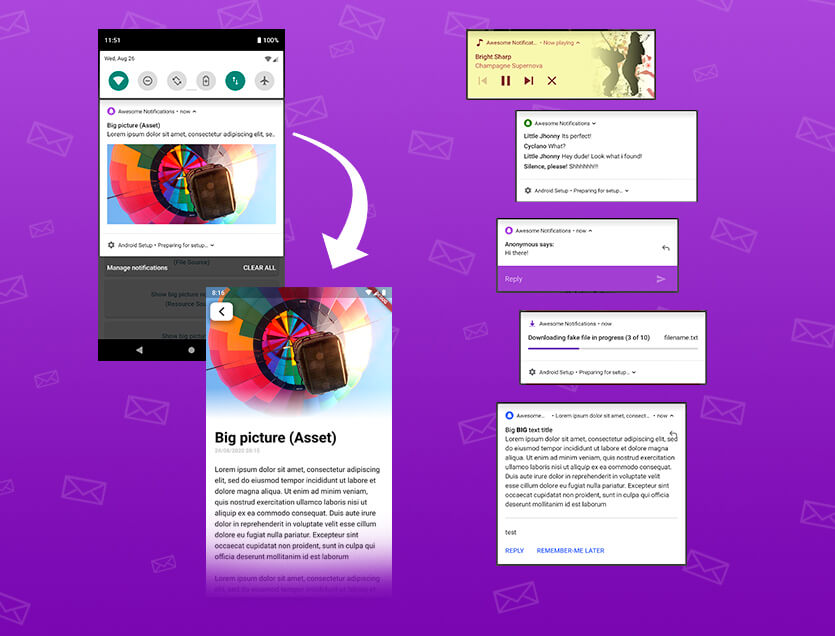
एक पूर्ण समाधान लोकल और पुश नोटिफिकेशन बनाने के लिए, बटन, छवियाँ, आवाज़, इमोजी को कस्टमाइज़ करने और Flutter ऐप्स के लिए कई अलग-अलग लेआउट लागू करने के लिए।
बैक बटन इंटरसेप्टर। एंड्रॉइड बैक बटन दबाने पर कुछ काम करने के लिए उपयोग किया जा सकता है, WillPopScope के विकल्प के रूप में।
Android, iOS, Web, Windows, macOS और Linux पर बाइट्स, मार्ग, स्ट्रीम और URL से फ़ाइलें सहेजें।
निर्भरता सूची 24 आइटम
{"sdk":"flutter"}^1.0.8^0.27.3^6.1.2^9.2.4^2.4.1^1.9.0^4.5.1^0.20.2{"sdk":"flutter"}^0.14.4^8.0.4^8.2.12^5.2.1^6.4.0^0.10.1^1.1.2^0.10.0^10.2.0^2.1.5^0.2.14^5.0.1{"sdk":"flutter"}^6.0.0यह अंग्रेज़ी मूल स्नैपशॉट है। नवीनतम सामग्री GitHub पर देखें।
ToDay App Logo
A minimalist yet powerful daily task manager
ToDay
Ensure Flutter is installed:
flutter doctor
Clone the repository:
git clone https://github.com/fiqryx/to-day.git
Install dependencies:
flutter pub get
Run the app:
flutter run
Set up environment variables:
cp .env.example .env
default configuration
APP_NAME=ToDay
DB_NAME=to_day.db
flutter build apk --release  # Android
flutter build ios --release  # iOS
# or
flutter build apk --split-per-abi # Android
Contributions are welcome! Here's how to get started:
git checkout -b feature/amazing-feature)git commit -m 'Add amazing feature')git push origin feature/amazing-feature)This project is licensed under the MIT License - see the LICENSE file for details.