पैकेज, रिपॉज़िटरी और ऐप श्रेणियाँ खोजें

GitHub रिपॉज़िटरीireshmw/crud_table

crud_table

CRUD Table Flutter में लेटी लोडिंग फंक्शन, रिसाइजेबल कॉलम और एकीकृत CRUD फॉर्म है।

crud_table प्रोजेक्ट कवर
स्टार
23
फ़ोर्क
11
अंतिम पुश (UTC)
13 अप्रैल 2026
प्रोजेक्ट स्थिति
सक्रिय

मूल README

यह अंग्रेज़ी मूल स्नैपशॉट है। नवीनतम सामग्री GitHub पर देखें।

CRUD Table Flutter

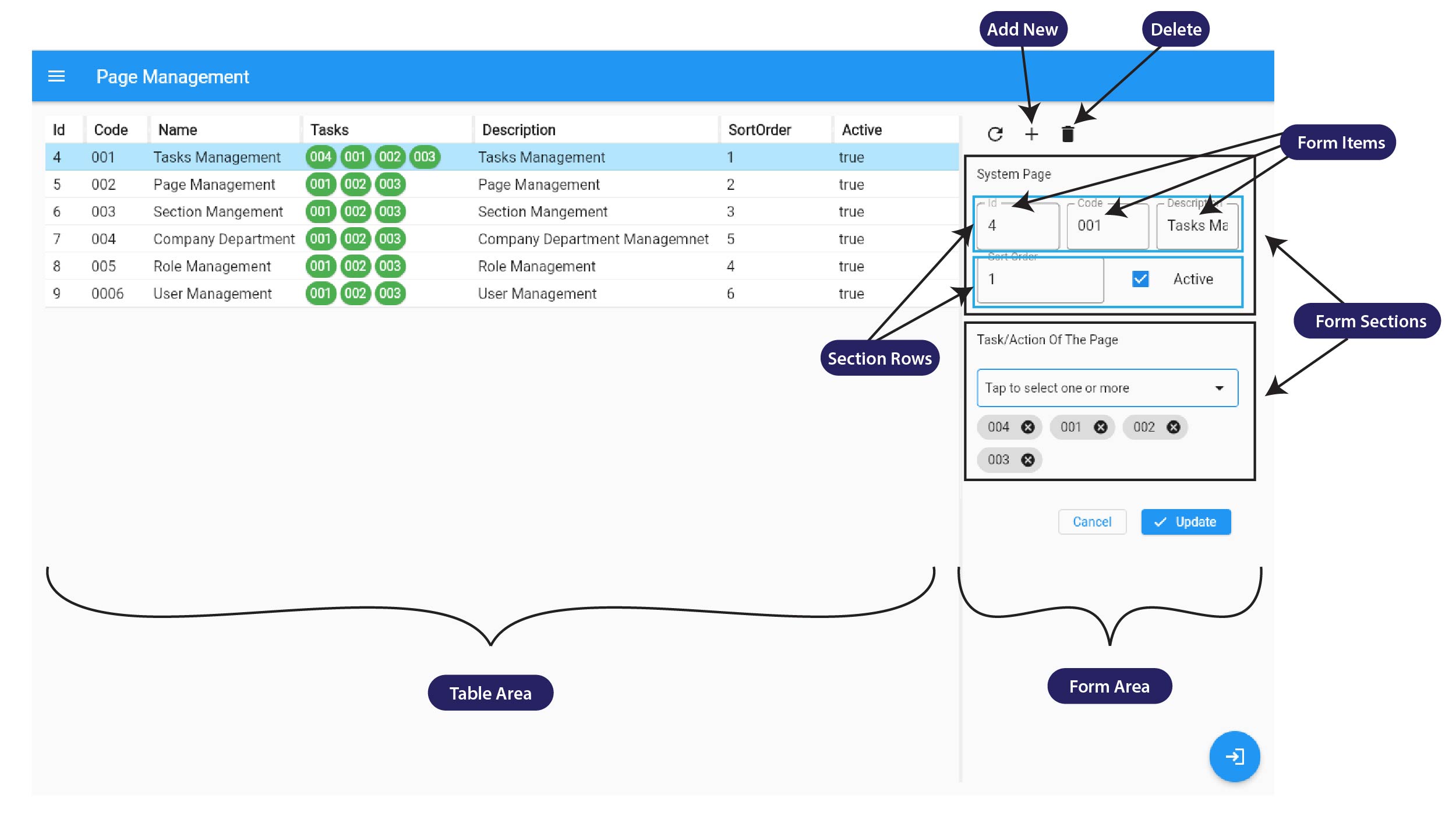
CRUD Table Flutter is a powerful Flutter package that simplifies the creation of CRUD UI for your entity, object or class. This package features a highly efficient lazy loading function, resizable columns, and an integrated CRUD form to provide a seamless user experience. With CRUD Table Flutter, you can easily manage and organize your data, boosting your productivity and efficiency.

Features

  • Lazy loading Table
  • Resizable columns
  • Integrated CRUD Form
  • Customizable UI

CRUD UI

Lazy loading

Getting started

The package uses Riverpod for state management. So Please ensure you import flutter_riverpod and wrap the app with ProviderScope.

import 'package:flutter_riverpod/flutter_riverpod.dart';

  runApp(
    ProviderScope(
      child: MyApp(),
    ),
  );

See the example project.

Installing:

In your pubspec.yaml

dependencies:
  crud_table: 
import 'package:crud_table/crud_table.dart';

Usage

When using CrudTable, a CrudViewSource field must be passed and cannot be null. In the CrudViewSource, you will find a function field called emptyEntityFactory. This function requires an empty object that will be used with the CRUD UI.
Ex :
 Let's say you use User.class with this CrudTable, then the emptyEntityFactory will be

emptyEntityFactory: () => User();

Note :
Give unique on every FormItem otherwise form data change will not work as we expect.

Check the example project.

Additional information

Inspired by Vaadin Crud UI Add-on

License

Licensed under the Apache License, Version 2.0

IRESH MADHURANGA GitHub avatar
भाषाएँDartHTMLSwiftKotlinObjective-C

श्रेणियाँ

इस रिपॉज़िटरी के पैकेज

उपयोग की गई निर्भरताएँ

निर्भरता सूची 7 आइटम

अपने प्रोजेक्ट के लिए रिपॉज़िटरी कैसे चुनें?

उपयोग के अनुसार छाँटें, गतिविधि की तुलना करें और अपनाने से पहले मूल प्रोजेक्ट की आवश्यकताएँ जाँचें।

  1. नाम, लेखक या विवरण से खोजें और तकनीकी विषय से परिणाम सीमित करें।
  2. स्टार, फ़ोर्क और हाल के पुश की तुलना करें। स्टार रुचि दर्शाते हैं, गुणवत्ता की गारंटी नहीं।
  3. उपयोग से पहले GitHub पर README, लाइसेंस और Issues जाँचें।

स्रोत और रखरखाव

“A repository is the most basic element of GitHub.”

GitHub Docs — About repositories ↗