

 v2.1.0
icon_picker
एक फ्लटर विजेट जो एक आइकन संग्रह युक्त डायलॉग प्रदर्शित करता है, जिसमें से एक चुना जाता है और एक जेसन iconData लौटाता है।
18लाइक 5630-दिन डाउनलोड60Pub अंक
प्लेटफ़ॉर्म डेटा नहीं
एक फ्लटर विजेट जो चुनने के लिए आइकन संग्रह दिखाता है। यह विजेट TextField का विस्तार करता है और TextFormField के समान व्यवहार करता है

यह अंग्रेज़ी मूल स्नैपशॉट है। नवीनतम सामग्री GitHub पर देखें।


A Flutter widget to show an icon collection to pick.
This widget extend TextField and has a similar behavior as TextFormField
In the pubspec.yaml of your flutter project, add the following dependency:
dependencies:
  ...
  icon_picker: "^2.1.0"
In your library add the following import:
import 'package:icon_picker/icon_picker.dart';
For help getting started with Flutter, view the online documentation.
IconPicker use an internal MaterialIcon collection by default, but you can set your own icon collection.
You just need to pass in iconCollection param a Map<String, IconData>.
final Map<String, IconData> myIconCollection = {
  'favorite': Icons.favorite,
  'home': Icons.home,
  'android': Icons.android,
  'album': Icons.album,
  'ac_unit': Icons.ac_unit,
  ...
}
IconPicker(
  initialValue: 'favorite',
  icon: Icon(Icons.apps),
  labelText: "Icon",
  title: "Select an icon",
  cancelBtn: "CANCEL",
  enableSearch: true,
  searchHint: 'Search icon',
  iconCollection: myIconCollection,
  onChanged: (val) => print(val),
  onSaved: (val) => print(val),
);
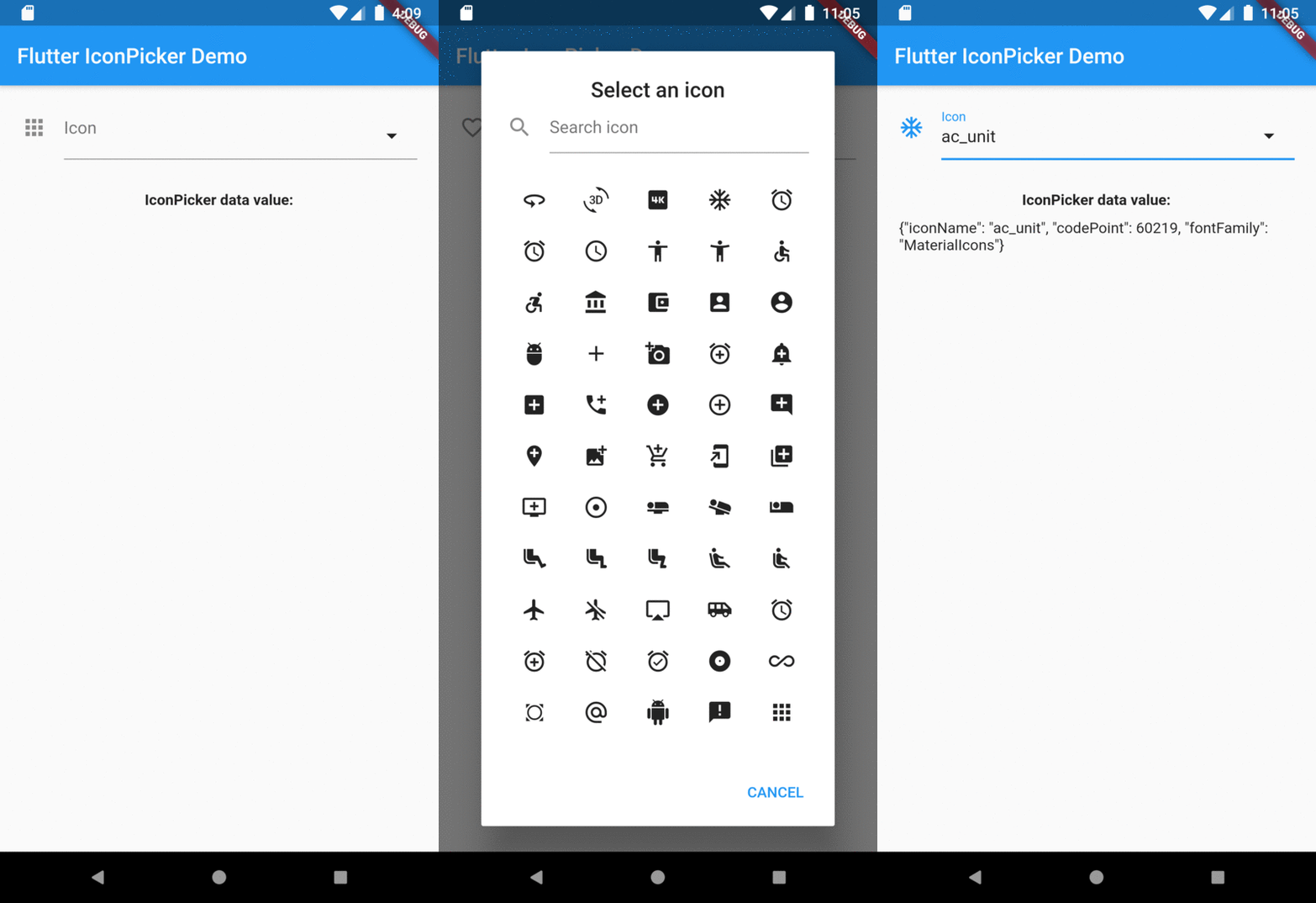
The result of val in onChanged, validator and onSaved will be a json String.
So, if you tap the icon ac_unit in the dialog window, the result value will be:
'{"iconName": "ac_unit", "codePoint": 60219, "fontFamily": "MaterialIcons"}'
Transforming the String result of IconPicker in an IconData:
String value = '{"iconName": "ac_unit", "codePoint": 60219, "fontFamily": "MaterialIcons"}'
var iconDataJson = jsonDecode(value);
IconData icon = IconData(iconDataJson['codePoint'], fontFamily: iconDataJson['fontFamily']);
Icon(icon);
निर्भरता सूची 3 आइटम
{"sdk":"flutter"}{"sdk":"flutter"}^1.0.0उपयोग के अनुसार छाँटें, गतिविधि की तुलना करें और अपनाने से पहले मूल प्रोजेक्ट की आवश्यकताएँ जाँचें।
“A repository is the most basic element of GitHub.”
GitHub Docs — About repositories ↗