

 v2.0.2
circular_reveal_animation
सर्कुलर रिवील एनिमेशन को फ्लटर विजेट के रूप में! एंड्रॉइड के ViewAnimationUtils.createCircularReveal(...) से प्रेरित।
271लाइक 4.3 हज़ार30-दिन डाउनलोड160Pub अंक
AndroidiOSWebmacOSWindowsLinux
सर्कुलर रिवील एनिमेशन के रूप में फ्लटर विजेट!

यह अंग्रेज़ी मूल स्नैपशॉट है। नवीनतम सामग्री GitHub पर देखें।

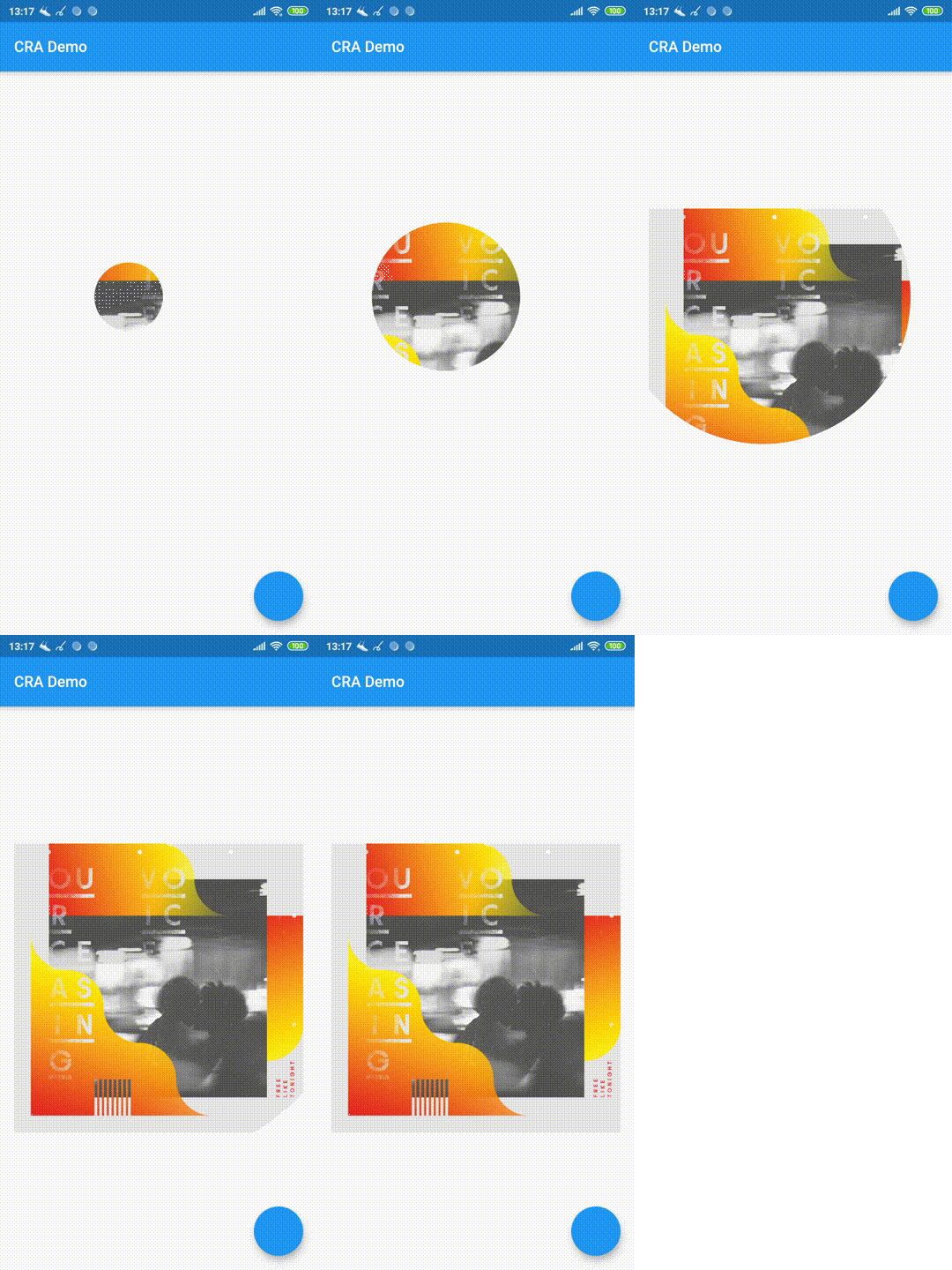
Circular Reveal Animation as Flutter widget!
Inspired by Android's ViewAnimationUtils.createCircularReveal(...).
Статья с описанием (русский).
Article with description (english).

CircularRevealAnimation(
  // @required
  child: Container(color: Colors.red),
  // @required [Animation<double>]
  animation: animation,
  // child's center if not specified
  centerAlignment: Alignment.centerRight,
  // 0 if not specified
  minRadius: 12,
  // distance from center to further child's corner if not specified
  maxRadius: 200,
);
import 'package:circular_reveal_animation/circular_reveal_animation.dart';
import 'package:flutter/material.dart';

void main() => runApp(MyApp());

class MyApp extends StatelessWidget {
  @override
  Widget build(BuildContext context) {
    return MaterialApp(
      title: 'CRA Demo',
      theme: ThemeData(
        primarySwatch: Colors.blue,
      ),
      home: MyHomePage(),
    );
  }
}

class MyHomePage extends StatefulWidget {
  @override
  _MyHomePageState createState() => _MyHomePageState();
}

class _MyHomePageState extends State<MyHomePage>
    with SingleTickerProviderStateMixin {
  AnimationController animationController;
  Animation<double> animation;

  @override
  void initState() {
    super.initState();
    animationController = AnimationController(
      vsync: this,
      duration: Duration(milliseconds: 1000),
    );
    animation = CurvedAnimation(
      parent: animationController,
      curve: Curves.easeIn,
    );
  }

  @override
  Widget build(BuildContext context) {
    return Scaffold(
      appBar: AppBar(
        title: Text("CRA Demo"),
      ),
      body: Padding(
        padding: const EdgeInsets.all(16.0),
        child: Center(
          child: Column(
            mainAxisSize: MainAxisSize.min,
            children: <Widget>[
              MaterialButton(
                child: Text("show reveal dialog"),
                onPressed: () => showRevealDialog(context),
                color: Colors.amber,
              ),
              SizedBox(height: 16),
              CircularRevealAnimation(
                child: Image.asset('assets/ocv.jpg'),
                animation: animation,
//                centerAlignment: Alignment.centerRight,
                centerOffset: Offset(130, 100),
//                minRadius: 12,
//                maxRadius: 200,
              ),
            ],
          ),
        ),
      ),
      floatingActionButton: FloatingActionButton(onPressed: () {
        if (animationController.status == AnimationStatus.forward ||
            animationController.status == AnimationStatus.completed) {
          animationController.reverse();
        } else {
          animationController.forward();
        }
      }),
    );
  }

  Future<void> showRevealDialog(BuildContext context) async {
    showGeneralDialog(
      barrierLabel: "Label",
      barrierDismissible: true,
      barrierColor: Colors.black.withOpacity(0.5),
      transitionDuration: Duration(milliseconds: 700),
      context: context,
      pageBuilder: (context, anim1, anim2) {
        return Align(
          alignment: Alignment.bottomCenter,
          child: Container(
            child: Padding(
              padding: const EdgeInsets.all(12.0),
              child: Image.asset('assets/klimt.png'),
            ),
            margin: EdgeInsets.only(top: 50, left: 12, right: 12, bottom: 0),
            decoration: BoxDecoration(
              color: Colors.white,
              borderRadius: BorderRadius.circular(5),
            ),
          ),
        );
      },
      transitionBuilder: (context, anim1, anim2, child) {
        return CircularRevealAnimation(
          child: child,
          animation: anim1,
          centerAlignment: Alignment.bottomCenter,
        );
      },
    );
  }
}
निर्भरता सूची 2 आइटम
{"sdk":"flutter"}{"sdk":"flutter"}उपयोग के अनुसार छाँटें, गतिविधि की तुलना करें और अपनाने से पहले मूल प्रोजेक्ट की आवश्यकताएँ जाँचें।
“A repository is the most basic element of GitHub.”
GitHub Docs — About repositories ↗