
 v0.4.2
flutter_context_menu
अपने ऐप में कस्टमाइज़ किए गए कॉन्टेक्स्ट मेनू बनाएं और प्रदर्शित करें।
124लाइक 26.9 हज़ार30-दिन डाउनलोड160Pub अंक
AndroidiOSWebmacOSWindowsLinux
अपने ऐप में कस्टमाइज़ किए गए कॉन्टेक्स्ट मेनू बनाएं और प्रदर्शित करें।

{"sdk":"flutter"}{"sdk":"flutter"}^6.0.0यह अंग्रेज़ी मूल स्नैपशॉट है। नवीनतम सामग्री GitHub पर देखें।
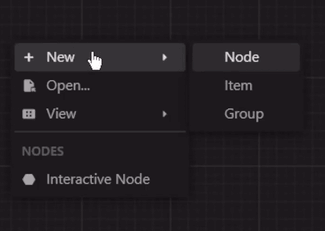
A Flutter library that provides a flexible and customizable solution for creating and displaying context menus in Flutter applications. It allows you to easily add context menus to your UI, providing users with a convenient way to access additional options and actions specific to the selected item or area.
View Example · Report Bug · Request FeaturePreview
ContextMenu: The package includes a highly customizable context menu system that can be
easily integrated into your Flutter application. It provides a seamless and intuitive user
experience, enhancing the usability of your app.
Hierarchical Structure: The context menu supports a hierarchical structure with submenu functionality. This enables you to create nested menus, providing a clear and organized representation of options and suboptions.
Selection Handling: The package includes built-in selection handling for context menu items. It allows you to define callback functions for individual menu items, enabling you to execute specific actions or logic when an item is selected.
Customization Options: Customize the appearance and behavior of the context menu to match your app's design and requirements. Modify the style, positioning, animation, and interaction of the menu to create a cohesive user interface.
Built-in Components: The package includes built-in components, such as MenuItem,
MenuDivider, and MenuHeader, that can be used in your context menu.
Cross Platform Support: The package is compatible with multiple platforms, including Android, iOS, Web, and Desktop.
run this command in your terminal:
flutter pub add flutter_context_menu
add this line to your pubspec.yaml dependencies:
dependencies:
    flutter_context_menu:
then, run this command in your terminal:
flutter pub get
First, import the package:
import 'package:flutter_context_menu/flutter_context_menu.dart';
Then, initialize a ContextMenu instance:
// define your context menu entries
final entries = <ContextMenuEntry>[
  const MenuHeader(text: "Context Menu"),
  MenuItem(
    label: const Text('Copy'),
    icon: const Icon(Icons.copy),
    onSelected: (value) {
      // implement copy
    },
  ),
  MenuItem(
    enabled: false, // disable this item
    label: const Text('Cut'),
    icon: const Icon(Icons.cut),
    onSelected: (value) {
      // implement cut
    },
  ),
  MenuItem(
    label: const Text('Paste'),
    icon: const Icon(Icons.paste),
    onSelected: (value) {
      // implement paste
    },
  ),
  const MenuDivider(),
  MenuItem.submenu(
    label: const Text('Edit'),
    icon: const Icon(Icons.edit),
    items: [
      MenuItem(
        label: const Text('Undo'),
        value: "Undo",
        icon: const Icon(Icons.undo),
        onSelected: (value) {
          // implement undo
        },
      ),
      MenuItem(
        label: const Text('Redo'),
        value: 'Redo',
        icon: const Icon(Icons.redo),
        onSelected: (value) {
          // implement redo
        },
      ),
    ],
  ),
];

// initialize a context menu
final menu = ContextMenu(
  entries: entries,
  position: const Offset(300, 300),
  padding: const EdgeInsets.all(8.0),
);
Finally, to show the context menu, there are two ways:
Method 1: Directly calling one of the show methods.
This will show the context menu at the manually specified position.
void showMenu() async {
  showContextMenu(context, contextMenu: menu);
  // or
  final selectedValue = await menu.show(context);
  print(selectedValue);
}
Method 2: Using the ContextMenuRegion widget to show the context menu when the user
right-clicks or long-presses the region area.
This will show the context menu where the user clicks when the
positionproperty is not specified in theContextMenuconstructor.
@override
Widget build(BuildContext context) {
  return Column(
    children: [
      ContextMenuRegion(
        contextMenu: contextMenu,
        onItemSelected: (value) {
          print(value);
        },
        child: Container(
          color: Colors.indigo,
          height: 300,
          width: 300,
          child: const Center(
            child: Text(
              'Right click or long press!',
            ),
          ),
        ),
      )
    ],
  );
}
Theme: By default, the context menu and its items uses the
MaterialApp's theme data for styling. However, you can customize the appearance and behavior of the context menu by modifying the theme data. Or individually by specifying aBoxDecorationin theboxDecorationproperty of theContextMenu.
Custom Entries: You can create your own context menu entries by subclassing the
ContextMenuEntryclass. This allows you to customize the appearance, behavior, and functionality of the context menu items.
If you have any suggestions or feedback, please open an issue or create a pull request.
If you like this package, please star it and follow me on X and GitHub.
This project is licensed under the BSD 3-Clause License.