
 v0.2.0
customizable_space_bar
AppBar जो स्क्रॉल की दर के साथ सामग्री बदलता है। "बड़ा शीर्षक" को लागू करने में सक्षम है
67लाइक 59730-दिन डाउनलोड140Pub अंक
AndroidiOSWebmacOSWindowsLinux
AppBar जो स्क्रॉल की दर के साथ सामग्री बदलता है। "बड़ा शीर्षक" को लागू करने में सक्षम है

{"sdk":"flutter"}{"sdk":"flutter"}यह अंग्रेज़ी मूल स्नैपशॉट है। नवीनतम सामग्री GitHub पर देखें।
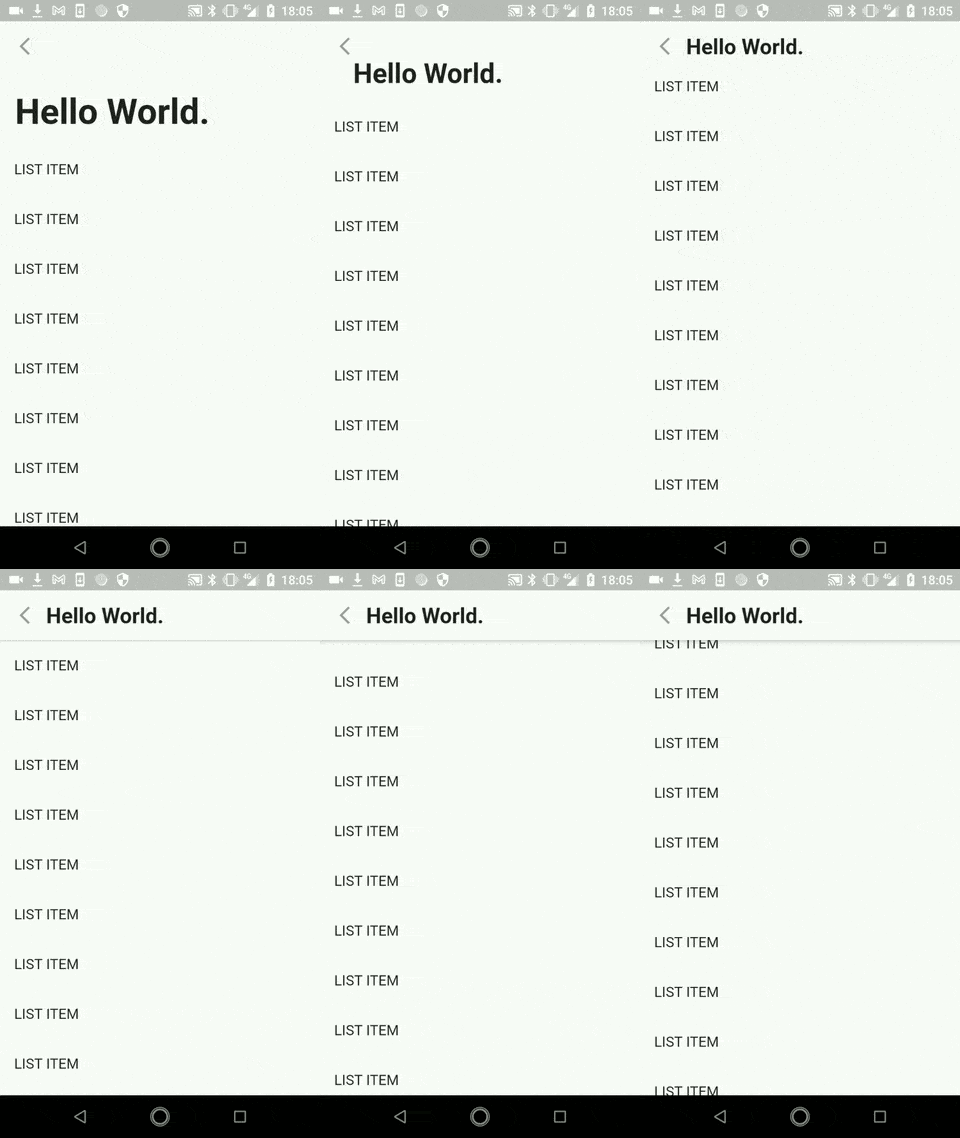
AppBar which changes the content with scrolling rate. Enables to implement "Large Title"
13063567123474
This package is expected to be used with flexibleSpace: in SliverAppBar, which means you also need to use CustomScrollView.
    CustomScrollView(
        slivers: [
          SliverAppBar(
            pinned: true,
            leading: IconButton(icon: Icon(Icons.arrow_back_ios_sharp)),
            backgroundColor: Theme.of(context).scaffoldBackgroundColor,

            /// This is the part you use this package
            flexibleSpace: CustomizableSpaceBar(
              builder: (context, scrollingRate) {
                /// Example content
                return Padding(
                  padding: EdgeInsets.only(
                      bottom: 13, left: 12 + 40 * scrollingRate),
                  child: Align(
                    alignment: Alignment.bottomLeft,
                    child: Text(
                      "Hello World.",
                      style: TextStyle(
                          fontSize: 42 - 18 * scrollingRate,
                          fontWeight: FontWeight.bold),
                    ),
                  ),
                );
              },
            ),
            /// End of the part

            expandedHeight: 150,
          ),
          SliverList(
            delegate: SliverChildBuilderDelegate(
              (context, index) {
                return ListTile(
                  title: Text("LIST ITEM"),
                );
              },
            ),
          )
        ],
      ),
You can control the layout in the AppBar with scrollingRate.
When the shape is fully expanded, scrollingRate is 0.0. When the shape is collapsed to AppBar, it reaches to the limit 1.0.
13063658045969
If you have any requests or questions, please feel free to ask on github.