

 v1.3.2
scroll_navigation
यह हाथ के चलन और टैप द्वारा एक शक्तिशाली नेविगेशन है। आप बाएं से दाएं स्क्रोल कर सकते हैं या नेविगेशन आइकन पर टैप कर सकते हैं।
120लाइक 19930-दिन डाउनलोड140Pub अंक
AndroidiOSmacOSWindowsLinux
FLUTTER PACKAGE: गतिविधि और टैप द्वारा शक्तिशाली नेविगेशन। आप बाएं से दाएं स्क्रॉल कर सकते हैं या नेविगेशन आइकन पर टैप कर सकते हैं।

यह अंग्रेज़ी मूल स्नैपशॉट है। नवीनतम सामग्री GitHub पर देखें।
| NavigationPosition.bottom | NavigationPosition.top |
|---|---|
 |
 |
@override
Widget build(BuildContext context) {
  return ScrollNavigation(
    bodyStyle: NavigationBodyStyle(
      background: Colors.white,
      borderRadius: BorderRadius.vertical(bottom: Radius.circular(20)),
    ),
    barStyle: NavigationBarStyle(
      background: Colors.white,
      elevation: 0.0,
    ),
    pages: [
      Container(color: Colors.blue[100]),
      Container(color: Colors.green[100]),
      Container(color: Colors.purple[100]),
      Container(color: Colors.amber[100]),
      Container(color: Colors.deepOrange[100])
    ],
    items: const [
      ScrollNavigationItem(icon: Icon(Icons.camera)),
      ScrollNavigationItem(icon: Icon(Icons.chat)),
      ScrollNavigationItem(icon: Icon(Icons.favorite)),
      ScrollNavigationItem(icon: Icon(Icons.notifications)),
      ScrollNavigationItem(icon: Icon(Icons.home))
    ],
  );
}
| NavigationPosition.left | NavigationPosition.right |
|---|---|
 |
 |
@override
Widget build(BuildContext context) {
  return ScrollNavigation(
    bodyStyle: NavigationBodyStyle(
      background: Colors.white,
      borderRadius: BorderRadius.horizontal(left: Radius.circular(20)),
      scrollDirection: Axis.vertical,
    ),
    barStyle: NavigationBarStyle(
      position: NavigationPosition.left,
      elevation: 0.0,
      background: Colors.white,
    ),
    pages: [
      Container(color: Colors.blue[100]),
      Container(color: Colors.green[100]),
      Container(color: Colors.purple[100]),
      Container(color: Colors.amber[100]),
      Container(color: Colors.deepOrange[100])
    ],
    items: const [
      ScrollNavigationItem(icon: Icon(Icons.camera)),
      ScrollNavigationItem(icon: Icon(Icons.chat)),
      ScrollNavigationItem(icon: Icon(Icons.favorite)),
      ScrollNavigationItem(icon: Icon(Icons.notifications)),
      ScrollNavigationItem(icon: Icon(Icons.home))
    ],
  );
}
final navigationKey = GlobalKey<ScrollNavigationState>();

@override
Widget build(BuildContext context) {
  return ScrollNavigation(
    key: navigationKey,
    pages: [...],
    items: [...],
    barStyle: NavigationBarStyle(position: NavigationPosition.top),
  );
}

void goToPage(int index) => navigationKey.currentState.goToPage(index);
| physics = true | physics = False |
|---|---|
 |
 |
| position = IdentifierPosition.topAndRight | showIdentifier = False |
|---|---|
 |
 |
return ScrollNavigation(
    pages: [...],
    items: [...],
    physics: true,
    showIdentifier: true,
    identiferStyle: NavigationIdentiferStyle(
      position: NavigationPosition.top,
    ),
);

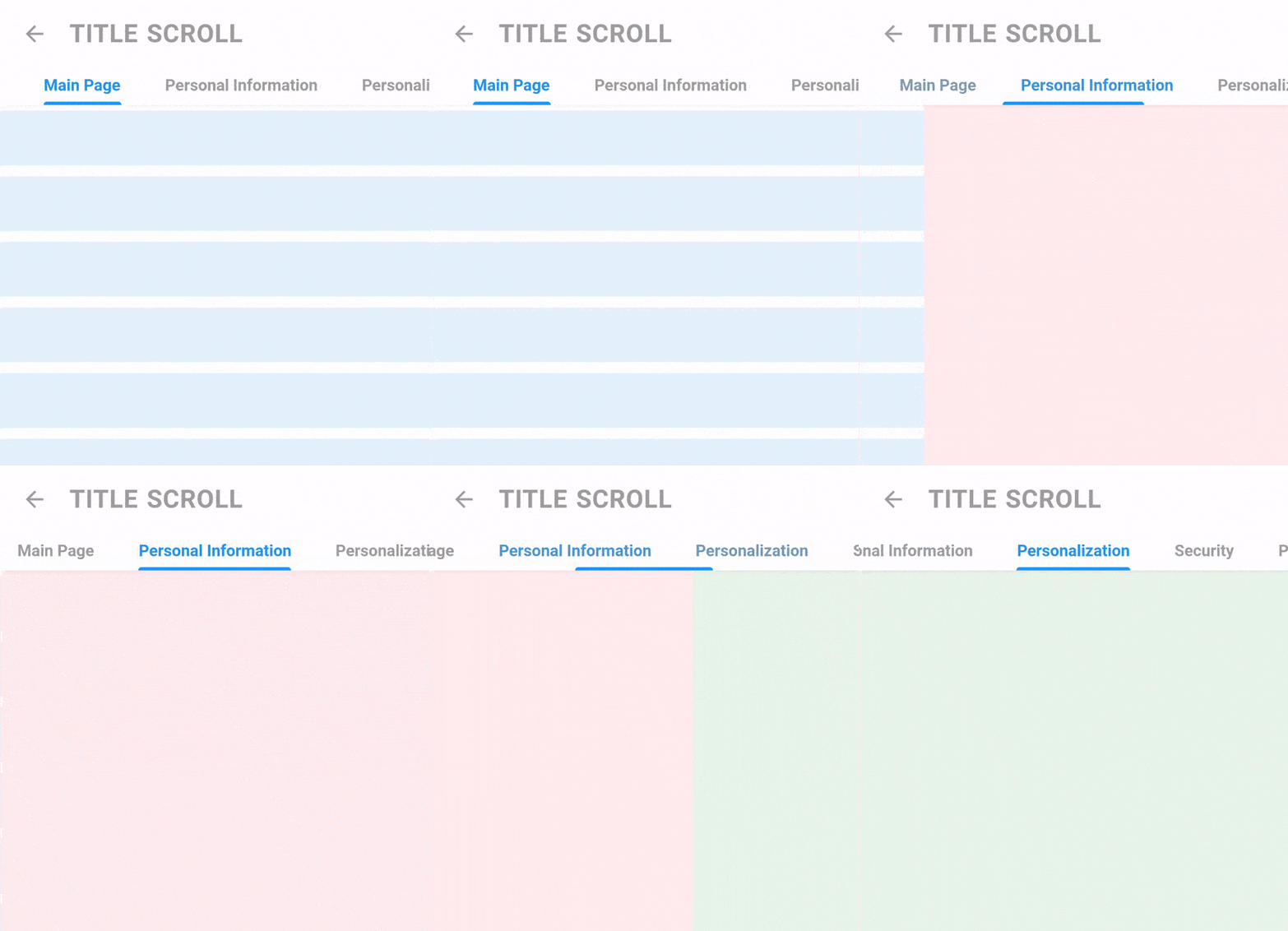
return TitleScrollNavigation(
    barStyle: TitleNavigationBarStyle(
      style: TextStyle(fontWeight: FontWeight.bold),
      padding: EdgeInsets.symmetric(horizontal: 40.0),
      spaceBetween: 40,
    ),
    titles: [
      "Main Page",
      "Personal Information",
      "Personalization",
      "Security",
      "Payment Methods",
    ],
    pages: [
      Container(color: Colors.blue[50]),
      Container(color: Colors.red[50]),
      Container(color: Colors.green[50]),
      Container(color: Colors.purple[50]),
      Container(color: Colors.yellow[50]),
    ],
);

ScrollController controller = ScrollController();

return Screen(
    appBar: AppBarTitle(title: "Title Scroll", showBack: true), //WIDGET IN THE EXAMPLE
    controllerToHideAppBar: controller,
    body: ListView.builder(
      itemCount: 15,
      padding: EdgeInsets.zero,
      controller: controller,
      itemBuilder: (_, __) {
        return Padding(
          padding: EdgeInsets.symmetric(vertical: 5),
          child: Container(
            height: 50,
            color: Colors.blue[50],
          ),
        );
      },
    ),
  );
निर्भरता सूची 3 आइटम
{"sdk":"flutter"}^1.1.3{"sdk":"flutter"}उपयोग के अनुसार छाँटें, गतिविधि की तुलना करें और अपनाने से पहले मूल प्रोजेक्ट की आवश्यकताएँ जाँचें।
“A repository is the most basic element of GitHub.”
GitHub Docs — About repositories ↗