पैकेज, रिपॉज़िटरी और ऐप श्रेणियाँ खोजें

GitHub रिपॉज़िटरीshirne/CartStepper

CartStepper

एक फ्लटर संख्यात्मक स्टेपर इनपुट

CartStepper प्रोजेक्ट कवर
स्टार
12
फ़ोर्क
13
अंतिम पुश (UTC)
22 दिस॰ 2023
प्रोजेक्ट स्थिति
सक्रिय

मूल README

यह अंग्रेज़ी मूल स्नैपशॉट है। नवीनतम सामग्री GitHub पर देखें।

cart_stepper

pub package

A fully customizable Flutter Widget to get count. It can be applicable in e-commerce apps for getting cart count.

This package is Forked from AYNStepperView
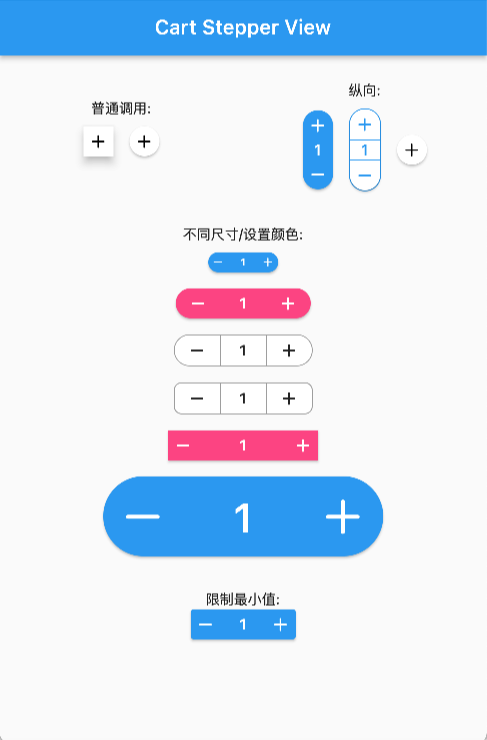
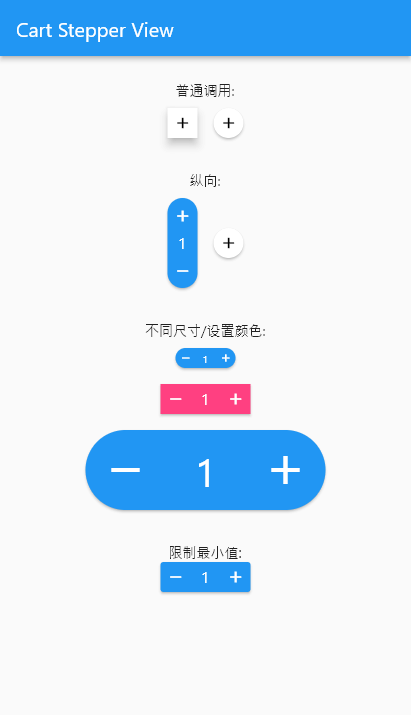
Preview

Arguments

  • count: int/double, the number to show
  • stepper: int/double, the number to increasing or decreasing
  • size: double, widget size
  • axis: Axis, layout direction
  • numberSize: double, number spacer, default 2
  • didChangeCount: Function, @required to set the release counter
  • style: CartStepperStyle
  • alwaysExpanded: bool, always expanded while value is 0
  • elevation: double, display a shadow around this widget

CartStepperStyle:

  • activeForegroundColor: Color, text color when counter > 0
  • activeBackgroundColor: Color, background color when counter > 0
  • foregroundColor: Color, text color when counter == 0
  • backgroundColor: Color, background color when counter == 0
  • shape: BoxShape,
  • radius: Radius, the borderRadius of this widget, default caculating a roundedRectAngle
  • BoxBorder: Border of the Widget
  • shadowColor: Color
  • textStyle,
  • iconTheme = const IconThemeData(),
  • iconPlus: IconData, customize the plus icon
  • iconMinus: IconData, customize the minus icon
  • buttonAspectRatio: plus & minux button's aspectRatio, default 1,
  • elevation: Widget's elevation,

Using

Create a widget to show and modify a number:

Widget _buildStepper() {
  return CartStepperInt(
        count: _counter,
        size: 30,
        style: CartStepperTheme.of(context).copyWith(activeForegroundColor: Colors.purple,)
        didChangeCount: (count) {
        setState(() {
        _counter = count;
        });
      },
  );
}

Migrating

// from 3.x to 4.x
// CartStepperStyle.
deActiveForegroundColor => foregroundColor
deActiveBackgroundColor => backgroundColor

OnlineDemo

shirne GitHub avatar
GitHub लेखक

shirne ↗

Flutter/PHP/Java/.NET/Vue

भाषाएँDartC++CMakeHTMLSwiftCKotlinObjective-C

श्रेणियाँ

इस रिपॉज़िटरी के पैकेज

उपयोग की गई निर्भरताएँ

निर्भरता सूची 4 आइटम

  • flutter{"sdk":"flutter"}
  • intl>=0.17.0
  • flutter_testडेवलपमेंट{"sdk":"flutter"}
  • flutter_lintsडेवलपमेंटany

अपने प्रोजेक्ट के लिए रिपॉज़िटरी कैसे चुनें?

उपयोग के अनुसार छाँटें, गतिविधि की तुलना करें और अपनाने से पहले मूल प्रोजेक्ट की आवश्यकताएँ जाँचें।

  1. नाम, लेखक या विवरण से खोजें और तकनीकी विषय से परिणाम सीमित करें।
  2. स्टार, फ़ोर्क और हाल के पुश की तुलना करें। स्टार रुचि दर्शाते हैं, गुणवत्ता की गारंटी नहीं।
  3. उपयोग से पहले GitHub पर README, लाइसेंस और Issues जाँचें।

स्रोत और रखरखाव

“A repository is the most basic element of GitHub.”

GitHub Docs — About repositories ↗