


 v1.2.0
terminate_restart
एक ऐप समाप्ति और डेटा साफ करने के विकल्प के साथ पुनरारंभ के लिए एक Flutter प्लगइन।
70लाइक 32.4 हज़ार30-दिन डाउनलोड160Pub अंक
AndroidiOSWeb
sleem2012/terminate_restart open-source repository details.

यह अंग्रेज़ी मूल स्नैपशॉट है। नवीनतम सामग्री GitHub पर देखें।


A robust Flutter plugin for terminating and restarting your app with extensive customization options. Perfect for implementing dynamic updates, clearing app state, or refreshing your app's UI.

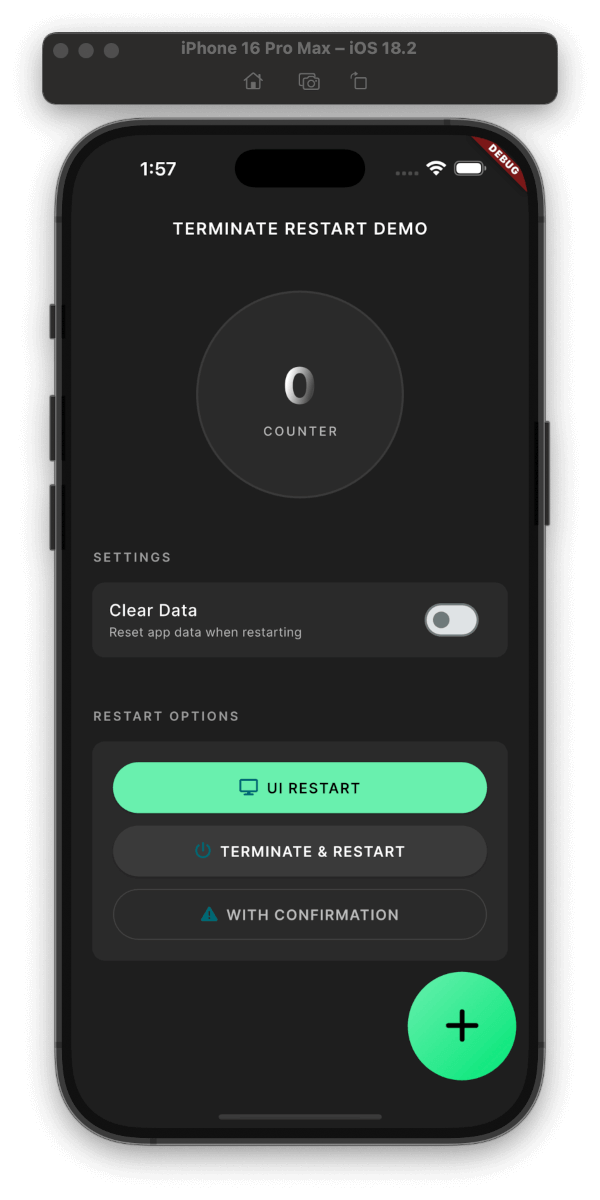
Plugin in Action

Clean & Simple Interface
Three Restart Modes:
UI-only Restart: (~200ms)
Full Process Restart: (~800ms)
With Confirmation Dialog: (+50ms)
Smart Data Management:
Security Features:
Platform Support:
User Experience:
dependencies:
  terminate_restart: ^1.1.0
Get up and running with Terminate Restart in minutes:
dependencies:
  terminate_restart: ^1.1.0
import 'package:terminate_restart/terminate_restart.dart';
void main() {
  WidgetsFlutterBinding.ensureInitialized();
  TerminateRestart.instance.initialize();
  // Wrap your app with wrapWithRestart to enable UI-only restart
  runApp(TerminateRestart.wrapWithRestart(child: MyApp()));
}
// Quick UI refresh
await TerminateRestart.instance.restartApp(
  options: const TerminateRestartOptions(
    terminate: false,
  ),
);

// Full app restart
await TerminateRestart.instance.restartApp(
  options: const TerminateRestartOptions(
    terminate: true,
  ),
);

// With confirmation dialog
await TerminateRestart.instance.restartAppWithConfirmation(
  context,
  title: 'Restart App',
  message: 'Do you want to restart the app?',
  terminate: true,
);
| Feature | Description |
|---|---|
| UI Restart | Quick UI refresh without app termination |
| Full Restart | Complete app termination and restart |
| Data Clearing | Optional storage clearing with keychain preservation |
| Confirmation | Optional user confirmation before restart |
| iOS Compliance | System-approved methods for App Store compliance |
| Web Support | Page reload with browser storage clearing |
This plugin follows Apple's App Store guidelines regarding app termination:
User-Initiated Actions: The plugin only performs termination in response to explicit user actions.
Graceful Shutdown: On iOS, the plugin uses approved APIs to ensure graceful app termination:
exit(0) for clean terminationRestart Mechanism: The restart functionality complies with iOS guidelines by:
Data Handling: When clearing data:
Note: While Android allows direct app termination, iOS termination is handled through system-approved methods.
After Dynamic Updates
// After downloading new assets/code
await TerminateRestart.instance.restartAppWithConfirmation(
  context,
  title: 'Update Ready',
  message: 'Restart to apply updates?',
  terminate: true,
);
Clearing Cache
// Clear app data but preserve important settings
await TerminateRestart.instance.restartApp(
  options: const TerminateRestartOptions(
    terminate: true,
    clearData: true,
    preserveKeychain: true,
    preserveUserDefaults: true,
  ),
);
Quick UI Refresh
// Refresh UI without full restart
await TerminateRestart.instance.restartApp(
  options: const TerminateRestartOptions(
    terminate: false,
  ),
);
With Confirmation Dialog
// Show confirmation dialog before restart
await TerminateRestart.instance.restartAppWithConfirmation(
  context,
  title: 'Restart Required',
  message: 'Do you want to restart the app?',
  terminate: true,
  clearData: false,
  preserveKeychain: true,
);
| Operation | Average Time |
|---|---|
| UI-only Restart | ~300ms |
| Full Termination | ~800ms |
| Data Clearing | ~200ms |
| With Dialog | +100ms |
Sensitive Data
preserveKeychain for credentialsState Management
Platform Security
Contributions are welcome! Please read our contributing guidelines before submitting PRs.
This project is licensed under the MIT License - see the LICENSE file for details.
If you have any questions or need help, you can:
Check out our example app for a full demonstration of all features, including:
The Android implementation uses a combination of techniques to ensure reliable app restart:
// Activity recreation (UI-only restart)
currentActivity.recreate()

// Full process termination
Process.killProcess(Process.myPid())
exitProcess(0)

// Smart Intent handling
intent.addFlags(Intent.FLAG_ACTIVITY_NEW_TASK or Intent.FLAG_ACTIVITY_CLEAR_TASK)
The iOS implementation provides:
Created by Ahmed Sleem GitHub • pub.dev • LinkedIn
For the restart functionality to work properly on iOS, you need to add URL scheme entries to your Info.plist file:
<key>CFBundleURLTypes</key>
<array>
    <dict>
        <key>CFBundleTypeRole</key>
        <string>Editor</string>
        <key>CFBundleURLSchemes</key>
        <array>
            <string>$(PRODUCT_BUNDLE_IDENTIFIER)</string>
        </array>
    </dict>
    <dict>
        <key>CFBundleURLSchemes</key>
        <array>
            <string>$(PRODUCT_BUNDLE_IDENTIFIER)</string>
        </array>
    </dict>
    <dict>
        <key>CFBundleURLSchemes</key>
        <array>
            <string>$(PRODUCT_BUNDLE_IDENTIFIER)</string>
        </array>
        <key>CFBundleURLName</key>
        <string>$(PRODUCT_BUNDLE_IDENTIFIER)</string>
    </dict>
</array>
This configuration allows the plugin to restart your app by opening a URL with your app's bundle identifier.
| Parameter | Type | Default | Description |
|---|---|---|---|
terminate |
bool |
true |
Whether to fully terminate the app process or just restart the UI |
clearData |
bool |
false |
Whether to clear app data during restart |
preserveKeychain |
bool |
false |
Whether to preserve keychain data when clearing app data |
preserveUserDefaults |
bool |
false |
Whether to preserve user defaults when clearing app data |
restartAppFuture<bool> restartApp({
required TerminateRestartOptions options,
})
Restarts the app immediately without user confirmation. Returns true if the restart was successful.
Parameters:
options: A TerminateRestartOptions object that configures the restart behavior.restartAppWithConfirmationFuture<bool> restartAppWithConfirmation(
BuildContext context, {
String title = 'Restart Required',
String message = 'The app needs to restart to apply changes.',
String confirmText = 'Restart Now',
String cancelText = 'Later',
bool clearData = false,
bool preserveKeychain = false,
bool preserveUserDefaults = false,
bool terminate = true,
})
Shows a confirmation dialog before restarting the app. Returns true if the user confirmed and the restart was successful, or false if the user canceled.
Parameters:
context: The BuildContext used to show the dialog.title: The title of the confirmation dialog.message: The message shown in the confirmation dialog.confirmText: The text for the confirm button.cancelText: The text for the cancel button.clearData: Whether to clear app data during restart.preserveKeychain: Whether to preserve keychain data when clearing app data.preserveUserDefaults: Whether to preserve user defaults when clearing app data.terminate: Whether to fully terminate the app process or just restart the UI.Use confirmation dialog when:
clearData: true to clear app datapreserveKeychain and preserveUserDefaults to selectively preserve dataYes! The plugin:
Future<void> changeLanguage(String newLocale) async {
  // Save new locale
  await prefs.setString('locale', newLocale);

  // Restart UI only with confirmation
  await TerminateRestart.instance.restartAppWithConfirmation(
    context,
    title: 'Language Change',
    message: 'Restart app to apply new language?',
    terminate: false,
    preserveUserDefaults: true,
  );
}
Future<void> installUpdate() async {
  try {
    // Download update
    await downloadUpdate();

    // Apply update with confirmation
    final confirmed = await TerminateRestart.instance.restartAppWithConfirmation(
      context,
      title: 'Update Ready',
      message: 'Install update and restart?',
      terminate: true,
    );

    if (!confirmed) {
      scheduleUpdateReminder();
    }
  } catch (e) {
    handleUpdateError(e);
  }
}
Future<void> secureLogout() async {
  // Clear sensitive data
  await TerminateRestart.instance.restartApp(
    options: const TerminateRestartOptions(
      terminate: true,
      clearData: true,
      preserveUserDefaults: true, // Keep app settings
      preserveKeychain: false, // Clear credentials
    ),
  );
}
graph TD
    A[Start] --> B{Restart Type}
    B -->|UI-only| C[Recreation Mode]
    B -->|Full| D[Termination Mode]

    C --> E{Show Dialog?}
    D --> E

    E -->|Yes| F[Show Confirmation]
    E -->|No| G[Process Restart]

    F -->|Confirmed| G
    F -->|Cancelled| H[Cancel Operation]

    G --> I{Clear Data?}
    I -->|Yes| J[Clear App Data]
    I -->|No| K[Preserve Data]

    J --> L[Restart App]
    K --> L

    L --> M[End]
Restart Type Selection:
Confirmation Dialog (Optional):
Data Management:
Platform-Specific Implementation:
निर्भरता सूची 6 आइटम
{"sdk":"flutter"}{"sdk":"flutter"}^2.0.2^1.1.0{"sdk":"flutter"}^3.0.0उपयोग के अनुसार छाँटें, गतिविधि की तुलना करें और अपनाने से पहले मूल प्रोजेक्ट की आवश्यकताएँ जाँचें।
“A repository is the most basic element of GitHub.”
GitHub Docs — About repositories ↗