


 v0.7.0
action_slider
एक स्लाइडर जो क्रियाओं की पुष्टि करने और बाद में लोडिंग के बाद इन क्रियाओं की सफलता के बारे में प्रतिक्रिया प्रदान करता है।
426लाइक 24.4 हज़ार30-दिन डाउनलोड150Pub अंक
AndroidiOSWebmacOSWindowsLinux
एक फ्लटर स्लाइडर जो कार्रवाई की पुष्टि करने और बाद में लोडिंग के बाद उनकी सफलता के बारे में फीडबैक प्रदान करने के लिए है।

यह अंग्रेज़ी मूल स्नैपशॉट है। नवीनतम सामग्री GitHub पर देखें।




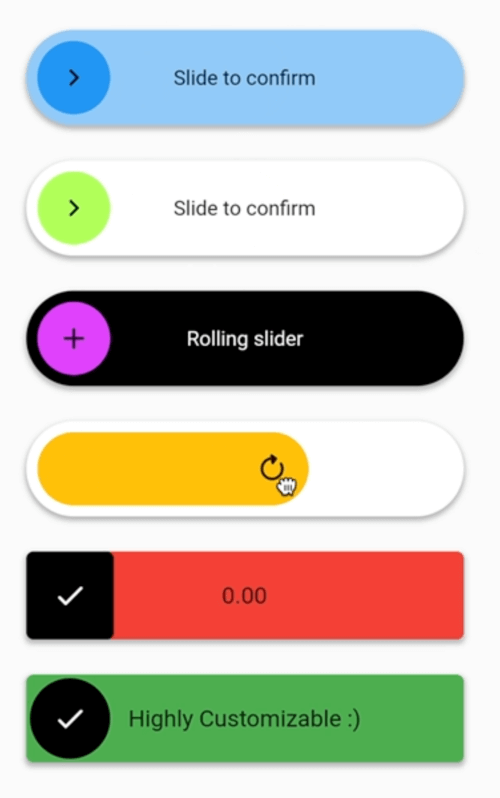
A fully customizable slider to confirm actions and provide feedback on the success. It supports different states like loading, success and failure.
LTR and RTL are both supported.
For a switch with a similar look, you can check out animated_toggle_switch.
ActionSlider.standard() with SliderBehavior.stretch
ActionSlider.dual()
ActionSlider.standard() with TextDirection.rtl
ActionSlider.standard() with SliderIconAnimation.roll
ActionSlider.standard() with SliderBehavior.stretch and SliderIconAnimation.roll
You can build your own sliders with ActionSlider.custom()
Easy to use and highly customizable.
ActionSlider.standard(
    child: const Text('Slide to confirm'),
    action: (controller) async {
        controller.loading(); //starts loading animation
        await Future.delayed(const Duration(seconds: 3));
        controller.success(); //starts success animation
    },
    ... //many more parameters
)
Two directions with ActionSlider.dual
ActionSlider.dual(
    child: const Text('Slide to confirm'),
    startAction: (controller) async {
        controller.success(expanded: true, side: SliderSide.start); //starts success animation with an expanded slider
    },
    endAction: (controller) async {
        controller.success(); //starts success animation
    },
    ... //many more parameters
)
Maximum customizability with ActionSlider.custom.
ActionSlider.custom(
    foregroundBuilder: (context, state, child) => ...,
    backgroundBuilder: (context, state, child) => ...,
    outerBackgroundBuilder: (context, state, child) => ...,
    action: (controller) => ...,
    ... //many more parameters
)
निर्भरता सूची 4 आइटम
{"sdk":"flutter"}{"sdk":"flutter"}^4.0.0^8.0.13उपयोग के अनुसार छाँटें, गतिविधि की तुलना करें और अपनाने से पहले मूल प्रोजेक्ट की आवश्यकताएँ जाँचें।
“A repository is the most basic element of GitHub.”
GitHub Docs — About repositories ↗