


v0.0.4
secure_shared_preferences
Android में SharedPreferences को एन्क्रिप्ट करने और iOS में UserDefaults को एन्क्रिप्ट करने के लिए सरल लेकिन शक्तिशाली पैकेज।
25लाइक 40330-दिन डाउनलोड140Pub अंक
AndroidiOSmacOS
the-kool-sk/secure_shared_preferences open-source repository details.

यह अंग्रेज़ी मूल स्नैपशॉट है। नवीनतम सामग्री GitHub पर देखें।

bool.String, int, bool, double, map and List<String>.AES-CBC-128 algorithm for encryption. pubspec.yaml file secure_shared_preferences:0.0.4import 'package:secure_shared_preferences/secure_shared_preferences.dart'; var pref = await SecureSharedPref.getInstance();
pref.putString("Key", "This is data I want to save to local storage", isEncrypted : true);
    var pref = await SecureSharedPref.getInstance();
    pref.getString("Key", isEncrypted : true);
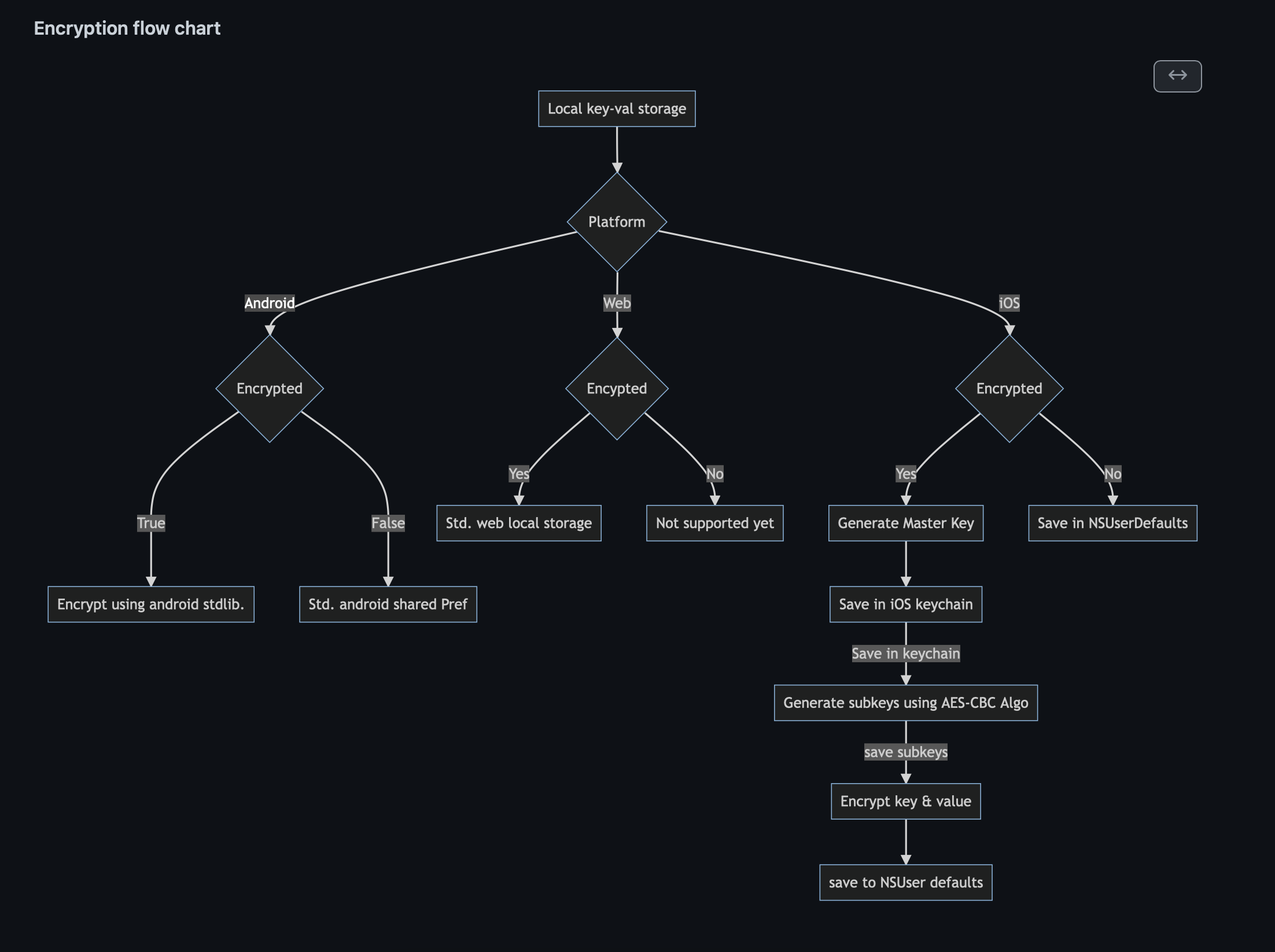
    var pref = await SecureSharedPref.getInstance();
    await pref.putString("StringEncrypted", "This is my first string test",isEncrypted: true);
    await pref.putInt("key", 100, isEncrypted: true);
    await pref.putMap("mapKey", {"Hello":true}, isEncrypted: true);
    await pref.putDouble("doubleKey", 20.32, isEncrypted: true);
    await pref.putBool("boolKey", true,isEncrypted:  true);
    await pref.putStringList("listKey", ["S","K"], isEncrypted: true);
First parameter is the 'key' Second parameter is the value Third parameter is whether you want to encrypt this key/value or not.
    var pref = await SecureSharedPref.getInstance();
    await pref.getString("StringEncrypted", isEncrypted: true);
    await pref.getInt("key", isEncrypted: true);
    await pref.getMap("mapKey", isEncrypted: true);
    await pref.getDouble("doubleKey", isEncrypted: true);
    await pref.getBool("boolKey",isEncrypted: true);
    await pref.getStringList("listKey", isEncrypted: true);
First parameter is the 'key' Second parameter is whether you have encrypted this key/value or not.
निर्भरता सूची 9 आइटम
{"sdk":"flutter"}^5.0.2^2.0.13^2.0.2^2.0.5^2.0.2{"sdk":"flutter"}^1.0.0{"sdk":"flutter"}उपयोग के अनुसार छाँटें, गतिविधि की तुलना करें और अपनाने से पहले मूल प्रोजेक्ट की आवश्यकताएँ जाँचें।
“A repository is the most basic element of GitHub.”
GitHub Docs — About repositories ↗