
newsbuzz
Flutter में न्यूज़ API का उपयोग करके रियल-टाइम डेटा प्राप्त करने और Firebase का उपयोग करके बैकएंड और प्रमाणीकरण के लिए बनाई गई समाचार ऐप।
- स्टार
- 597
- फ़ोर्क
- 190
- अंतिम पुश (UTC)
- 27 अक्टू॰ 2018
- प्रोजेक्ट स्थिति
- सक्रिय
मूल README
यह अंग्रेज़ी मूल स्नैपशॉट है। नवीनतम सामग्री GitHub पर देखें।
News Buzz
News App created in Flutter using News API for fetching realtime data and Firebase as the backend and authenticator.
Features
- Custom news feed based on selected sources
- Saving articles
- Explore news based on categories
- Search for topics
- Sharing articles
Preview
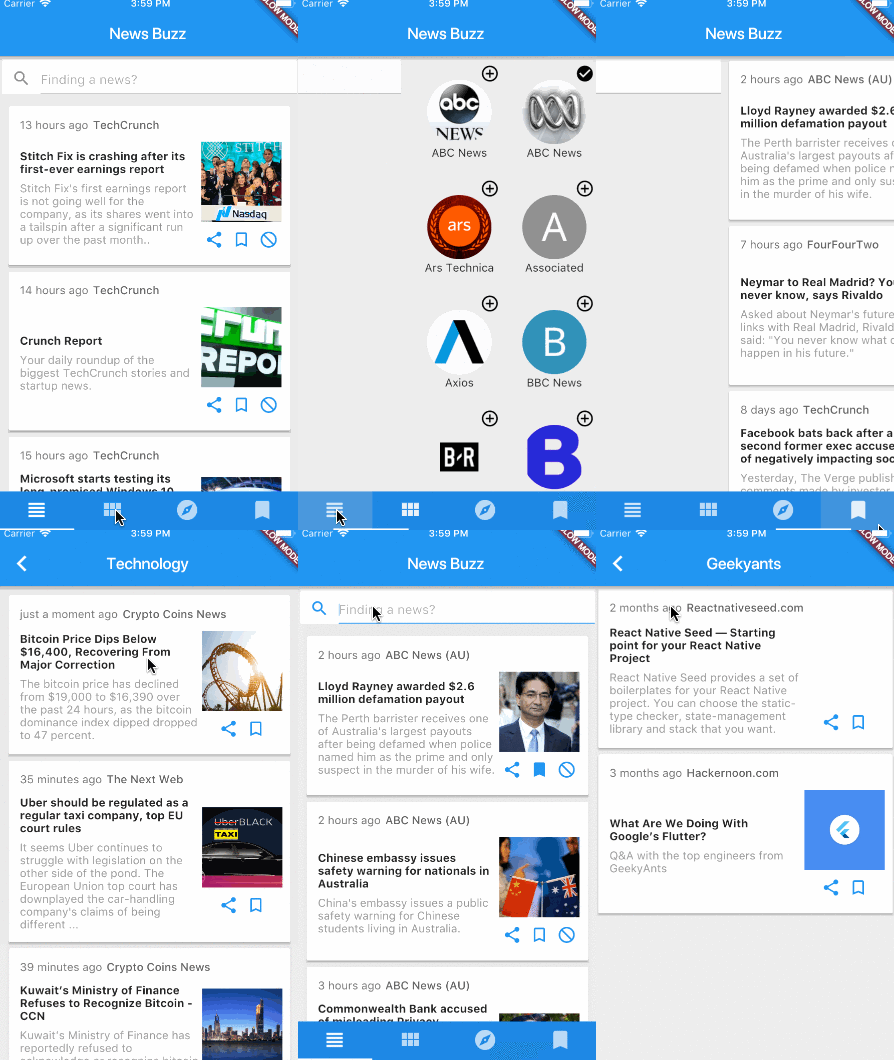
Dependencies
Getting Started
1. Setup Flutter
2. Clone the repo
$ git clone https://github.com/theankurkedia/newsbuzz.git
$ cd newsbuzz/
3. Setup firebase app
- You'll need to create a Firebase instance. Follow the instructions at https://console.firebase.google.com.
- Once your Firebase instance is created, you'll need to enable anonymous authentication.
- Go to the Firebase Console for your new instance.
- Click "Authentication" in the left-hand menu
- Click the "sign-in method" tab
- Click "Google" and enable it
- (skip if not running on Android)
- Create an app within your Firebase instance for Android, with package name com.yourcompany.news
- Run the following command to get your SHA-1 key:
keytool -exportcert -list -v \
-alias androiddebugkey -keystore ~/.android/debug.keystore
- In the Firebase console, in the settings of your Android app, add your SHA-1 key by clicking "Add Fingerprint".
- Follow instructions to download google-services.json
- place
google-services.jsonintonewsbuzz/android/app/.
- (skip if not running on iOS)
- Create an app within your Firebase instance for iOS, with package name com.yourcompany.news
- Follow instructions to download GoogleService-Info.plist, and place it into newsbuzz/ios/Runner in XCode
- Open newsbuzz/ios/Runner/Info.plist. Locate the CFBundleURLSchemes key. The second item in the array value of this key is specific to the Firebase instance. Replace it with the value for REVERSED_CLIENT_ID from GoogleService-Info.plist
4. Run the app
$ flutter run
License
Licensed under the MIT license.

GitHub लेखक
Ankur Kedia ↗
भाषाएँDartRubyObjective-CJava
श्रेणियाँ
उपयोग की गई निर्भरताएँ
निर्भरता सूची 11 आइटम
- flutter
{"sdk":"flutter"} - flutter_testडेवलपमेंट
{"sdk":"flutter"} - shareडेवलपमेंट
^0.2.1 - flutter_webview_pluginडेवलपमेंट
^0.0.9+1 - google_sign_inडेवलपमेंट
0.3.1 - firebase_analyticsडेवलपमेंट
0.0.4 - firebase_authडेवलपमेंट
0.2.0 - firebase_databaseडेवलपमेंट
0.0.12 - firebase_storageडेवलपमेंट
0.0.5 - timeagoडेवलपमेंट
^1.2.0 - cupertino_iconsडेवलपमेंट
^0.1.0
रैंकिंग
अपने प्रोजेक्ट के लिए रिपॉज़िटरी कैसे चुनें?
उपयोग के अनुसार छाँटें, गतिविधि की तुलना करें और अपनाने से पहले मूल प्रोजेक्ट की आवश्यकताएँ जाँचें।
- नाम, लेखक या विवरण से खोजें और तकनीकी विषय से परिणाम सीमित करें।
- स्टार, फ़ोर्क और हाल के पुश की तुलना करें। स्टार रुचि दर्शाते हैं, गुणवत्ता की गारंटी नहीं।
- उपयोग से पहले GitHub पर README, लाइसेंस और Issues जाँचें।
स्रोत और रखरखाव
“A repository is the most basic element of GitHub.”
GitHub Docs — About repositories ↗