
 v1.1.5+1
likk_picker
कैमरा और गैलरी पिकर, Photo Manager से। Facebook मैसेंजर का कस्टम व्यू। (इमेज पिकर, कैमरा, गैलरी रीडर)
60लाइक 1730-दिन डाउनलोड50Pub अंक
प्लेटफ़ॉर्म डेटा नहीं
tranhuongk/likk_picker open-source repository details.

{"sdk":"flutter"}1.8.13.0.40.9.11.3.101.5.0{"sdk":"flutter"}^2.1.2यह अंग्रेज़ी मूल स्नैपशॉट है। नवीनतम सामग्री GitHub पर देखें।
Platform Pub Package likes Forks
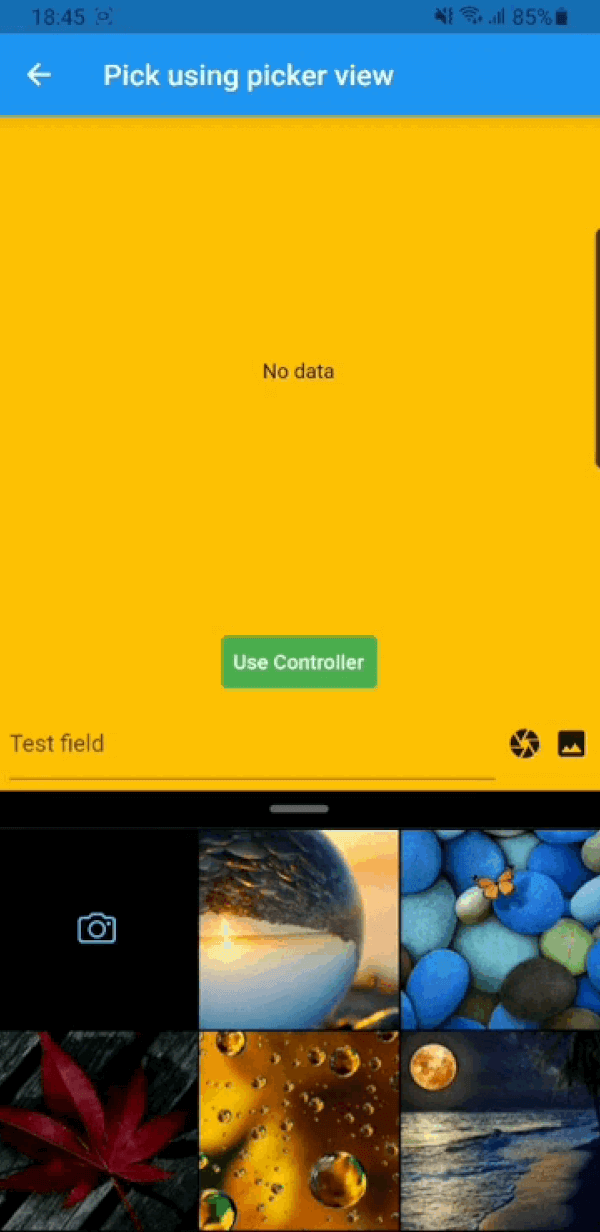
Buy Me A CoffeeA flutter package which is clone of facebook messenger gallery picker and camera, combined as single component. Gallery view and Camera view can also be use as Flutter widget. Under the hood likk picker used Photo Manager and Camera.
Add this to your package's pubspec.yaml file:
dependencies:
  likk_picker: ^latest_version
You can install packages from the command line:
with pub:
$ pub get
with Flutter:
$ flutter pub get
Now in your Dart code, you can use:
import 'package:likk_picker/likk_picker.dart';
For more details (if needed) you can go through Photo Manager and Camera readme section as well.
Change the minimum Android sdk version to 21 (or higher) in your android/app/build.gradle file.
minSdkVersion 21
Required permissions: INTERNET, READ_EXTERNAL_STORAGE, WRITE_EXTERNAL_STORAGE, ACCESS_MEDIA_LOCATION.
If you don't need the ACCESS_MEDIA_LOCATION permission,
see Disable ACCESS_MEDIA_LOCATION permission.
Android native use glide to create image thumb bytes, version is 4.11.0.
If your other android library use the library, and version is not same, then you need edit your android project's build.gradle.
rootProject.allprojects {

    subprojects {
        project.configurations.all {
            resolutionStrategy.eachDependency { details ->
                if (details.requested.group == 'com.github.bumptech.glide'
                        && details.requested.name.contains('glide')) {
                    details.useVersion '4.11.0'
                }
            }
        }
    }
}
And, if you want to use ProGuard, you can see the ProGuard of Glide.
Android contains ACCESS_MEDIA_LOCATION permission by default.
This permission is introduced in Android Q. If your app doesn't need this permission, you need to add the following node to the Android manifest in your app.
<uses-permission
  android:name="android.permission.ACCESS_MEDIA_LOCATION"
  tools:node="remove"
  />
If you found some warning logs with Glide appearing,
then the main project needs an implementation of AppGlideModule.
See Generated API.
Add following content to info.plist.
<key>NSPhotoLibraryUsageDescription</key>
<string>Replace with your permission description..</string>
<key>NSCameraUsageDescription</key>
<string>Replace with your permission description..</string>
<key>NSMicrophoneUsageDescription</key>
<string>Replace with your permission description..</string>
| https://raw.githubusercontent.com/tranhuongk/likk_picker/master/assets/gallery.gif | https://raw.githubusercontent.com/tranhuongk/likk_picker/master/assets/1.jpg | https://raw.githubusercontent.com/tranhuongk/likk_picker/master/assets/7.jpg |
| https://raw.githubusercontent.com/tranhuongk/likk_picker/master/assets/photo_editor.gif | https://raw.githubusercontent.com/tranhuongk/likk_picker/master/assets/5.jpg | https://raw.githubusercontent.com/tranhuongk/likk_picker/master/assets/6.jpg |
GalleryViewWrapper to make gallery view collapsible otherwise ignore it.class PickerDemo extends StatelessWidget {
late final GalleryController controller;
...
@override
Widget build(BuildContext context) {
return GalleryViewWrapper(
controller: controller,
child: Scaffold(
body: ...
),
);
}
}
GalleryController can be used for extra setting and
picking media.pick() function on controller to pick media.class PickerDemo extends StatelessWidget {
late final GalleryController controller;
@override
void initState() {
super.initState();
controller = GalleryController(
gallerySetting: const GallerySetting(
albumSubtitle: 'Collapsable',
enableCamera: true,
maximum: 10,
requestType: RequestType.all,
),
panelSetting: const PanelSetting(topMargin: 24.0),
);
}
...
onPressed : () async {
final entities = await controller.pick();
}
...
}
GalleryViewField similarly as flutter TextField to pick media.onChanged – triggered every time user select/unselect media
onSubmitted – triggered when user done with selection
GalleryViewField(
  selectedEntities: [],
  onChanged: (entity, isRemoved) {
     ...
  },
  onSubmitted: (list) {
     ...
  }
  child: const Icon(Icons.camera),
),
GalleryView as a Widget.| https://raw.githubusercontent.com/tranhuongk/likk_picker/master/assets/camera.gif | https://raw.githubusercontent.com/tranhuongk/likk_picker/master/assets/8.jpg | https://raw.githubusercontent.com/tranhuongk/likk_picker/master/assets/12.jpg |
| https://raw.githubusercontent.com/tranhuongk/likk_picker/master/assets/playground.gif | https://raw.githubusercontent.com/tranhuongk/likk_picker/master/assets/photo_editor.gif | https://raw.githubusercontent.com/tranhuongk/likk_picker/master/assets/10.jpg |
pick() function on CameraView to pick media. ...
onPressed : () async {
final entity = await CameraView.pick();
}
...
CameraViewField similarly as flutter TextField to pick media.onCapture – triggered when photo/video capture completedGalleryViewField(
onCapture: (entity) {
...
},
child: const Icon(Icons.camera),
),
CameraView as a Widget.If you encounter any problems feel free to open an issue. If you feel the library is missing a feature, please raise a ticket on GitHub and I'll look into it. Pull request are also welcome.