

 v0.3.0+2
flutter_polygon
Flutter में बहुभुज के साथ काम करने के लिए उपकरणों वाला एक प्लगइन। क्लिपर (PolygonClipper, ClipPolygon) और बॉर्डर (PolygonBorder) प्रदान करता है
48लाइक 3.2 हज़ार30-दिन डाउनलोड150Pub अंक
AndroidiOSWebmacOSWindowsLinux
Flutter बहुभुज आकृतियाँ और क्लिपर

यह अंग्रेज़ी मूल स्नैपशॉट है। नवीनतम सामग्री GitHub पर देखें।
A Flutter plugin to create views using regular polygon shapes (e.g. Pentagons and Hexagons).
Based on the polygon_clipper package by leonardocaldas.
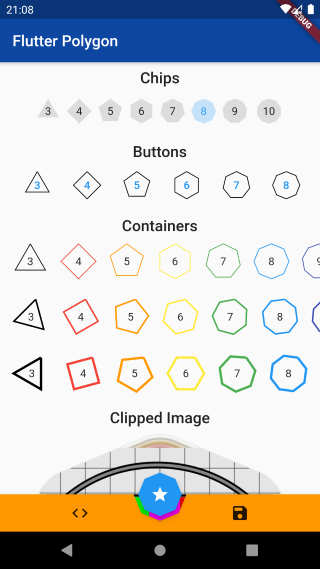
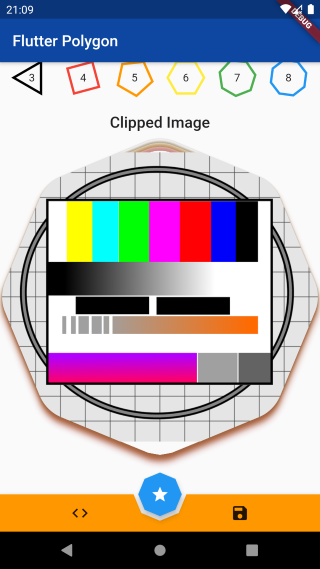
Add this to your package's pubspec.yaml file:
dependencies:
  flutter_polygon: ^0.2.0
Use the ClipPolygon widget to clip a child widget.
import 'package:flutter_polygon/flutter_polygon.dart';

ClipPolygon(
 sides: 6,
 borderRadius: 5.0,     // Defaults to 0.0 degrees
 rotate: 90.0,          // Defaults to 0.0 degrees
 boxShadows: [
  PolygonBoxShadow(color: Colors.black, elevation: 1.0),
  PolygonBoxShadow(color: Colors.grey, elevation: 5.0)
 ],
 child: Container(color: Colors.black),
);
Use the PolygonBorder shape with your favorites widgets!
import 'package:flutter_polygon/flutter_polygon.dart';

FloatingActionButton(
  shape: PolygonBorder(
    sides: 6,
    borderRadius: 5.0,                                      // Defaults to 0.0 degrees
    rotate: 30.0,                                           // Defaults to 0.0 degrees
    border: BorderSide(color: Colors.red, width: 2.0),      // Defaults to BorderSide.none
  ),
  onPressed: () {},
  child: Icon(Icons.star),
),
Other widgets:
TextButton, ElevatedButton, ...ContainerChipIf you find an issue with this package, please open an issue on github.
If you wish to contribute to this project, I encourage you to open a pull request.
Based on the polygon_clipper package by leonardocaldas.
निर्भरता सूची 2 आइटम
{"sdk":"flutter"}—उपयोग के अनुसार छाँटें, गतिविधि की तुलना करें और अपनाने से पहले मूल प्रोजेक्ट की आवश्यकताएँ जाँचें।
“A repository is the most basic element of GitHub.”
GitHub Docs — About repositories ↗