

 v0.1.0
chips_input
एक फ्लटर विजेट जो सुझावों में से चयन किए जा सकने वाले बहुत सारे चिप्स के साथ इनपुट बनाता है।
41लाइक 21530-दिन डाउनलोड70Pub अंक
प्लेटफ़ॉर्म डेटा नहीं
एक फ्लटर चिप्स इनपुट
यह अंग्रेज़ी मूल स्नैपशॉट है। नवीनतम सामग्री GitHub पर देखें।
Flutter library for building input fields with InputChips as input options.

import 'package:chips_input/chips_input.dart';
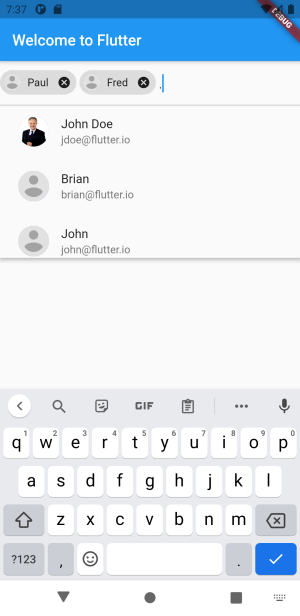
First create some sort of Class that holds the data. You could also use a simple String.
class AppProfile {
  final String name;
  final String email;
  final String imageUrl;

  const AppProfile(this.name, this.email, this.imageUrl);

  @override
  bool operator ==(Object other) =>
      identical(this, other) ||
      other is AppProfile &&
          runtimeType == other.runtimeType &&
          name == other.name;

  @override
  int get hashCode => name.hashCode;

  @override
  String toString() {
    return name;
  }
}
Initialize some data and implement the ChipsInput Widget to your liking.
const mockResults = <AppProfile>[
    AppProfile('John Doe', 'jdoe@flutter.io',
        'https://d2gg9evh47fn9z.cloudfront.net/800px_COLOURBOX4057996.jpg'),
    AppProfile('Paul', 'paul@google.com',
        'https://upload.wikimedia.org/wikipedia/commons/7/7c/Profile_avatar_placeholder_large.png'),
    AppProfile('Fred', 'fred@google.com',
        'https://upload.wikimedia.org/wikipedia/commons/7/7c/Profile_avatar_placeholder_large.png'),
    AppProfile('Brian', 'brian@flutter.io',
        'https://upload.wikimedia.org/wikipedia/commons/7/7c/Profile_avatar_placeholder_large.png'),
    AppProfile('John', 'john@flutter.io',
        'https://upload.wikimedia.org/wikipedia/commons/7/7c/Profile_avatar_placeholder_large.png'),
    AppProfile('Thomas', 'thomas@flutter.io',
        'https://upload.wikimedia.org/wikipedia/commons/7/7c/Profile_avatar_placeholder_large.png'),
    AppProfile('Nelly', 'nelly@flutter.io',
        'https://upload.wikimedia.org/wikipedia/commons/7/7c/Profile_avatar_placeholder_large.png'),
    AppProfile('Marie', 'marie@flutter.io',
        'https://upload.wikimedia.org/wikipedia/commons/7/7c/Profile_avatar_placeholder_large.png'),
    AppProfile('Charlie', 'charlie@flutter.io',
        'https://upload.wikimedia.org/wikipedia/commons/7/7c/Profile_avatar_placeholder_large.png'),
    AppProfile('Diana', 'diana@flutter.io',
        'https://upload.wikimedia.org/wikipedia/commons/7/7c/Profile_avatar_placeholder_large.png'),
    AppProfile('Ernie', 'ernie@flutter.io',
        'https://upload.wikimedia.org/wikipedia/commons/7/7c/Profile_avatar_placeholder_large.png'),
    AppProfile('Gina', 'fred@flutter.io',
        'https://upload.wikimedia.org/wikipedia/commons/7/7c/Profile_avatar_placeholder_large.png'),
];

ChipsInput(
    maxChips: 3, // remove, if you like infinity number of chips
    initialValue: [mockResults[1]],
    findSuggestions: (String query) {
        if (query.isNotEmpty) {
            var lowercaseQuery = query.toLowerCase();
            final results = mockResults.where((profile) {
            return profile.name
                    .toLowerCase()
                    .contains(query.toLowerCase()) ||
                profile.email
                    .toLowerCase()
                    .contains(query.toLowerCase());
            }).toList(growable: false)
            ..sort((a, b) => a.name
                .toLowerCase()
                .indexOf(lowercaseQuery)
                .compareTo(
                    b.name.toLowerCase().indexOf(lowercaseQuery)));
            return results;
        }
        return mockResults;
    },
    onChanged: (data) {
        print(data);
    },
    chipBuilder: (context, state, AppProfile profile) {
        return InputChip(
            key: ObjectKey(profile),
            label: Text(profile.name),
            avatar: CircleAvatar(
            backgroundImage: NetworkImage(profile.imageUrl),
            ),
            onDeleted: () => state.deleteChip(profile),
            materialTapTargetSize: MaterialTapTargetSize.shrinkWrap,
        );
    },
    suggestionBuilder: (context, AppProfile profile) {
        return ListTile(
            key: ObjectKey(profile),
            leading: CircleAvatar(
            backgroundImage: NetworkImage(profile.imageUrl),
            ),
            title: Text(profile.name),
            subtitle: Text(profile.email),
        );
    },
)
Instead of the suggestionBuilder you can also pass an optionsViewBuilder for more customization:
//...
optionsViewBuilder: (context, onSelected, options) {
    return Align(
        alignment: Alignment.topLeft,
        child: Material(
            elevation: 4.0,
            child: Container(
                height: 200.0,
                child: ListView.builder(
                    padding: EdgeInsets.all(8.0),
                    itemCount: options.length,
                    itemBuilder: (BuildContext context, int index) {
                        final option = options.elementAt(index);
                        return GestureDetector(
                            onTap: () {
                                onSelected(option);
                            },
                            child: ListTile(
                                key: ObjectKey(option),
                                leading: CircleAvatar(
                                    backgroundImage: NetworkImage(option.imageUrl),
                                ),
                                title: Text(option.name),
                                subtitle: Text(option.email),
                            ),
                        );
                    },
                ),
            ),
        ),
    );
},
//...

निर्भरता सूची 2 आइटम
{"sdk":"flutter"}{"sdk":"flutter"}उपयोग के अनुसार छाँटें, गतिविधि की तुलना करें और अपनाने से पहले मूल प्रोजेक्ट की आवश्यकताएँ जाँचें।
“A repository is the most basic element of GitHub.”
GitHub Docs — About repositories ↗