सार्वजनिक जानकारी से बना चयन मार्गदर्शन। केवल संदर्भ हेतु।
Catcher एक Flutter/Dart पैकेज है जो कई प्लेटफॉर्म, जिनमें Android, iOS, Web, macOS, Windows और Linux शामिल हैं, में अनहैंडल्ड त्रुटियों और एक्सेप्शन को पकड़ने के लिए डिज़ाइन किया गया है। इसमें लॉगिंग, डायलॉग दिखाना, बाहरी सेवाओं को रिपोर्ट भेजना या त्रुटियों को स्थानीय रूप से सहेजने जैसे कस्टमाइज़ेबल त्रुटि हैंडलर शामिल हैं। डिबगिंग और ऐप स्थिरता में सुधार के लिए आदर्श, यह सुनिश्चित करता है कि डेवलपर्स क्रैश के बारे में सूचित किए जाएं भले ही त्रुटियों को स्पष्ट रूप से हैंडल न किया गया हो। प्लगइन को मौजूदा ऐप में न्यूनतम सेटअप के साथ बिना किसी दिक्कत के एकीकृत किया जा सकता है और डेवलपमेंट और प्रोडक्शन दोनों वातावरणों का समर्थन करता है।
उपयोग
उत्पादन ऐप में अनकैच्ड एक्सेप्शन का प्रबंधन
डिबगिंग के उद्देश्यों के लिए त्रुटि लॉगिंग
बाहरी सेवाओं को क्रैश रिपोर्ट भेजना
उपयोगकर्ता-मित्र त्रुटि डायलॉग प्रदर्शित करना
प्लेटफॉर्म के आसपास एप्लिकेशन स्थिरता का मॉनिटरिंग
मुख्य विशेषताएँ
एक से अधिक त्रुटि हैंडलर (लॉग, डायलॉग, रिपोर्ट)
क्रॉस-प्लेटफ़ॉर्म समर्थन
कस्टमाइज़ किए गए त्रुटि रिपोर्टिंग
न्यूनतम कोड के साथ आसान एकीकरण
डिबग और रिलीज मोड दोनों का समर्थन करता है
इनके लिए उपयुक्त
मजबूत त्रुटि संभाल की तलाश में विकासकर्ता
एप्लिकेशन विश्वसनीयता पर केंद्रित टीमें
क्रैश विश्लेषण की आवश्यकता वाले ऐप
कठोर गुणवत्ता आश्वासन मानकों वाले प्रोजेक्ट
बहुप्लेटफॉर्म लक्षित फ्लटर एप्प्स
विचार योग्य बातें
बाहरी रिपोर्टिंग सेवाओं के लिए अतिरिक्त कॉन्फ़िगरेशन की आवश्यकता हो सकती है
शामिल विशेषताओं के कारण ऐप का आकार थोड़ा बढ़ सकता है
संवेदनशील डेटा के परिदृश्यों में सावधानीपूर्वक संचालन की आवश्यकता होती है
प्रत्याशित रनटाइम त्रुटियों को जानबूझकर पकड़ने के लिए नहीं बनाया गया है
मूल README
संबंधित सोर्स रिपॉज़िटरी के मूल README का स्नैपशॉट। नवीनतम सामग्री के लिए रिपॉज़िटरी देखें।
Catcher
Catcher is Flutter plugin which automatically catches error/exceptions and handle them. Catcher offers multiple way to handle errors.
Catcher is heavily inspired from ACRA: https://github.com/ACRA/acra.
Catcher supports Android, iOS, Web, Linux, Windows and MacOS platforms.
To check which features of Catcher are available in given platform visit this page: Platform support
Basic example
Basic example utilizes debug config with Dialog Report Mode and Console Handler and release config with Dialog Report Mode and Email Manual Handler.
To start using Catcher, you have to:
Create Catcher configuration (you can use only debug config at start)
Create Catcher instance and pass your root widget along with catcher configuration
Add navigator key to MaterialApp or CupertinoApp
Here is complete example:
import'package:flutter/material.dart';
import'package:catcher/catcher.dart';
main() {
/// STEP 1. Create catcher configuration. /// Debug configuration with dialog report mode and console handler. It will show dialog and once user accepts it, error will be shown /// in console.CatcherOptions debugOptions =
CatcherOptions(DialogReportMode(), [ConsoleHandler()]);
/// Release configuration. Same as above, but once user accepts dialog, user will be prompted to send email with crash to support.CatcherOptions releaseOptions = CatcherOptions(DialogReportMode(), [
EmailManualHandler(["support@email.com"])
]);
/// STEP 2. Pass your root widget (MyApp) along with Catcher configuration:Catcher(rootWidget: MyApp(), debugConfig: debugOptions, releaseConfig: releaseOptions);
}
classMyAppextendsStatefulWidget{
@override_MyAppStatecreateState() => _MyAppState();
}
class_MyAppStateextendsState<MyApp> {
@overridevoidinitState() {
super.initState();
}
@overrideWidgetbuild(BuildContext context) {
returnMaterialApp(
/// STEP 3. Add navigator key from Catcher. It will be used to navigate user to report page or to show dialog.
navigatorKey: Catcher.navigatorKey,
home: Scaffold(
appBar: AppBar(
title: constText('Plugin example app'),
),
body: ChildWidget()),
);
}
}
classChildWidgetextendsStatelessWidget{
@overrideWidgetbuild(BuildContext context) {
returnContainer(
child: TextButton(
child: Text("Generate error"),
onPressed: () => generateError()));
}
generateError() async {
throw"Test exception";
}
}
If you run this code you will see screen with "Generate error" button on the screen.
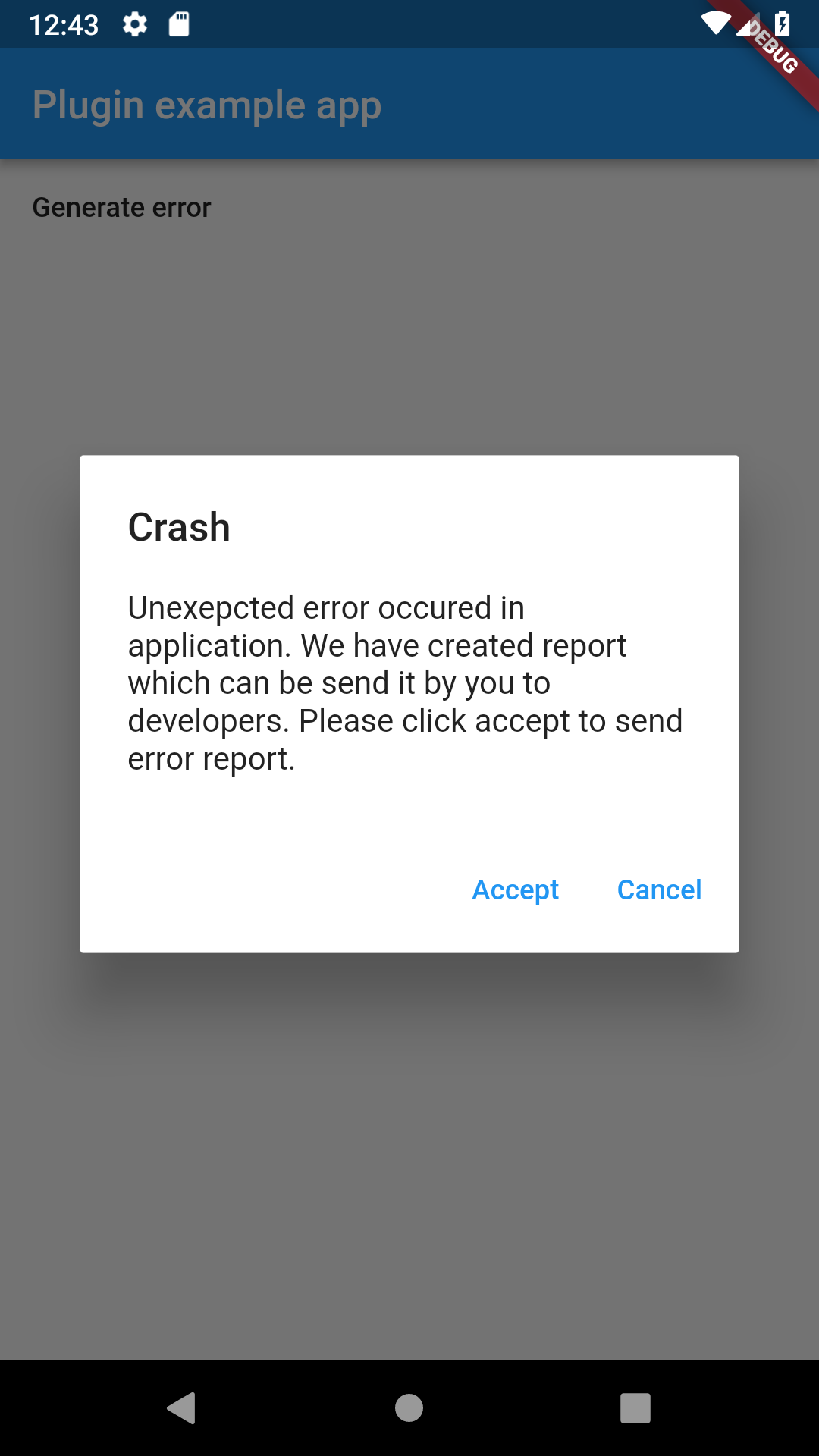
After clicking on it, it will generate test exception, which will be handled by Catcher. Before Catcher process exception to handler, it will
show dialog with information for user. This dialog is shown because we have used DialogReportHandler. Once user confirms action in this dialog,
report will be send to console handler which will log to console error informations.
In order to make work Page Report Mode and Dialog Report Mode, you must include navigator key. Catcher plugin exposes key which must be included in your MaterialApp or WidgetApp:
You need to provide this key, because Catcher needs context of navigator to show dialogs/pages. There is no need to include this navigator key if you won't use Page/Dialog Report Mode.
You can also provide your own navigator key if need to. You can provide it with Catcher constructor (see below). Please check custom navigator key example to see basic example.
Catcher configuration
Catcher instance needs rootWidget or runAppFunction in setup time. Please provide one of it.
rootWidget (optional) - instance of your root application widget
runAppFunction (optional) - function where runApp() will be called
debugConfig (optional) - config used when Catcher detects that application runs in debug mode
releaseConfig (optional) - config used when Catcher detects that application runs in release mode
profileConfig (optional) - config used when Catcher detects that application runs in profile mode
CatcherOptions parameters:
handlers - list of handlers, which will process report, see handlers to get more information.
handlerTimeout - timeout in milliseconds, this parameter describes max time of handling report by handler.
reportMode - describes how error report will be shown to user, see report modes to get more information.
localizationOptions - translations used by report modes nad report handlers.
explicitExceptionReportModesMap - explicit report modes map which will be used to trigger specific report mode for specific error.
explicitExceptionHandlersMap - Explicit report handler map which will be used to trigger specific report report handler for specific error.
customParameters - map of additional parameters that will be included in report (for example user id or user name).
handleSilentError - should handle silent errors reported, see FlutterErrorDetails.silent for more details.
screenshotsPath - path where screenshots will be saved.
excludedParameters - parameters which will be excluded from report.
filterFunction - function used to filter errors which shouldn't be handled.
Report catched exception
Catcher won't process exceptions catched in try/catch block. You can send exception from try catch block to Catcher:
import'package:flutter/material.dart';
import'package:catcher/catcher.dart';
import'package:flutter_localizations/flutter_localizations.dart';
main() {
CatcherOptions debugOptions = CatcherOptions(DialogReportMode(), [
ConsoleHandler(),
HttpHandler(HttpRequestType.post, Uri.parse("https://httpstat.us/200"),
printLogs: true)
], localizationOptions: [
LocalizationOptions("pl",
notificationReportModeTitle: "Wystąpił błąd aplikacji",
notificationReportModeContent:
"Naciśnij tutaj aby wysłać raport do zespołu wpsarcia",
dialogReportModeTitle: "Błąd aplikacji",
dialogReportModeDescription:
"Wystąpił niespodziewany błąd aplikacji. Raport z błędem jest gotowy do wysłania do zespołu wsparcia. Naciśnij akceptuj aby wysłać raport lub odrzuć aby odrzucić raport.",
dialogReportModeAccept: "Akceptuj",
dialogReportModeCancel: "Odrzuć",
pageReportModeTitle: "Błąd aplikacji",
pageReportModeDescription:
"Wystąpił niespodziewany błąd aplikacji. Raport z błędem jest gotowy do wysłania do zespołu wsparcia. Naciśnij akceptuj aby wysłać raport lub odrzuć aby odrzucić raport.",
pageReportModeAccept: "Akceptuj",
pageReportModeCancel: "Odrzuć",
toastHandlerDescription: "Wystąpił błąd:",
)
]);
CatcherOptions releaseOptions = CatcherOptions(NotificationReportMode(), [
EmailManualHandler(["recipient@email.com"])
]);
Catcher(rootWidget: MyApp(), debugConfig: debugOptions, releaseConfig: releaseOptions);
}
classMyAppextendsStatefulWidget{
@override_MyAppStatecreateState() => _MyAppState();
}
class_MyAppStateextendsState<MyApp> {
@overridevoidinitState() {
super.initState();
}
@overrideWidgetbuild(BuildContext context) {
returnMaterialApp(
navigatorKey: Catcher.navigatorKey,
localizationsDelegates: [
GlobalMaterialLocalizations.delegate,
GlobalWidgetsLocalizations.delegate,
],
supportedLocales: [
constLocale('en', 'US'),
constLocale('pl', 'PL'),
],
home: Scaffold(
appBar: AppBar(
title: constText('Plugin example app'),
),
body: ChildWidget()),
);
}
}
classChildWidgetextendsStatelessWidget{
@overrideWidgetbuild(BuildContext context) {
returnContainer(
child: TextButton(
child: Text("Generate error"), onPressed: () => generateError()));
}
generateError() async {
throw"Test exception";
}
}
Report modes
Report mode is the process of gathering user permission to handle error. User can accept or deny permission to handle error. There are 4 types of report mode:
Silent Report Mode
Silent Report Mode is default report mode. This report mode doesn't ask user for permission to handle crash logs. It will push logs automatically to handlers.
ReportMode reportMode = SilentReportMode();
Notification Report Mode
Notification Report Mode has been removed because of incompatibility with firebase. Please check local_notifications_example to re-add local notificaitons to your app.
Dialog Report Mode
Dialog Report Mode shows dialog with information about error. Dialog has title, description and 2 buttons: Accept and Cancel. Once user clicks on Accept button, report will be pushed to handlers.
ReportMode reportMode = DialogReportMode();
See localization options to change default texts.
Dialog report mode
Page Report Mode
Page Report Mode shows new page with information about error. Page has title, description, stack trace view and 2 buttons: Accept and Cancel. Once user clicks on Accept button, report will be pushed to handlers.
recipients (required) - list of email addresses of recipients
enableDeviceParameters (optional) - see Console Handler description
enableStackTrace (optional) - see Console Handler description
enableCustomParameters (optional) - see Console Handler description
enableApplicationParameters (optional) - see Console Handler description
sendHtml (optional) - enable/disable html email formatting
emailTitle (optional) - set custom email title
emailHeader (optional) - set additional email text header
printLogs (optional) - enable/disable debug logs
Email Auto Handler
Email handler can be used to send automatically email with error reports. Email handler has multiple configuration parameters. Few of them are required, other are optional. These parameters are required:
We need to setup email smtp server, email account and recipient. Currently, only Gmail was tested and worked. You can try use other email providers, but there can be errors.
List of all parameters:
smtpHost (required) - host address of your email, for example host for gmail is smtp.gmail.com
smtpPort (required) - smtp port of your email, for example port for gmail is 587
senderEmail (required) - email from which Catcher will send email (it will be sender of error emails)
senderName (required) - name of sender email
senderPassword (required) - password for sender email
recipients (required) - list which contains recipient emails
enableSSL (optional) - if your email provider supports SSL, you can enable this option
enableDeviceParameters (optional) - please look in console handler description
enableApplicationParameters (optional) - please look in console handler description
enableStackTrace (optional) - please look in console handler description
enableCustomParameters (optional) - please look in console handler description
emailTitle (optional) - custom title of report email, if not set then title will be: Handled Error: >> [Error name] <<
emailHeader (optional)- custom header message before report data
sendHtml (optional) - enable/disable html data in your email, if enabled then html will be sent and your report will look much better
printLog (optional) - enable/disable debug logs
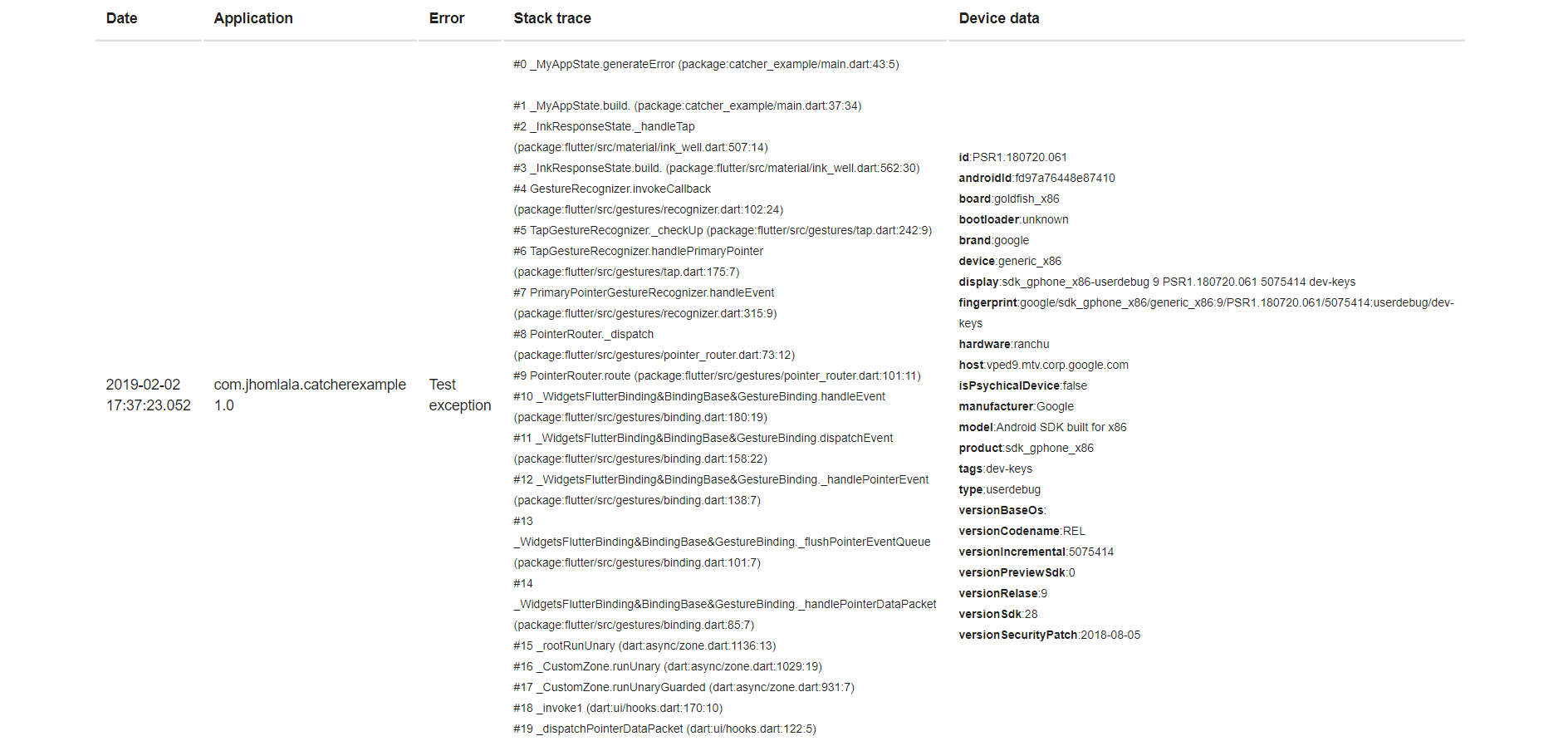
Example email:
Http Handler
Http Handler provides feature for sending report to external server. Data will be encoded in JSON and sent to specified server. Currently only POST request can be send. Minimal example:
requestType (required) - type of request, currently only POST is supported
endpointUri (required) - uri address of server
headers (optional) - map of additional headers that can be send in http request
requestTimeout (optional) - request time in milliseconds
printLogs (optional) - show debug logs
enableDeviceParameters (optional) - please look in console handler description
enableApplicationParameters (optional) - please look in console handler description
enableStackTrace (optional) - please look in console handler description
enableCustomParameters (optional) - please look in console handler description
You can try using example backend server which handles logs. It's written in Java 8 and Spring Framework and uses material design.
You can find code of backend server here: https://github.com/jhomlala/catcher/tree/master/backend
Note: Remeber to add Internet permission in Android Manifest:
file (required) - the file where you want to store your logs
enableDeviceParameters (optional) - please look in console handler description
enableApplicationParameters (optional) - please look in console handler description
enableStackTrace (optional) - please look in console handler description
enableCustomParameters (optional) - please look in console handler description
printLogs (optional) - enable/disable debug logs
handleWhenRejected - please look in console handler description
Example of logging to file in external directory: https://github.com/jhomlala/catcher/blob/master/example/lib/file_example.dart
If you want to get file path with path_provider lib, you need to call Catcher constructor with
ensureInitialized = true. Then you need to pass your catcher config with updateConfig.
This is required because WidgetBindings ensureInitialized must be called first before accessing
path_provider methods.
See example here: https://github.com/jhomlala/catcher/blob/master/example/lib/file_example.dart
Toast Handler
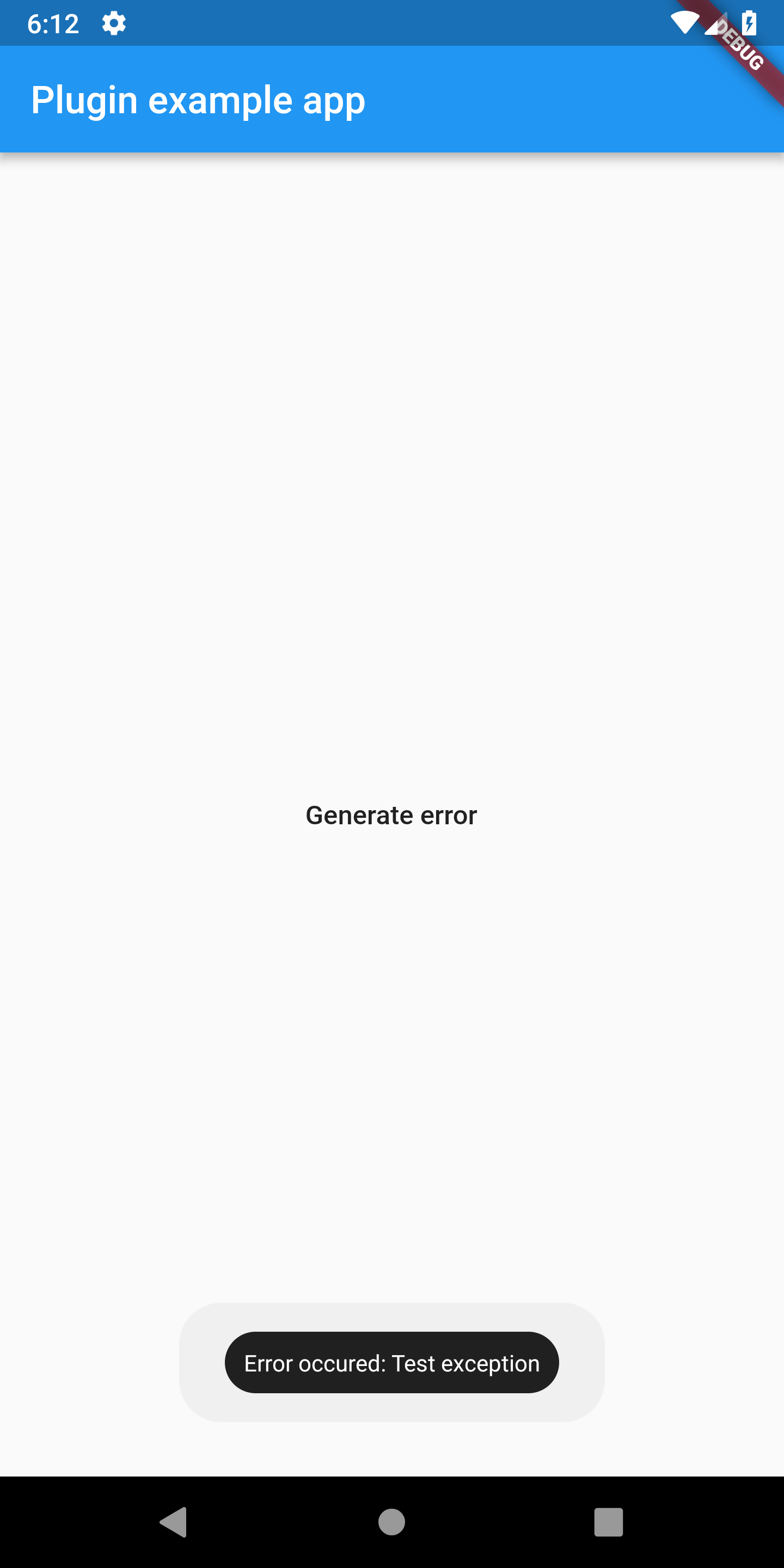
Toast handler allows to show short message in toast. Minimal example:
All parameters list:
gravity (optional) - location of the toast on screen top/middle/bottom
length (optional) - length of toast: long or short
backgroundColor (optional) - background color of toast
textColor (optional) - text color of toast
fontSize (optional) - text size
customMessage (optional) - custom message for toast, if not set then "Error occured: error" will be displayed.
handleWhenRejected - please look in console handler description
Sentry Handler
Sentry handler allows to send handled errors to Sentry.io. Before using sentry handler, you need to create your project in
Sentry.io page and then copy DSN link. Example:
enableDeviceParameters (optional) - please look in console handler description
enableApplicationParameters (optional) - please look in console handler description
enableCustomParameters (optional) - please look in console handler description
customEnvironment (optional) - custom environment string, if null, Catcher will generate it
customRelease (optional) - custom release string , if null, Catcher will generate it
printLogs (optional) - enable/disable debug logs
Slack Handler
Slack Handler allows to send messages to your Slack workspace. You can specify destination
of your message and format. You need to register webhook in your workspace to make this handler
works: https://api.slack.com/incoming-webhooks.
channel (required) - your channel name (i.e. #catcher)
username (optional) - name of the integration bot
iconEmoji (optional) - avatar of the integration bot
enableDeviceParameters (optional) - please look in console handler description
enableApplicationParameters (optional) - please look in console handler description
enableCustomParameters (optional) - please look in console handler description
enableStackTrace (optional) - please look in console handler description
printLogs (optional) - enable/disable debug logs
customMessageBuilder - provide custom message
Discord Handler
Discord Handler allows to send messages to your Discord workspace. You need to register webhook in your server to make this handler
works: https://support.discordapp.com/hc/en-us/articles/228383668-Intro-to-Webhooks.
duration - See [SnackBar] in Flutter docs for details.
backgroundColor - See [SnackBar] in Flutter docs for details.
elevation - See [SnackBar] in Flutter docs for details.
margin - See [SnackBar] in Flutter docs for details.
padding - See [SnackBar] in Flutter docs for details.
width - See [SnackBar] in Flutter docs for details.
shape - See [SnackBar] in Flutter docs for details.
behavior - See [SnackBar] in Flutter docs for details.
action - See [SnackBar] in Flutter docs for details.
animation - See [SnackBar] in Flutter docs for details.
onVisible - See [SnackBar] in Flutter docs for details.
customMessage - Custom message which can be displayed instead default one.
textStyle - Custom text style for text displayed within snackbar.
printLogs - Enable additional logs printing
Crashlytics Handler
Crashlytics handler has been removed from core package. You can re-enable it in your project by using custom report mode presented in crashlytics_example in example project.
Explicit exception report handler map
Explicit exception report handler map allows you to setup report handler for specific exception. For example if you want to setup Console Handler for FormatException, you can write:
Now if FormatException will be catched, then Console Handler will be used. Warning: if you setup explicit exception map for specific exception, then only this handler will be used for this exception!
Explicit exception report mode map
Same as explicit report handler map, but it's for report mode. Let's say you want to use specific report mode for some exception:
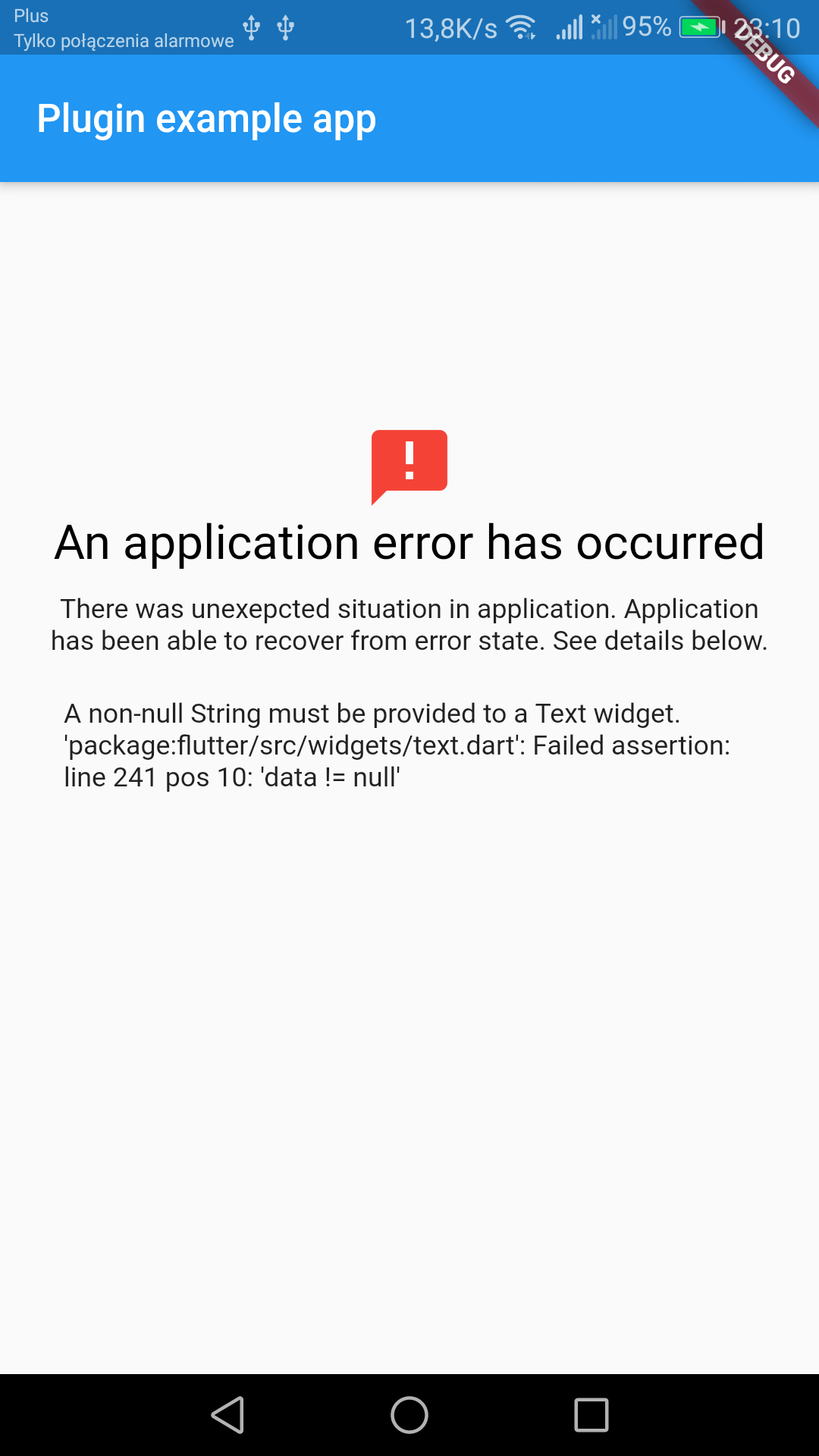
You need to add in your MaterialApp or CupertinoApp builder method with Catcher.addDefaultErrorWidget(). This will add error handler for each widget in your app.
You can provide optional parameters:
showStacktrace - show/hide stacktrace
title - custom title for error widget
description - custom description for error widget
maxWidthForSmallMode - max width for "small" mode, default is 150
Error widget will replace your widget if he fails to render. If width of widget is less than maxWidthForSmallMode then "small" mode will be enabled, which will show only error icon
Catcher can create screenshots automatically and include them in report handlers. To add screenshot
support in your app, simply wrap your root widget with CatcherScreenshot widget: