
v0.1.4
keyboard_shortcuts
アプリケーション用のショートカットを使用できるウィジェットです。自分で定義するカスタムショートカットと、下端および上端への自動スクロールなどのグローバルショートカットがあります。
47いいね 5430日間ダウンロード40Pub ポイント
プラットフォーム情報なし
Flutter アプリケーションにショートカットを追加するためのウィジェット
以下は英語原文のスナップショットです。最新版は GitHub をご覧ください。
Keyboard shortcuts to add where you want
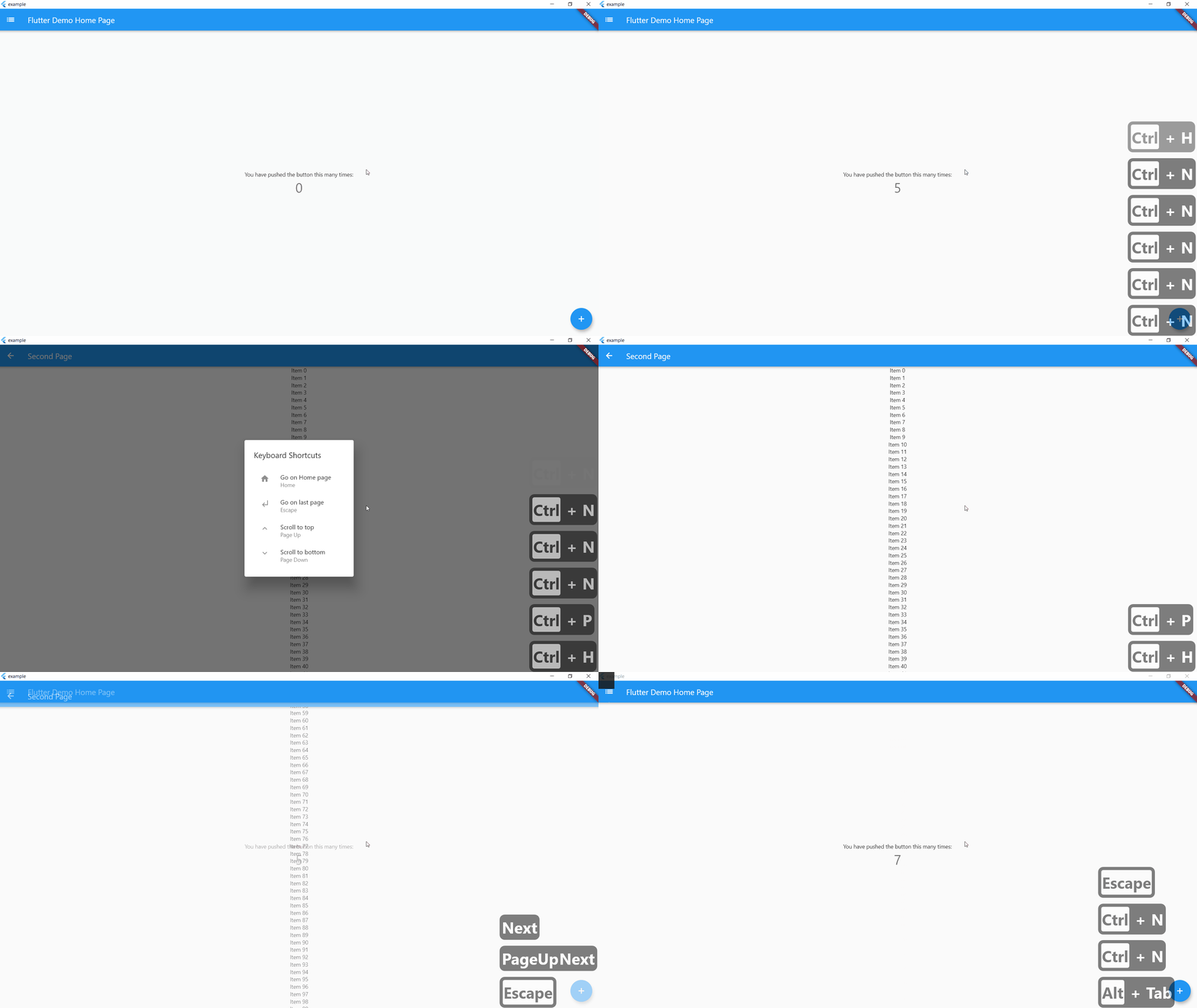
On controlLeft + key P are pressed, user navigate to SecondPage() helpLabel will be display on help menu
    KeyBoardShortcuts(
        keysToPress: {LogicalKeyboardKey.controlLeft, LogicalKeyboardKey.keyP},
        onKeysPressed: () => Navigator.push(
          context,
          MaterialPageRoute(builder: (context) => SecondPage()),
        ),
        helpLabel: "Go to Second Page",
        child: Center(
          child: Column(
            mainAxisAlignment: MainAxisAlignment.center,
            children: <Widget>[
              Text(
                'You have pushed the button this many times:',
              ),
              Text(
                '$_counter',
                style: Theme.of(context).textTheme.headline4,
              ),
            ],
          ),
        ),
      ),
If globalShortcuts is set to true, user can use Home Button to go on Homepage, up and down button to go on top or bottom of the page and escape to go on last page
    KeyBoardShortcuts(
        globalShortcuts: true,
        child: Center(
          child: Column(
            mainAxisAlignment: MainAxisAlignment.center,
            children: <Widget>[
              Text(
                'You have pushed the button this many times:',
              ),
              Text(
                '$_counter',
                style: Theme.of(context).textTheme.headline4,
              ),
            ],
          ),
        ),
      ),
initShortCuts() is used to customize shortcuts, you can set home page, title of help menu, icon on custom shortcuts and custom help menu
initShortCuts(HomePage(), helpTitle : "Help Menu", helpIcon : Icons.menu);
You can also use initShortCuts to create your own global shortcuts, they will be allow in all page were globalShortcuts is true without rewriting these shortcuts
  initShortCuts(
    HomePage(),
    keysToPress: {
      {LogicalKeyboardKey.controlLeft, LogicalKeyboardKey.keyP},
    },
    onKeysPressed: {() => print("Work")},
    helpLabel: {"Print Work"},
  );

依存関係一覧 4 件
{"sdk":"flutter"}^0.1.5^1.0.3{"sdk":"flutter"}用途で絞り込み、開発状況を比較し、採用前に元のリポジトリで要件を確認しましょう。
“A repository is the most basic element of GitHub.”
GitHub Docs — About repositories ↗