

v1.0.3
infinite_cards
Flutter用の無限カードスイッチングUI、カスタムアニメーションをサポート
31いいね 1930日間ダウンロード40Pub ポイント
プラットフォーム情報なし
Flutter用の無限カードスイッチングUI、カスタムアニメーションをサポート

以下は英語原文のスナップショットです。最新版は GitHub をご覧ください。


An infinite card switching UI for Flutter, support custom animation 可自定义动效的卡片切换视图(中文文档)
https://github.com/BakerJQ/Android-InfiniteCards
https://github.com/BakerJQ/Flutter-InfiniteCards/tree/web
| Android | iOS |
|---|---|
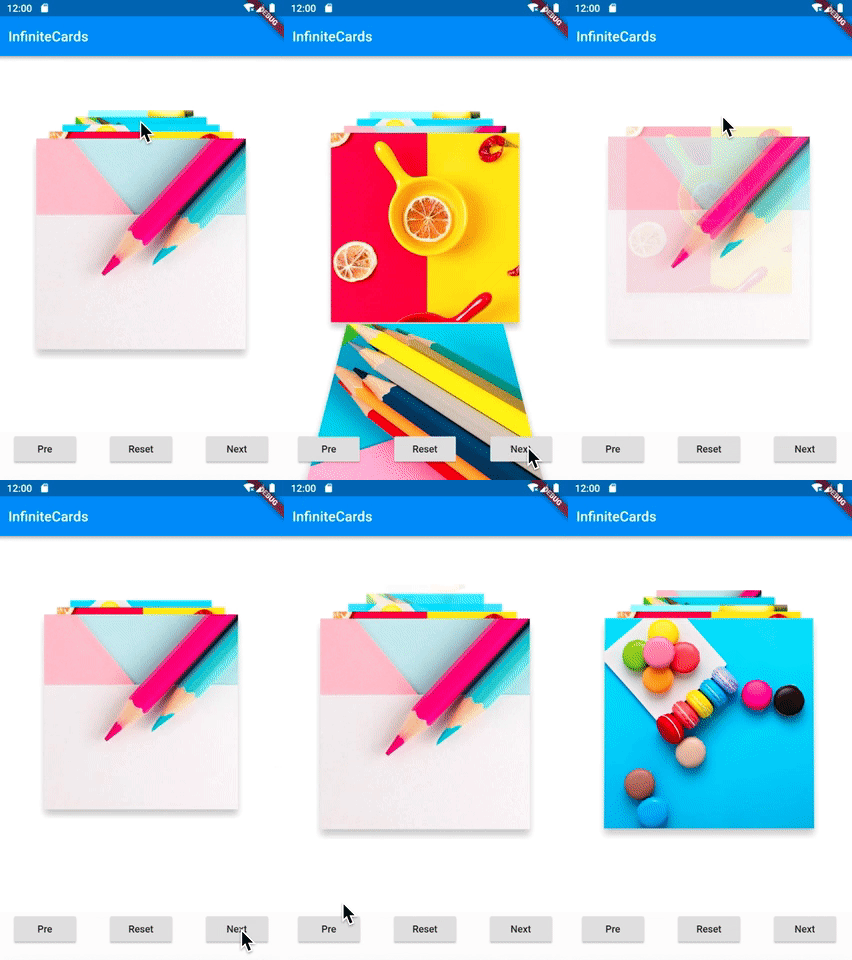 |
 |
cd ./example
flutter create .
flutter run
dependencies:
  infinite_cards: ^1.0.3
@override
  void initState() {
    super.initState();
    _controller = InfiniteCardsController(
      itemBuilder: _renderItem,
      itemCount: 5,
      animType: AnimType.SWITCH,
    );
  }
InfiniteCards(
  controller: _controller,
)
  _controller.previous();
  _controller.next();
  _controller.reset(...);
If you just use all default animations, just do nothing.
InfiniteCardsController(
            ...
            transformToFront: yourCustomTransformToFront,
            transformToBack: yourCustomTransformToBack,
            curve: yourCustomCurve
            ...
          )
One example of implement Transform
Transform _defaultCommonTransform(Widget item,
    double fraction, double curveFraction, double cardHeight, double cardWidth, int fromPosition, int toPosition)
  {
  //Count of card which needs to move over
  int positionCount = fromPosition - toPosition;
  //0.8 scale for the first card, and -0.1 per card behind
  //(0.8 - 0.1 * fromPosition) = current specific card scale
  //(0.1 * fraction * positionCount) = scale while moving
  double scale = (0.8 - 0.1 * fromPosition) + (0.1 * fraction * positionCount);
  //translate -0.02 * cardHeight per card behind
  //-cardHeight * (0.8 - scale) * 0.5 to center the card
  double translationY = -cardHeight * (0.8 - scale) * 0.5 -
      cardHeight * (0.02 * fromPosition - 0.02 * fraction * positionCount);
  //return the Widget after scale and translate
  return Transform.translate(
    offset: Offset(0, translationY),
    child: Transform.scale(
      scale: scale,
      child: item,
    ),
  );
}
InfiniteCards is released under the Apache 2.0 license.
Copyright 2019 BakerJ.

Licensed under the Apache License, Version 2.0 (the "License");
you may not use this file except in compliance with the License.
You may obtain a copy of the License at following link.

     http://www.apache.org/licenses/LICENSE-2.0

Unless required by applicable law or agreed to in writing, software
distributed under the License is distributed on an "AS IS" BASIS,
WITHOUT WARRANTIES OR CONDITIONS OF ANY KIND, either express or implied.
See the License for the specific language governing permissions and
limitations under the License.
依存関係一覧 3 件
{"sdk":"flutter"}^0.1.2{"sdk":"flutter"}用途で絞り込み、開発状況を比較し、採用前に元のリポジトリで要件を確認しましょう。
“A repository is the most basic element of GitHub.”
GitHub Docs — About repositories ↗