

 v0.1.0-dev.5
storage_view
任意のデータベース、ストレージ、shared_preferences用のFlutterインスペクターツール
29いいね 55830日間ダウンロード140Pub ポイント
AndroidiOSWebmacOSWindowsLinux
任意のデータベース、ストレージ、shared_preferences用のFlutterインスペクターツール。

以下は英語原文のスナップショットです。最新版は GitHub をご覧ください。
Show some ❤️ and star the repo to support the project!

Follow these steps to use this package
dependencies:
  storage_view: ^0.1.0-dev.5
import 'package:storage_view/storage_view.dart';
The package uses a driver StorageDriver to interact with the database.
In order to connect your database you should use one of available drivers:
Or create your own StorageDriver implementation like there:
class MockStorageDriver implements StorageDriver {
  final _data = <String, dynamic>{
    'test_id' : 'test',
  };

  @override
  FutureOr<Set<String>> getKeys<String>() {
    return _data.keys.toSet() as Set<String>;
  }

  @override
  FutureOr<T?> read<T>(String key) {
    return _data[key] as T;
  }

  @override
  FutureOr<void> write<T>({required String key, required T value}) {
    _data[key] = value;
  }

  @override
  FutureOr<void> delete(String key) {
    _data.remove(key);
  }
}
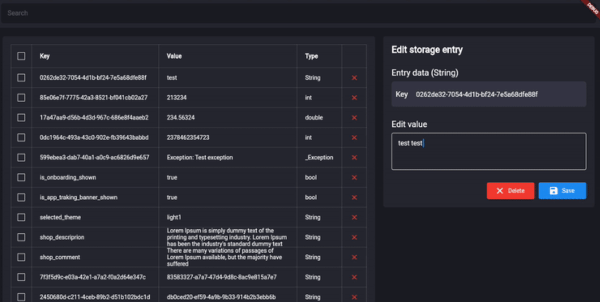
After the driver was connected, you can use StorageView anywhere in your application.
final _mockStorageDriver = MockStorageDriver();
Scaffold(
    body: StorageView(storageDriver: _mockStorageDriver),
),

The project is under development and ready for your pull-requests and issues 👍
Thank you for support ❤️
For help getting started with 😍 Flutter, view online documentation, which offers tutorials, samples, guidance on mobile development, and a full API reference.
用途で絞り込み、開発状況を比較し、採用前に元のリポジトリで要件を確認しましょう。
“A repository is the most basic element of GitHub.”
GitHub Docs — About repositories ↗