

 v1.0.1
pretty_gauge
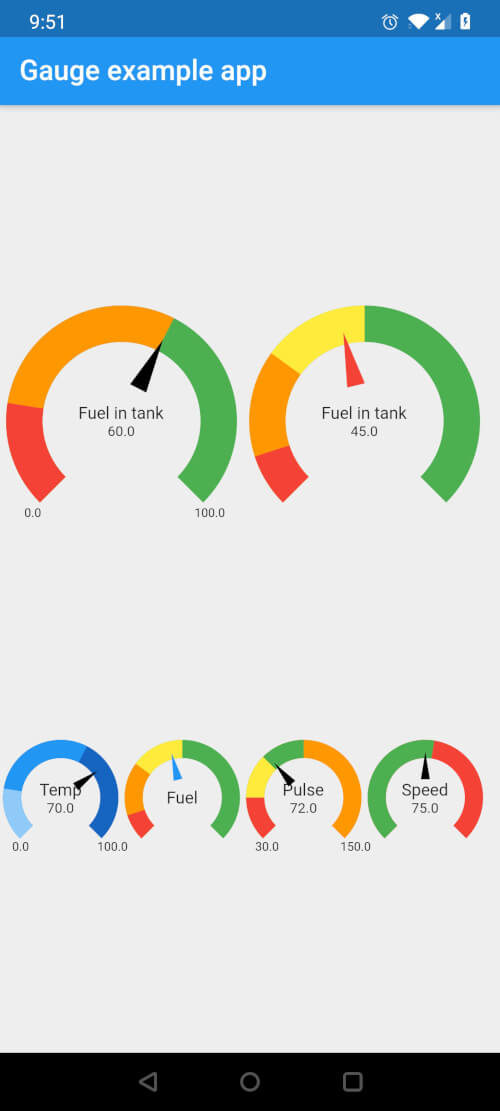
Flutter用に完全にカスタマイズ可能なゲージウィジェット。複数のセグメント、色、現在値とテキストを表示するためのカスタマイズ可能なスタイルが利用可能
22いいね 368030日間ダウンロード150Pub ポイント
AndroidiOSWebmacOSWindowsLinux
複数のセグメント、色、カスタマイズ可能なスタイルを備えたゲージをカスタマイズするためのFlutterパッケージで、現在の値とテキストを表示できます。

以下は英語原文のスナップショットです。最新版は GitHub をご覧ください。
Fully customizable Gauge widget for Flutter

In your pubspec.yaml, add the following dependency
dependencies:
  pretty_gauge: 1.0.0
import 'package:pretty_gauge/pretty_gauge.dart';

PrettyGauge(
    gaugeSize: 200,
    segments: [
        GaugeSegment('Low', 20, Colors.red),
        GaugeSegment('Medium', 40, Colors.orange),
        GaugeSegment('High', 40, Colors.green),
    ],
    currentValue: 46,
    displayWidget: Text('Fuel in tank', style: TextStyle(fontSize: 12)),
),
This project is licensed under the BSD 2-Clause license - see the LICENSE file for details
依存関係一覧 2 件
{"sdk":"flutter"}{"sdk":"flutter"}用途で絞り込み、開発状況を比較し、採用前に元のリポジトリで要件を確認しましょう。
“A repository is the most basic element of GitHub.”
GitHub Docs — About repositories ↗