
 v1.0.0+2
zkfinger10
zk_finger10 プラグインは、ZKTECO の指紋デバイスの登録および検証機能をサポートするために使用されます。
19いいね 1330日間ダウンロード150Pub ポイント
Android
zkfinger10 プラグインは、ZKTECO の指紋デバイスの登録および検証機能をサポートするために使用されます。

{"sdk":"flutter"}^2.1.8^4.5.1{"sdk":"flutter"}^5.0.0以下は英語原文のスナップショットです。最新版は GitHub をご覧ください。
pub package Flutter Android Stand with Palestine
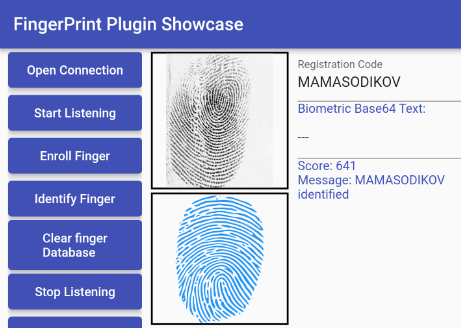
screenshot
A modern, fully updated Flutter plugin for ZKTeco fingerprint scanners with Flutter v3.35.3 compatibility and Android Plugin V2 embedding. This package provides comprehensive support for ZKTeco fingerprint devices including enrollment, verification, and advanced template management.
This plugin has been completely modernized for 2024+ Flutter development:
Compatible with ZKTeco fingerprint scanners including:
Note: This is an unofficial community-maintained package
cbdd3449eef878911f5c7b6ec75365d2-300x300 (1)
Add this to your package's pubspec.yaml file:
dependencies:
  zkfinger10: ^1.0.0
Then run:
flutter pub get
Add these permissions to your android/app/src/main/AndroidManifest.xml:
   <uses-permission
        android:name="android.permission.READ_EXTERNAL_STORAGE"
        android:maxSdkVersion="32" />
    <uses-permission
        android:name="android.permission.WRITE_EXTERNAL_STORAGE"
        android:maxSdkVersion="32"
        tools:ignore="ScopedStorage" />
    <uses-permission android:name="android.permission.INTERNET" />
    <uses-permission android:name="android.permission.RECEIVE_BOOT_COMPLETED" />
    <uses-permission android:name="android.hardware.usb.host" />
Add these intent filters inside the <activity> tag in your AndroidManifest.xml:
<intent-filter>
    <action android:name="android.hardware.usb.action.USB_DEVICE_ATTACHED" />
    <action android:name="android.intent.action.BOOT_COMPLETED" />
  </intent-filter>
  <meta-data
           android:name="android.hardware.usb.action.USB_DEVICE_ATTACHED"
           android:resource="@xml/device_filter" />
Create android/app/src/main/res/xml/device_filter.xml with the following content:
<?xml version="1.0" encoding="utf-8"?>
<resources>
    <usb-device vendor-id="6997" product-id="289" />
</resources>
import 'package:zkfinger10/zkfinger10.dart';

// Initialize connection
await ZkFinger.openConnection();

// Register a fingerprint
await ZkFinger.registerFinger(userId: "user123");

// Identify a fingerprint
await ZkFinger.identify();

// Clear all fingerprints
await ZkFinger.clearFingerDatabase();

// Close connection
await ZkFinger.closeConnection();
// Get fingerprint feature data for a specific user
String? feature = await ZkFinger.getUserFeature(userId: "user123");

// Get all users and their fingerprint data
Map<String, String>? users = await ZkFinger.getAllUsers();

// Get total count of users
int? count = await ZkFinger.getUserCount();

// Update user's fingerprint feature data
bool? success = await ZkFinger.updateUserFeature(
  userId: "user123",
  feature: "base64_encoded_fingerprint_data"
);

// Check if user exists
bool? exists = await ZkFinger.checkUserExists(userId: "user123");
// Listen to fingerprint status changes
ZkFinger.fingerStatusChangeStream.listen((status) {
  print('Status: ${status['message']}');
});

// Listen to fingerprint image data
ZkFinger.fingerImageStream.listen((imageBytes) {
  // Process fingerprint image
});
Add these lines to your android/app/build.gradle if you have problems on release:
    buildTypes {
        release {
           ....

            //Add these lines when releasing your app
            minifyEnabled false
            shrinkResources false
            // useProguard false

        }
    }
flutter pub get and restarted your IDEIf upgrading from an older version:
build.gradleFound a bug or want to contribute?
This project is licensed under the MIT License - see the LICENSE file for details.