パッケージ、リポジトリ、アプリカテゴリを検索

GitHub リポジトリNishchayShakya1/redirect_icon

リダイレクトアイコン

美しいクリック可能なアイコンを構築するのに役立つFlutterパッケージで、URLにリダイレクトします。

リダイレクトアイコン のプロジェクト画像
スター
4
フォーク
0
最終プッシュ(UTC)
2022/05/30
プロジェクト状態
公開中

元の README

以下は英語原文のスナップショットです。最新版は GitHub をご覧ください。

Redirect Icon

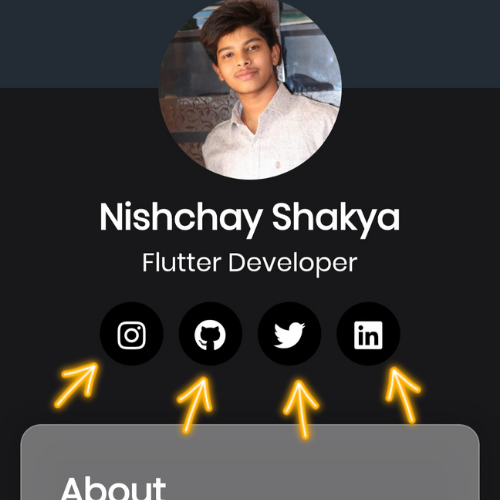
Redirect Icon package lets you add a beautiful clickable Icon to your Flutter app.

Installation

  1. Add the latest version of package to your pubspec.yaml (and rundart pub get):
dependencies:
  redirect_icon: ^0.0.1
  1. Import the package and use it in your Flutter App.
import 'package:redirect_icon/redirect_icon.dart';

Example

There are a number of properties that you can modify:

  • url
  • icon
  • radius
  • size
  • iconColor
  • circleAvatarColor

class FancyScreen extends StatelessWidget {  
  const FancyScreen({Key? key}) : super(key: key);  
  
  @override  
  Widget build(BuildContext context) {  
    return Scaffold(  
      body: Column(
        children: [
          const SizedBox(height: 8),
          const Text(
            'Nishchay Shakya',
            style: TextStyle(fontSize: 28, fontWeight: FontWeight.bold),
          ),
          const Text(
            'Flutter Developer',
            style: TextStyle(fontSize: 20, fontWeight: FontWeight.normal),
          ),
          const SizedBox(height: 16),
          Row(
            mainAxisAlignment: MainAxisAlignment.center,
            children: const [
              RedirectSocialIcon(
                url: "https://www.instagram.com/nishchayshakyaa/",
                icon: FontAwesomeIcons.instagram,
                radius: 25,
                size: 30,
                iconColor: Colors.white,
                circleAvatarColor: Colors.black,
              ),
              SizedBox(width: 12),
             RedirectSocialIcon(
                url: "https://www.instagram.com/nishchayshakyaa/",
                icon: FontAwesomeIcons.instagram,
                radius: 25,
                size: 30,
                iconColor: Colors.white,
                circleAvatarColor: Colors.black,
              ),
              SizedBox(width: 12),
              RedirectSocialIcon(
                url: "https://www.instagram.com/nishchayshakyaa/",
                icon: FontAwesomeIcons.instagram,
                radius: 25,
                size: 30,
                iconColor: Colors.white,
                circleAvatarColor: Colors.black,
              ),
              SizedBox(width: 12),
              RedirectSocialIcon(
                url: "https://www.instagram.com/nishchayshakyaa/",
                icon: FontAwesomeIcons.instagram,
                radius: 25,
                size: 30,
                iconColor: Colors.white,
                circleAvatarColor: Colors.black,
              ),
            ],
          ),
        ],
      ); 
    );  
  }  
}

Getting Error

Add these in your android/app/src/main/AndroidManifest.xml

<manifest xmlns:android="http://schemas.android.com/apk/res/android"
    package="com.yourpackagename">
  <uses-permission android:name="android.permission.INTERNET"/>
    <queries>
<!-- If your app opens https URLs -->
<intent>
<action android:name="android.intent.action.VIEW" />
<data android:scheme="https" />
</intent>
<!-- If your app makes calls -->
<intent>
<action android:name="android.intent.action.DIAL" />
<data android:scheme="tel" />
</intent>
<!-- If your app emails -->
<intent>
<action android:name="android.intent.action.SEND" />
<data android:mimeType="*/*" />
</intent>
</queries>
</manifest>
Nishchay Shakya GitHub avatar
GitHub 作者

Nishchay Shakya ↗

Software Engineer at Capgemini. A Java Backend Developer. Completed B.tech in CSE from IIIT Kota 2024.

CapgeminiBengaluru公式サイト ↗

カテゴリー

使用している依存関係

依存関係一覧 6 件

プロジェクトに合うリポジトリを選ぶには?

用途で絞り込み、開発状況を比較し、採用前に元のリポジトリで要件を確認しましょう。

  1. 名前・作者・説明で検索し、技術トピックで絞り込みます。
  2. スター、フォーク、最近のプッシュを比較します。スターは関心の目安であり、品質の保証ではありません。
  3. 利用前に GitHub で README、ライセンス、Issues を確認します。

情報源と管理

“A repository is the most basic element of GitHub.”

GitHub Docs — About repositories ↗