v0.28.0
rxdart
RxDart は、非同期プログラミングのための人気のある ReactiveX API の実装であり、ネイティブな Dart Streams API を活用しています。
2880いいね 641万30日間ダウンロード135Pub ポイント
AndroidiOSWebmacOSWindowsLinux
Flutter ウィジェット用のビジュアルエディタ

以下は英語原文のスナップショットです。最新版は GitHub をご覧ください。


The project is currently not maintained by me and the code could probably use a bit of refactoring.
This README is still work in progress.
If anybody is interested in contributing/ forking/ using it as a base for another project - feel free!
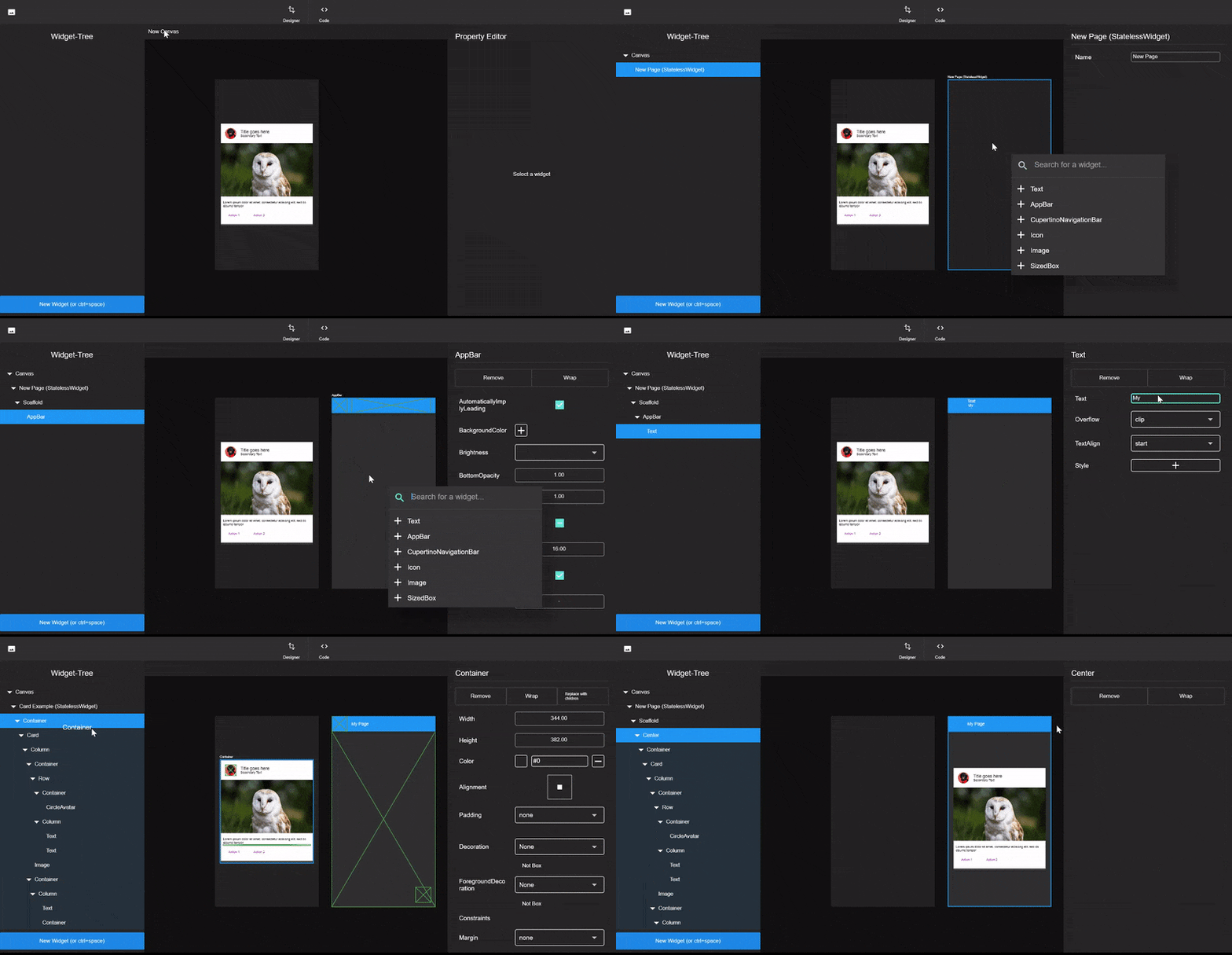

This is intended to be run using Flutter Desktop or Flutter web. For Desktop, simply switch to the master channel and run:
flutter run -d [windows|linux|macos]
A few words about the code architecture.
Widget-Elements play a central part in the Widget-Maker as these are actual widgets
you drag around and style.
The Widget-Elements can be found under lib/data/widget_elements.
Widget-Elements form a forth tree (on top of Widgets/RenderObjects and Elements) they include
a lot of meta information.
Widget-Elements only manage the tree, but not the actual rendering, interaction and modification
of the widgets, that is up to the widget which is generated by the generateWidget() method.
Those widgets have to mix in ElementWidgetStateMixin, that class contains code which handles common UX scenarios
like accepting children via drag, or showing a border on selection.
You certainly can make new Widget-Elements by hand, in fact Widget-Elements such as the Scaffold,
Row and more are hand made.
But a lot of widgets are pretty basic, so instead of copy-pasting the same wrapper code over and over again, there is a generator which does that for you.
Take a look at (lib/Data/widget_elements/config.yaml and README.md) to get a sense of the schema.
To generated those widget simply execute the lib/data/widget_elements/scripts/build.dart file.
Be sure to be inside the script folder when running that script because it relies on relative paths!
dart build.dart
The MProperty is the base class for all properties inside the Widget-Maker.
Each Widget-Element has a list of properties. These properties reflect the constructor parameters
of the widgets in code.
Properties are responsible for providing a way of changing themselves and providing meta information.
For more information take a look at lib/data/properties/basic_properties.dart
Not all tests seem to pass as of now.
flutter test
The docs folder contains the source for www.widgetmaker.dev
Feel free to donate a pizza/ coffee :)
RxDart は、非同期プログラミングのための人気のある ReactiveX API の実装であり、ネイティブな Dart Streams API を活用しています。
React Hooks の Flutter 実装。コード再利用を強化した新しい種類のウィジェットを追加します。
主観的で自動的なDartソースコードフォーマッタ。APIとCLIツールを提供します。
すべての良いデザインからインスパイアされた、HSV(HSB)/HSL/RGB/Materialカラーピッカー。素晴らしいFlutterアプリに最適です。
多数の言語とテーマをサポートするFlutter用の構文強調ウィジェット。
有効なDartコードを生成するための、スムーズでビルダー型のライブラリです。
依存関係一覧 17 件
{"sdk":"flutter"}^2.0.1^2.0.1any^3.2.0^1.2.8any{"git":{"url":"https://github.com/Norbert515/file_system_explorer.git"}}{"git":{"url":"https://github.com/Norbert515/flutter_desktop_widgets2.git"}}^0.6.03.4.1^0.7.0{"git":{"url":"https://github.com/Norbert515/mustache.git"}}^0.1.2{"sdk":"flutter"}{"sdk":"flutter"}any用途で絞り込み、開発状況を比較し、採用前に元のリポジトリで要件を確認しましょう。
“A repository is the most basic element of GitHub.”
GitHub Docs — About repositories ↗