

 v1.2.0
flutter_material_color_picker
Flutter アプリ向けのカスタマイズ可能な Material 色選択ツール
126いいね 406030日間ダウンロード150Pub ポイント
AndroidiOSWebmacOSWindowsLinux
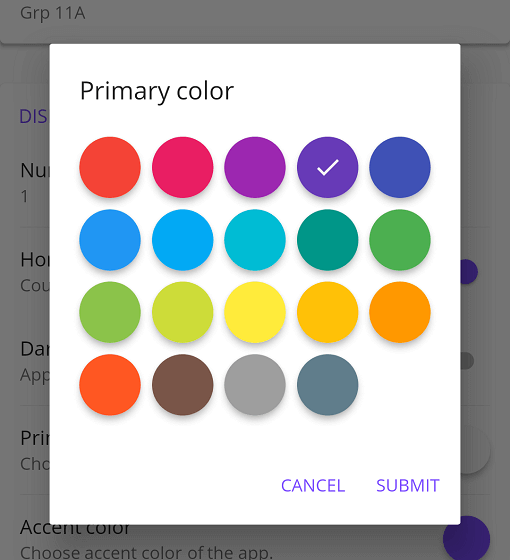
マテリアルカラーピッカー、カスタマイズ可能な色を選択できます。2段階で選択:まずメインカラー、その後シャドウ。

以下は英語原文のスナップショットです。最新版は GitHub をご覧ください。

Material Color picker is a Flutter widget, that can be customizable.
By default, it's Material Colors, but you can define your own colors.
You can also use CircleColor widget to display color in your app. Example, you can set the color picker in a dialog and display the selected color in a ListTile, for settings.
These examples use a static color for 'selectedColor', but you can use a variable (state)
You just need to add flutter_material_color_picker as a dependency in your pubspec.yaml file.
flutter_material_color_picker: ^1.2.0
import 'package:flutter_material_color_picker/flutter_material_color_picker.dart';
MaterialColorPicker(
    onColorChange: (Color color) {
        // Handle color changes
    },
    selectedColor: Colors.red
)
MaterialColorPicker(
    onColorChange: (Color color) {
        // Handle color changes
    },
    onMainColorChange: (ColorSwatch color) {
        // Handle main color changes
    },
    selectedColor: Colors.red
)
MaterialColorPicker(
    allowShades: false, // default true
    onMainColorChange: (ColorSwatch color) {
        // Handle main color changes
    },
    selectedColor: Colors.red
)
If allowShades is set to false then only main colors will be shown and allowed to be selected.
onColorChange will not be called, use onMainColorChange instead.
In this example, custom colors are a list of Material Colors (class who extend of ColorSwatch). But you can create your own list of ColorSwatch.
MaterialColorPicker(
    onColorChange: (Color color) {
        // Handle color changes
    },
    selectedColor: Colors.red,
    colors: [
        Colors.red,
        Colors.deepOrange,
        Colors.yellow,
        Colors.lightGreen
    ],
)
There is two step, first choose the main color, and when you press it, you have to choose a shade of the main color. By default it's all Material Colors, but you can define custom colors, a list of ColorSwatch.


You can insert the color picker into a Dialog


You can use CircleColor widget, to display the selected color into your settings for example.

依存関係一覧 2 件
{"sdk":"flutter"}^2.0.0用途で絞り込み、開発状況を比較し、採用前に元のリポジトリで要件を確認しましょう。
“A repository is the most basic element of GitHub.”
GitHub Docs — About repositories ↗