

v0.0.3
variable_app_icon
AndroidおよびiOSで複数のアプリアイコンを使用するためのプラグイン。
81いいね 555030日間ダウンロード150Pub ポイント
AndroidiOS
iOSで複数のアプリアイコンを使用するためのFlutterプラグイン

以下は英語原文のスナップショットです。最新版は GitHub をご覧ください。
A plugin to use multiple app icon on Android and iOS.
If you don't know yet, you can use multiple app icon in an iOS app from 10.3. in android, you can do this using activity-alias. You can accomplish
this in your flutter app by using this plugin
First, add variable_app_icon as a dependency in your pubspec.yaml file.
dependencies:
  variable_app_icon: ^0.0.1
Don't forget to flutter pub get.
Drop your app icons into mipmap folders. Then configure android/app/src/main/AndroidManifest.xml as follows.
Why this layout? Activity-aliases are how Android serves multiple launcher icons from one APK, but two known issues require extra care:
- Flutter's tooling does not properly follow
<activity-alias>forflutter run(flutter/flutter#38965). To makeflutter runwork,MainActivitymust declareandroid:exported="true"(Android 12+ rule, since it is reachable fromadb shell am start) and carry aMAIN+LAUNCHERintent-filter in the source manifest. TheLAUNCHERcategory is then stripped at merge time viatools:node="remove"soMainActivitydoes not appear as a duplicate launcher icon next to the aliases at runtime.- Some OEM launchers (e.g. Huawei) read app metadata from
<application>for the uninstall prompt and system dialogs — see issue #5. Keepandroid:iconandandroid:labelon<application>.
Use this template (replace your_app_name / mipmap names / activity-alias ids as needed):
<manifest xmlns:android="http://schemas.android.com/apk/res/android"
    xmlns:tools="http://schemas.android.com/tools">

    <application
        android:name="${applicationName}"
        android:icon="@mipmap/ic_launcher"
        android:label="your_app_name">

        <!-- One activity-alias per selectable icon. The id (android:name) must contain at least one dot. -->
        <activity-alias
            android:name="appicon.DEFAULT"
            android:enabled="true"
            android:exported="true"
            android:icon="@mipmap/ic_launcher"
            android:label="your_app_name"
            android:targetActivity=".MainActivity">
            <intent-filter>
                <action android:name="android.intent.action.MAIN" />
                <category android:name="android.intent.category.LAUNCHER" />
            </intent-filter>
        </activity-alias>

        <!-- Repeat <activity-alias> for each additional icon, with android:enabled="false". -->

        <activity
            android:name=".MainActivity"
            android:exported="true"
            android:launchMode="singleTop"
            android:taskAffinity=""
            android:theme="@style/LaunchTheme"
            android:configChanges="orientation|keyboardHidden|keyboard|screenSize|smallestScreenSize|locale|layoutDirection|fontScale|screenLayout|density|uiMode"
            android:hardwareAccelerated="true"
            android:windowSoftInputMode="adjustResize">
            <meta-data
                android:name="io.flutter.embedding.android.NormalTheme"
                android:resource="@style/NormalTheme" />

            <!-- This intent-filter makes `flutter run` work with the activity-alias setup
                 (flutter/flutter#38965). Flutter's launchable-activity detection reads the
                 source manifest and needs MainActivity to declare MAIN + LAUNCHER; without
                 it, `flutter run` cannot locate MainActivity as launchable. If LAUNCHER
                 survived to runtime, however, MainActivity would appear as a duplicate
                 launcher icon next to the activity-aliases. `tools:node="remove"` strips
                 LAUNCHER at manifest-merge time, satisfying both constraints. -->
            <intent-filter>
                <action android:name="android.intent.action.MAIN" />
                <category android:name="android.intent.category.LAUNCHER"
                    tools:node="remove" />
            </intent-filter>
        </activity>

        <meta-data
            android:name="flutterEmbedding"
            android:value="2" />
    </application>
</manifest>
Notes per icon:
android:name is the icon id (must contain at least one dot — e.g. appicon.DEFAULT, appicon.TEAL). You pass this id from Dart when calling VariableAppIcon.changeAppIcon.android:enabled="true" on the default icon's alias, android:enabled="false" on the rest.See example/android/app/src/main/AndroidManifest.xml in this repo for a complete working example with three icons.
Open your ios project i.e. Runner in Xcode, then go to Build Settings tab.
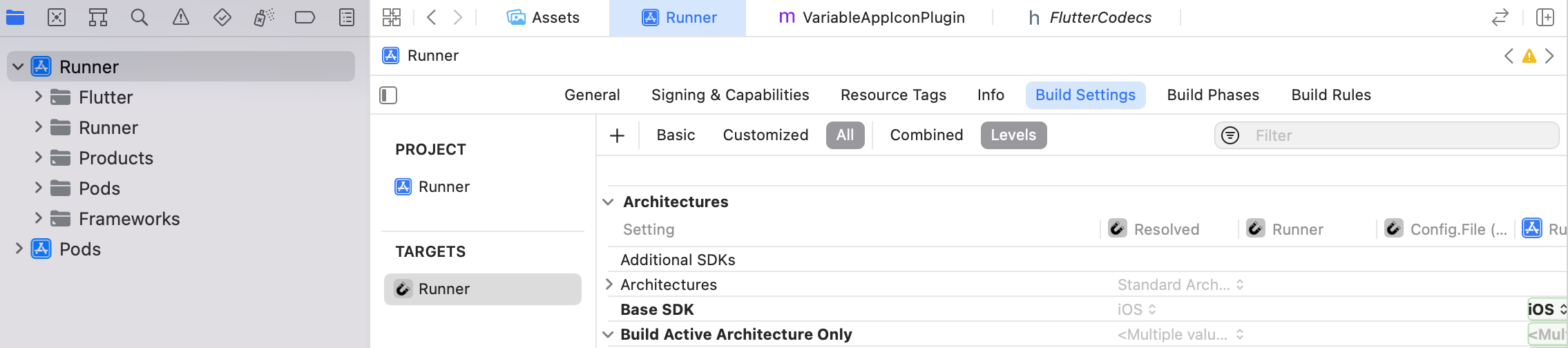 Now search icon, you will find Assets Catalog Compiler Options. Set Include All App Icon
Assets to Yes.
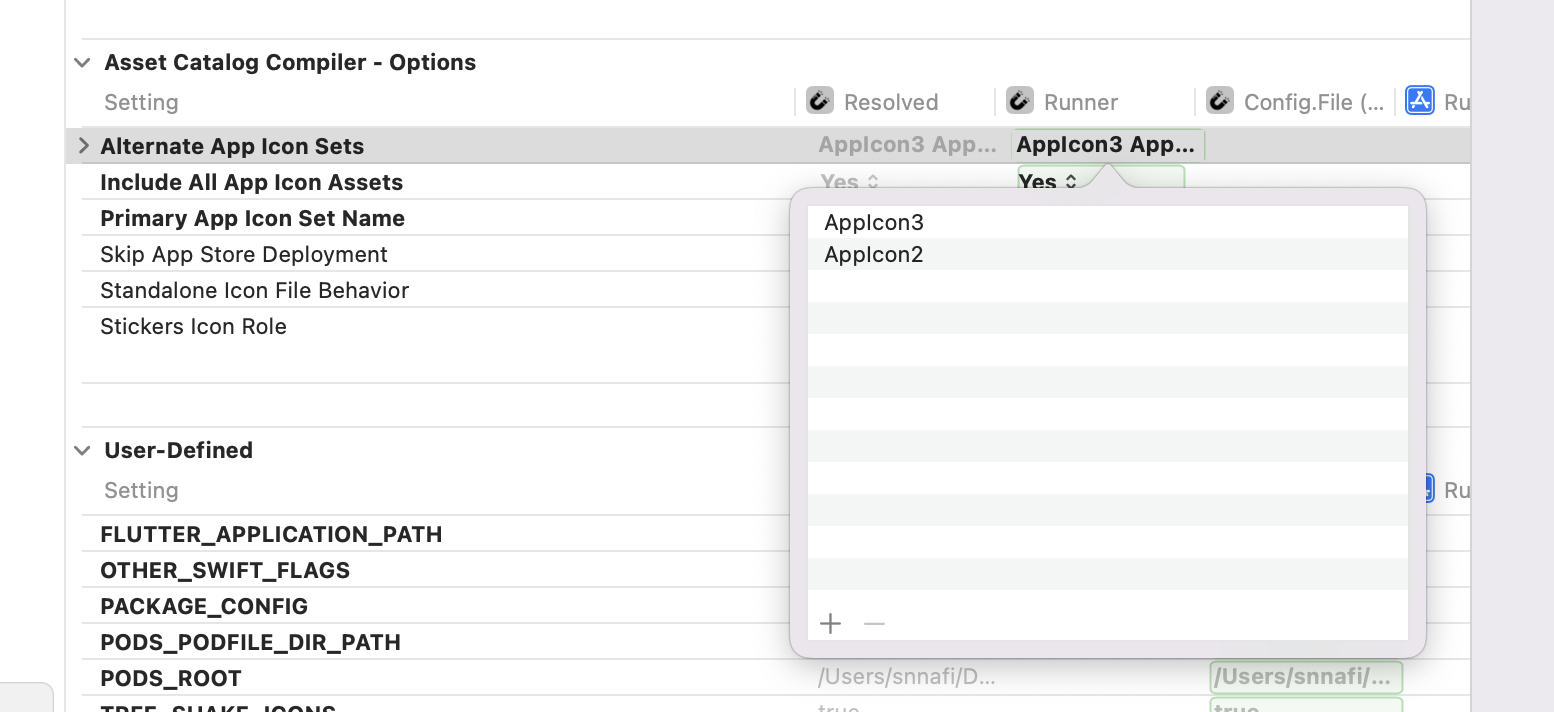
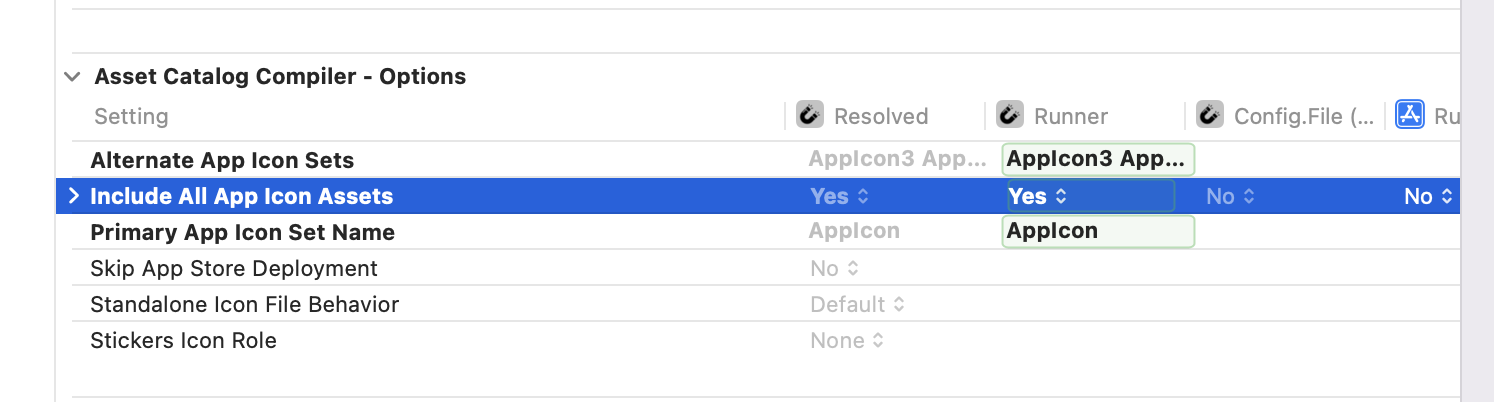 Then add all the icons name to the Alternate App Icon Sets.
In main function set this two variable,
VariableAppIcon.iOSDefaultAppIcon = iosAppIcons[0]; // default ios icon
VariableAppIcon.androidAppIconIds = androidIconIds; // all android icons ids, this is the android:name, you have specified in `AndroidManifest.xml` file. like, ["appicon.DEFAULT", others]
Call this method to change app icon.
 await VariableAppIcon.changeAppIcon(
androidIconId: "appicon.TEAL",
iosIcon: "AppIcon2);
See the example app for complete example.
You are done. Enjoy!
https://user-images.githubusercontent.com/22527366/191311548-c46fac40-e39f-4286-88c5-05fd6765b5e9.mp4
https://user-images.githubusercontent.com/22527366/191091356-817b69f0-1a84-4620-87ae-5969d519b4eb.MP4
If you find this package useful, you can support it by giving it a star.
This package is created by Shahriar Nasim Nafi
依存関係一覧 4 件
{"sdk":"flutter"}^2.1.8{"sdk":"flutter"}^3.0.0用途で絞り込み、開発状況を比較し、採用前に元のリポジトリで要件を確認しましょう。
“A repository is the most basic element of GitHub.”
GitHub Docs — About repositories ↗