


 v2.0.0
animated_text_lerp
数値または文字列テキストの間をアニメーションするためのシンプルなウィジェット。数値の増減アニメーション、通貨価値アニメーション、文字列コンテンツの変化アニメーションに役立ちます。
60いいね 205030日間ダウンロード150Pub ポイント
AndroidiOSWebmacOSWindowsLinux
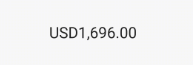
Flutter用のアニメーションテキスト用パッケージ。通貨価値の増減アニメーションやテキストコンテンツの補間アニメーションに役立ちます。

以下は英語原文のスナップショットです。最新版は GitHub をご覧ください。
Simple widgets to animate between number or string text. Useful for number increase/decrease animation, currency value animation or string content changing animation.
import 'package:animated_text_lerp/animated_text_lerp.dart';

The widget support lerping between number values. Just setState with the current value and the widget will start animating to it.
AnimatedNumberText(
  value, // int or double
  curve: Curves.easeIn,
  duration: const Duration(seconds: 1),
  style: const TextStyle(fontSize: 30),
  formatter: (value) {
    final formatted =
    intl.NumberFormat.currency(locale: "en").format(value);
    return formatted;
  },
)

The widget support lerping between string values. Just setState with the current value and the widget will start animating to it. Each character will lerp to the new corresponding one respectively.
AnimatedStringText(
  value, // string
  curve: Curves.easeIn,
  duration: const Duration(seconds: 1),
  style: const TextStyle(fontSize: 30),
)
依存関係一覧 3 件
{"sdk":"flutter"}{"sdk":"flutter"}^3.0.0用途で絞り込み、開発状況を比較し、採用前に元のリポジトリで要件を確認しましょう。
“A repository is the most basic element of GitHub.”
GitHub Docs — About repositories ↗