
 v2.1.0
icon_decoration
ボーダーとグラデーションを使用して、Icon ウィジェットに装飾機能を追加します。
97いいね 252030日間ダウンロード150Pub ポイント
AndroidiOSWebmacOSWindowsLinux
Icon ウィジェットに影、ボーダー、グラデーションなどの装飾機能を追加します。

以下は英語原文のスナップショットです。最新版は GitHub をご覧ください。
Pub Version Test workflow Coverage Status
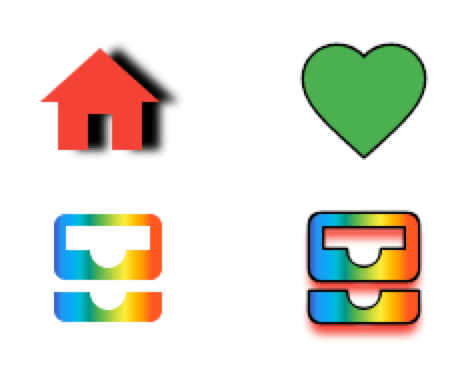
Add decoration capabilities to the Icon widget with borders and gradients. This new DecoratedIcon widget overlap itself with the base Icon widget to provide a more complete decoration system through a IconDecoration property.
pubspec.yamlicon_decoration: any
import 'package:icon_decoration/icon_decoration.dart';
DecoratedIcon(
    icon: Icon(Icons.favorite, color: Colors.green),
    decoration: IconDecoration(border: IconBorder()),
)
Gradients are supported on Flutter Web only with the canvaskit renderer
https://raw.githubusercontent.com/TesteurManiak/icon_decoration/refs/heads/main/screenshots/base_gradient.pngDecoratedIcon(
icon: Icon(Icons.all_inbox),
decoration: IconDecoration(
gradient: rainbowGradient,
),
)
DecoratedIcon(
    icon: Icon(
        Icons.all_inbox,
        shadows: [
            Shadow(
                color: Colors.red,
                blurRadius: 3,
                offset: Offset(0, 2),
            ),
        ],
    ),
    decoration: IconDecoration(
        gradient: _rainbowGradient,
        border: IconBorder(),
    ),
)
IconDecoration.shadows, use Icon.shadows instead.Before
DecoratedIcon(
    icon: Icon(Icons.all_inbox),
    decoration: IconDecoration(
        shadows: [
            Shadow(
                color: Colors.red,
                blurRadius: 3,
                offset: Offset(0, 2),
            ),
        ],
    ),
)
After
Icon(
    Icons.all_inbox,
    shadows: [
        Shadow(
            color: Colors.red,
            blurRadius: 3,
            offset: Offset(0, 2),
        ),
    ],
),