
 v3.3.0
pretty_animated_text
カスタマイズ可能なアニメーションテキストウィジェットを作成するためのFlutterプラグインで、魅力的なテキストアニメーションによりアプリの美しさを向上させます。
138いいね 139030日間ダウンロード150Pub ポイント
AndroidiOSWeb
美しいアニメーションテキストエフェクトを簡単に作成できる、スムーズで完全にカスタマイズ可能なFlutterプラグイン

依存関係一覧 7 件
{"sdk":"flutter"}{"sdk":"flutter"}^1.1.0^2.0.2^0.14.2+1{"sdk":"flutter"}^3.0.0以下は英語原文のスナップショットです。最新版は GitHub をご覧ください。
Link: https://pretty-animated-text.vercel.app
Buy Me A Coffee GitHub Repo stars
A text animation UI plugin that provides you with gorgeous and customizable animated text widgets so that you can use them effortlessly in your project.
Physics-based animations are utilized for text animations, providing a smooth and delightful experience.
This project heavily inspires on jasudev's AnimateText for SwiftUI package
To use this package, add pretty_animated_text as a dependency in your pubspec.yaml file:
flutter pub add pretty_animated_text
Animations are configured using AnimationConfig. There are two main animation types that you can trigger inside the config:
AnimationType.wordAnimationType.letterYou can also pass callbacks to react to animation lifecycle events:
onPlay: Triggered when the animation starts.onComplete: Triggered when the animation finishes.onPause, onResume, onDismissed, etc.And for texts such as RotateText and OffsetText, you can trigger some more variations like rotation direction and slide offset.
Currently, the plugin supports default Flutter text alignments:
TextAlign.startTextAlign.centerTextAlign.endSpring Text
  SpringText(
    text: 'Lorem ipsum dolor sit amet ...',
    style: const TextStyle(fontSize: 18),
    config: AnimationConfig(
      duration: const Duration(seconds: 4),
      type: AnimationType.word,
      onPlay: (controller) => print('Animation started'),
      onComplete: (controller) => print('Animation completed'),
    ),
  )
Chime Bell Text
  ChimeBellText(
    text: 'Lorem ipsum dolor sit amet ...',
    style: const TextStyle(fontSize: 18),
    config: const AnimationConfig(
      duration: Duration(seconds: 4),
      type: AnimationType.word,
    ),
  )
Scale Text
  ScaleText(
    text: 'Lorem ipsum dolor sit amet ...',
    style: const TextStyle(fontSize: 18),
    config: const AnimationConfig(
      duration: Duration(seconds: 4),
      type: AnimationType.word,
    ),
  )
Blur Text
  BlurText(
    text: 'Lorem ipsum dolor sit amet ...',
    style: const TextStyle(fontSize: 18),
    config: const AnimationConfig(
      duration: Duration(seconds: 4),
      type: AnimationType.word,
    ),
  )
Rotate Text
For RotateText, you can tweak two rotation directions.
RotateAnimationType.clockwise (default)RotateAnimationType.anticlockwise RotateText(
text: 'Lorem ipsum dolor sit amet ...',
direction: RotateAnimationType.clockwise,
style: const TextStyle(fontSize: 18),
config: const AnimationConfig(
duration: Duration(seconds: 4),
type: AnimationType.word,
),
)
Offset Text
OffsetText has multiple slide effects that you can tweak according to your needs.
SlideAnimationType.topBottom (default)SlideAnimationType.bottomTopSlideAnimationType.alternateTBSlideAnimationType.leftRightSlideAnimationType.rightLeftSlideAnimationType.alternateLR OffsetText(
text: 'Lorem ipsum dolor sit amet ...',
slideType: SlideAnimationType.topBottom,
style: const TextStyle(fontSize: 18),
config: const AnimationConfig(
duration: Duration(seconds: 4),
type: AnimationType.word,
),
)
Scramble Text (new in v3)
  ScrambleText(
    text: 'Lorem ipsum dolor sit amet ...',
    style: const TextStyle(fontSize: 18),
    config: AnimationConfig(
      duration: const Duration(milliseconds: 300),
      type: AnimationType.letter, // or AnimationType.word
    ),
  )
Phase 1 (first half of the animation): every character cycles through random glyphs. Phase 2 (second half): characters resolve left-to-right into the final text. Spaces are never scrambled.
Glitch Text (new in v3.2)
  GlitchText(
    text: 'Lorem ipsum dolor sit amet ...',
    style: const TextStyle(fontSize: 18),
    config: AnimationConfig(
      duration: const Duration(milliseconds: 300),
      type: AnimationType.word, // or AnimationType.letter
      repeat: true, // loop the glitch continuously
    ),
    // Optional: customize the tear (defaults shown)
    glitchStyle: const GlitchStyle(
      shadows: true, // true = chromatic tinted tear + RGB-split shadow fringe
      color1: Color(0xFFFF2E88), // primary split (pink)
      color2: Color(0xFF23D7F5), // secondary split (cyan)
      shadowColor: Color(0xFF0D0A1A), // dark shadow accent
    ),
  )
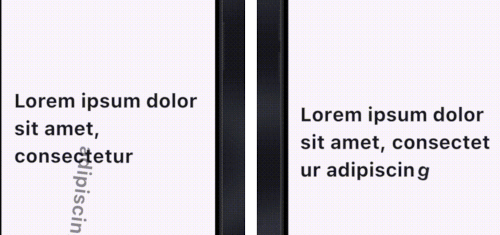
All characters are visible and readable from the start; a random, rotating
subset briefly glitches by tearing into horizontal slices that shear sideways
(with an RGB-split shadow fringe on the sheared parts when shadows is on).
In word mode at most one word glitches at a time; in letter mode a random
group of 2-3 letters glitches together. The order covers every segment exactly
once per forward pass and is reshuffled on each repeat. Because the slices are
disjoint bands, each glyph is still drawn exactly once (no ghosting), so the
text stays readable while it tears — the caller's TextStyle (font, weight) is
preserved. Use GlitchStyle(shadows: true) for a chromatic tinted tear or
shadows: false for a clean monochrome one. Enable config.repeat for a
continuous loop.
Squash Bounce Text (new in v3.2)
A SplitText-inspired squash bounce. Each glyph drops, squashes, and rotates, then elastically settles back to rest — animating as a continuous traveling wave across the text.
  SquashBounceText(
    text: 'Lorem ipsum dolor sit amet ...',
    style: const TextStyle(fontSize: 18),
    config: AnimationConfig(
      duration: const Duration(milliseconds: 150),
      type: AnimationType.letter, // or AnimationType.word
      repeat: true, // loop the bounce continuously
    ),
    // Optional: customize the bounce (defaults shown)
    squashStyle: const SquashBounceStyle(
      dropFraction: 0.5, // peak drop as a fraction of glyph height
      squashScaleY: 0.3, // vertical scale at the squash peak
      rotateDegrees: 17, // peak rotation, pivoting on the glyph's bottom
      squashPhase: 0.2, // fraction of each glyph's window spent squashing in
      waveSpread: 0.6, // smaller = tighter wave, larger = more sequential
    ),
  )
Each glyph runs its full drop→squash→elastic-return over a wide window while
the start times are packed tightly, so many glyphs are mid-flight at slightly
offset phases — reading as one wave traveling across the text. The caller's
TextStyle (font, weight) is preserved. Enable config.repeat for a
continuous loop.
Reveal Text (new in v3)
  RevealText(
    text: 'Lorem ipsum dolor sit amet ...',
    style: const TextStyle(fontSize: 18),
    config: AnimationConfig(
      duration: const Duration(milliseconds: 300),
      type: AnimationType.word, // or AnimationType.letter
    ),
    // Optional: customize the sliding cursor
    cursorColor: Colors.indigo,
    dimOpacity: 0.3, // initial opacity of unrevealed text (default 0.3)
  )
All text starts at dimOpacity (default 0.3). A cursor sweeps left-to-right
and each character/word transitions to full opacity as the cursor passes it.
Gravity Text (new in v3)
A real 2D rigid-body simulation powered by forge2d
(a Box2D port). The whole text is visible at rest first; on play each segment
(letter or word) becomes a physics body and falls under gravity — letters collide,
pile up on the floor between the walls, carry real linear + angular momentum, push
their neighbours, and rest (sleep) until disturbed. Tap a letter to kick it, or
press-drag-and-release to throw it.
  GravityText(
    text: 'Lorem ipsum dolor sit amet ...',
    style: const TextStyle(fontSize: 18),
    config: const AnimationConfig(
      type: AnimationType.letter, // or AnimationType.word
    ),
    // Optional: tune the physics
    gravity: 30.0, // m/s²
    pixelsPerMeter: 50.0,
    density: 1.0,
    friction: 0.4,
    restitution: 0.1, // bounciness (keep low so piles settle)
    // Optional: stage / interaction
    height: 400, // floor sits at the bottom of the stage (null = fill parent)
    enableInteraction: true, // tap to kick, drag to throw
    kickStrength: 9.0, // m/s imparted to a tapped letter
    maxSpin: 2.5, // max angular velocity (rad/s) when a segment drops
  )
Playback via the controller: play / restart / repeat re-drop the text from its
reading layout; pause / resume freeze and run the simulation.
This project is licensed under MIT License.
Feel free to check it out and give it a https://raw.githubusercontent.com/YeLwinOo-Steve/pretty_animated_text/HEAD/assets/Star.png️ if you love it. Follow me for more updates and more projects
Suggestions are warmly welcome & more updates are coming along the way ...️
Copyright (©️) 2024 YE LWIN OO