
flutter_最適化スクロール
Flutter Webおよびデスクトップ向けに、より良いスクロールを実装しようとします。キーボード、MButton、カスタムマウスホイールスクロールを含みます。

- スター
- 50
- フォーク
- 25
- 最終プッシュ(UTC)
- 2026/01/27
- プロジェクト状態
- 公開中
元の README
以下は英語原文のスナップショットです。最新版は GitHub をご覧ください。
This package has been deprecated


An attempt to implement better scrolling for Flutter Web and Desktop.
Includes keyboard, MButton and custom mouse wheel scrolling.
Getting started
Example
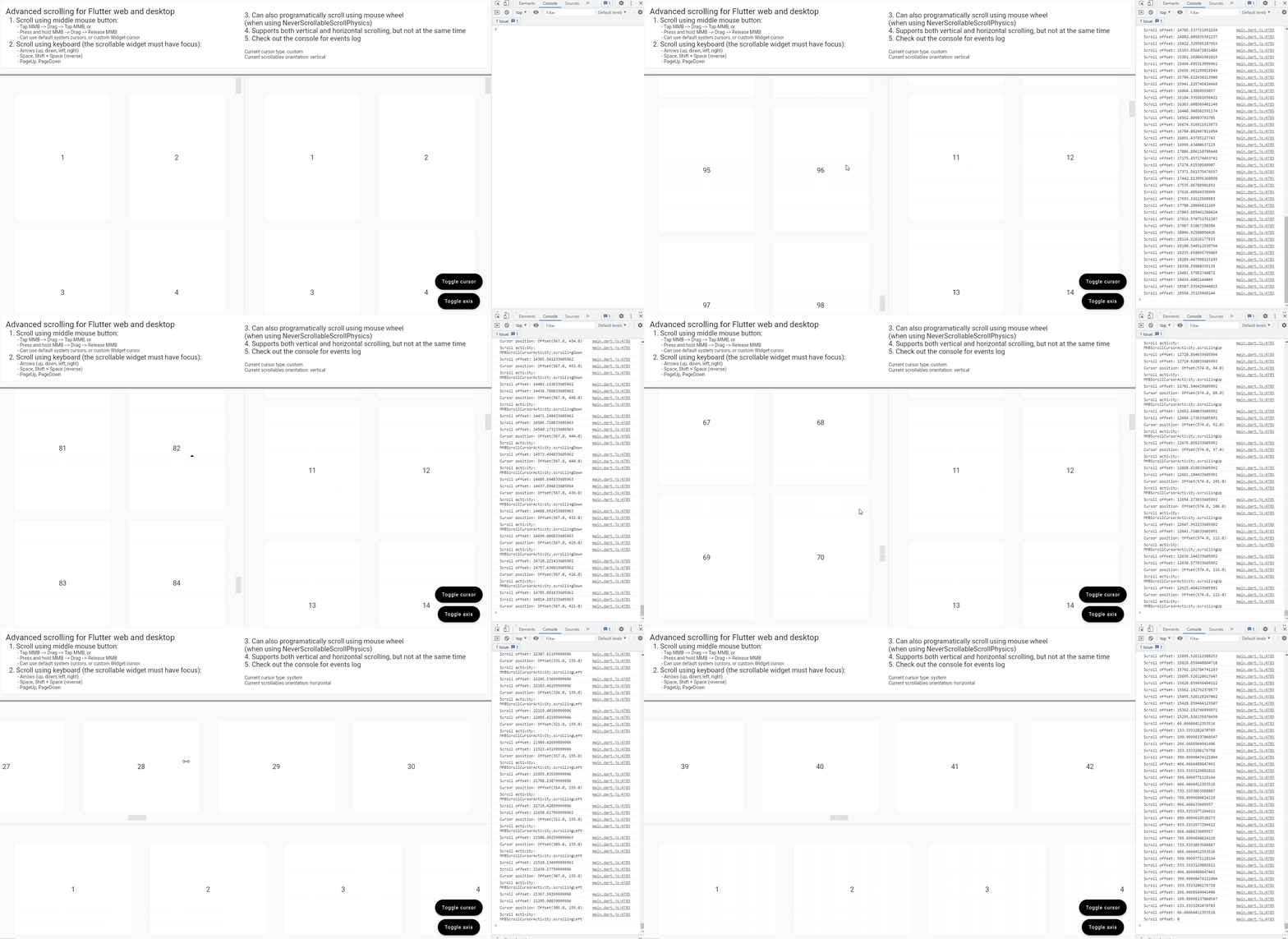
Usage and features
(from the example app)
final controller = ScrollController();

...

ImprovedScrolling(
      scrollController: controller,
      onScroll: (scrollOffset) => debugPrint(
        'Scroll offset: $scrollOffset',
      ),
      onMMBScrollStateChanged: (scrolling) => debugPrint(
        'Is scrolling: $scrolling',
      ),
      onMMBScrollCursorPositionUpdate: (localCursorOffset, scrollActivity) => debugPrint(
            'Cursor position: $localCursorOffset\n'
            'Scroll activity: $scrollActivity',
      ),
      enableMMBScrolling: true,
      enableKeyboardScrolling: true,
      enableCustomMouseWheelScrolling: true,
      mmbScrollConfig: MMBScrollConfig(
        customScrollCursor: useSystemCursor ? null : const DefaultCustomScrollCursor(),
      ),
      keyboardScrollConfig: KeyboardScrollConfig(
        arrowsScrollAmount: 250.0,
        homeScrollDurationBuilder: (currentScrollOffset, minScrollOffset) {
          return const Duration(milliseconds: 100);
        },
        endScrollDurationBuilder: (currentScrollOffset, maxScrollOffset) {
          return const Duration(milliseconds: 2000);
        },
      ),
      customMouseWheelScrollConfig: const CustomMouseWheelScrollConfig(
        scrollAmountMultiplier: 2.0,
      ),
      child: ScrollConfiguration(
        behavior: const CustomScrollBehaviour(),
        child: GridView(
          controller: controller,
          physics: const NeverScrollableScrollPhysics(),
          scrollDirection: axis,
          padding: const EdgeInsets.all(24.0),
          gridDelegate: const SliverGridDelegateWithMaxCrossAxisExtent(
            maxCrossAxisExtent: 400.0,
            mainAxisExtent: 400.0,
          ),
          children: buildScrollableItemList(axis),
        ),
      ),
    );
Requirements
- The
ImprovedScrollingWidget must be added as a parent of your scrollable Widget (List/Grid/SingleChildScrollView/etc). - You must create and provide the same scroll controller to both the
ImprovedScrollingWidget and your scrollable Widget.
- Optional: If you want to programatically scroll when rotating the mouse wheel and not let the framework manage the scrolling, you can set
physics: NeverScrollableScrollPhysics()to your scrollable and then setenableCustomMouseWheelScrolling: trueonImprovedScrollingto enable this feature.
Features:
-
Scrolling using the keyboard (Arrows, Page{Up, Down}, Spacebar, Home, End)
You need to set
enableKeyboardScrolling: trueand then you can configure the scrolling amount, duration and curve by usingkeyboardScrollConfig: KeyboardScrollConfig(...) -
Scrolling using the middle mouse button ("auto-scrolling")
You need to set
enableMMBScrolling: trueand then you can configure the scrolling delay, velocity, acceleration and cursor appearance and size by usingmmbScrollConfig: MMBScrollConfig(...)
There is also a
DefaultCustomScrollCursorclass which is a default custom cursor implementation -
Programatically scroll using the mouse wheel
You need to set
enableCustomMouseWheelScrolling: trueand then you can configure the scrolling speed, duration, curve and throttling time by usingcustomMouseWheelScrollConfig: CustomMouseWheelScrollConfig(...) -
Horizontal scrolling using Left/Right arrows or Shift + mouse wheel
Requires
enableKeyboardScrolling: trueandenableCustomMouseWheelScrolling: trueto be set.
Callbacks:
Other than the above features, there are also a few callbacks available on the ImprovedScrolling Widget:
// Triggers whenever the ScrollController scrolls, no matter how or why
onScroll: (double scrollOffset) => debugPrint(
  'Scroll offset: $scrollOffset',
),

// Triggers whenever the middle mouse button scrolling feature is activated or deactivated
onMMBScrollStateChanged: (bool scrolling) => debugPrint(
  'Is scrolling: $scrolling',
),

// Triggers whenever the cursor is moved on the scrollable area, while the
// middle mouse button feature is active and is scrolling
//
// We also get the current scroll activity (idle or moving up/down/left/right)
// at the time the cursor moves
onMMBScrollCursorPositionUpdate: (
  Offset localCursorOffset,
  MMBScrollCursorActivity scrollActivity,
) => debugPrint(
    'Cursor position: $localCursorOffset\n'
    'Scroll activity: $scrollActivity',
 ),
License

Adrian Flutur ↗
使用している依存関係
依存関係一覧 3 件
- flutter
{"sdk":"flutter"} - flutter_test開発用
{"sdk":"flutter"} - lint開発用
^1.6.0
プロジェクトに合うリポジトリを選ぶには?
用途で絞り込み、開発状況を比較し、採用前に元のリポジトリで要件を確認しましょう。
- 名前・作者・説明で検索し、技術トピックで絞り込みます。
- スター、フォーク、最近のプッシュを比較します。スターは関心の目安であり、品質の保証ではありません。
- 利用前に GitHub で README、ライセンス、Issues を確認します。
情報源と管理
“A repository is the most basic element of GitHub.”
GitHub Docs — About repositories ↗