
 v3.0.0
device_preview
別のデバイスでのFlutterアプリの外観とパフォーマンスを概算します。
4260いいね 16.8万30日間ダウンロード150Pub ポイント
AndroidiOSWebmacOSWindowsLinux
別のデバイスでのアプリの外観と動作を概算します。

以下は英語原文のスナップショットです。最新版は GitHub をご覧ください。
Device Preview for Flutter
https://img.shields.io/pub/v/device_preview.svg https://img.shields.io/badge/$-donate-ff69b4.svg?maxAge=2592000&style=flat
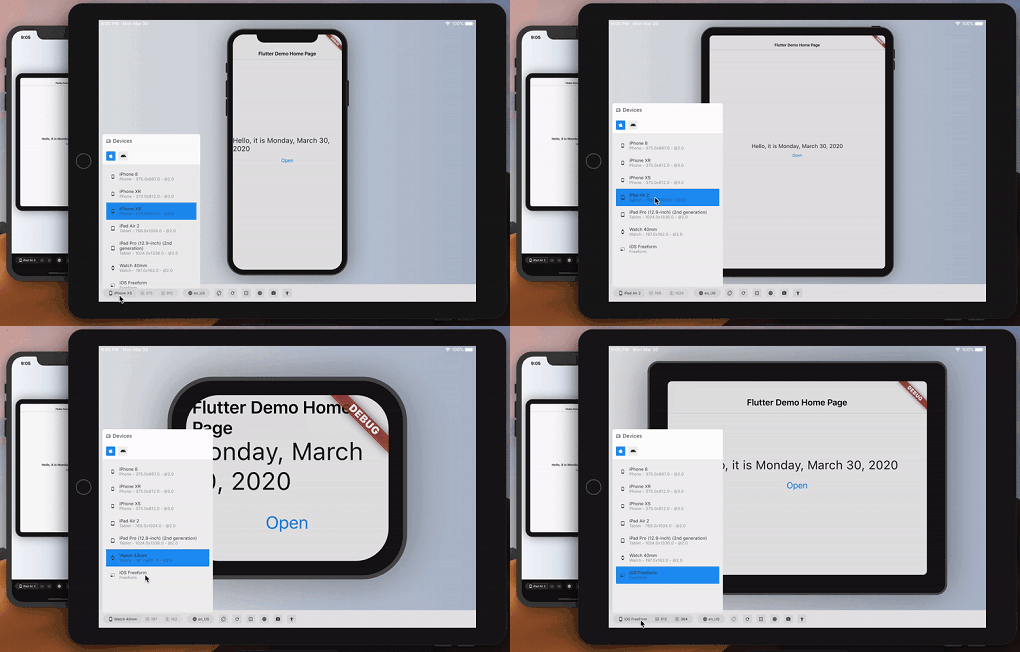
You build on one screen; your users arrive on hundreds. Device Preview switches your running app to another device — an old 320pt phone, a tablet in landscape, a notched display, a half-width desktop window — instantly, with no rebuild and no simulator.
Screen size, pixel ratio, safe areas, orientation, folds, the software keyboard, locales, brightness, text scale, accessibility settings and target platform all change with it, and your app reads them through the same MediaQuery it always used. So the problems that normally surface in front of a customer — a clipped headline, a button under the home indicator, an overflow at 200% text — surface in front of you instead.
Control it from Flutter DevTools, from Dart, or from your tests.
dependencies:
  device_preview: <latest version>
void main() {
  DevicePreview.enable();
  runApp(const MyApp()); // runs as usual — now simulatable
}
That's the whole integration. Open DevTools, select the device_preview tab, and pick a device.
enable() is safe to call unconditionally: simulation is active in debug and profile builds and completely off in release, so nothing ships to your users. Pass a value to decide yourself — DevicePreview.enable(enabled: kDebugMode) for debug only, DevicePreview.enable(enabled: false) to turn it off.
Programmatic control:
import 'package:device_preview/presets.dart';

final c = DevicePreview.controller;
await c.applyPreset(DevicePresets.iPhone16Pro);
await c.setOrientation(Orientation.landscape);
await c.update((s) => s.copyWith(textScaleFactor: 2.0, platformBrightness: Brightness.dark));
await c.reset();
DevicePreview.controller throws when simulation is off (every release build); use DevicePreview.maybeController?.… from code that ships.
See device_preview/README.md for the full package documentation, including widget-test support via DevicePreviewBindingMixin.
Open the website · Design document
| Directory | Contents |
|---|---|
device_preview |
The published package: binding, controller, presets, service extensions, bundled DevTools extension build. |
device_preview_devtools_extension |
Source of the DevTools extension web app (never published; built into device_preview/extension/devtools/build). |
device_specs |
The device catalog: one JSON per device — metrics, screen outline and body artwork. Generated into both the extension catalog and the package's built-in DevicePresets; see its README to add a device. |
device_frame |
Legacy device frame drawings package from the 2.x era. Nothing in the 3.0 release depends on it — 3.0 renders frames from the device_specs artwork, carried by the built-in presets and pushed over the DevTools protocol. |
docs |
The website, including its interactive demo — docs/demo is the counter example built for the web, docs/device_catalog.json the catalog its HTML panel pushes to it. Rebuild both with tool/build_demo.sh. |