

v1.0.2
internet_connectivity_checker
デバイスのインターネット接続状態に基づいて、ウィジェットを簡単に動的に管理するのに役立つFlutterパッケージです。
38いいね 45830日間ダウンロード160Pub ポイント
AndroidiOSmacOSWindowsLinux
デバイスのインターネット接続状態に基づいて、ウィジェットを簡単に動的に管理するのに役立つFlutterパッケージです。

以下は英語原文のスナップショットです。最新版は GitHub をご覧ください。
The connectivity package and other similar packages only provides information if there is a network connection, but not if the network is connected to the Internet. That's why the internet_connectivity_checker package helps you easily manage widgets dynamically based on the device's internet access.
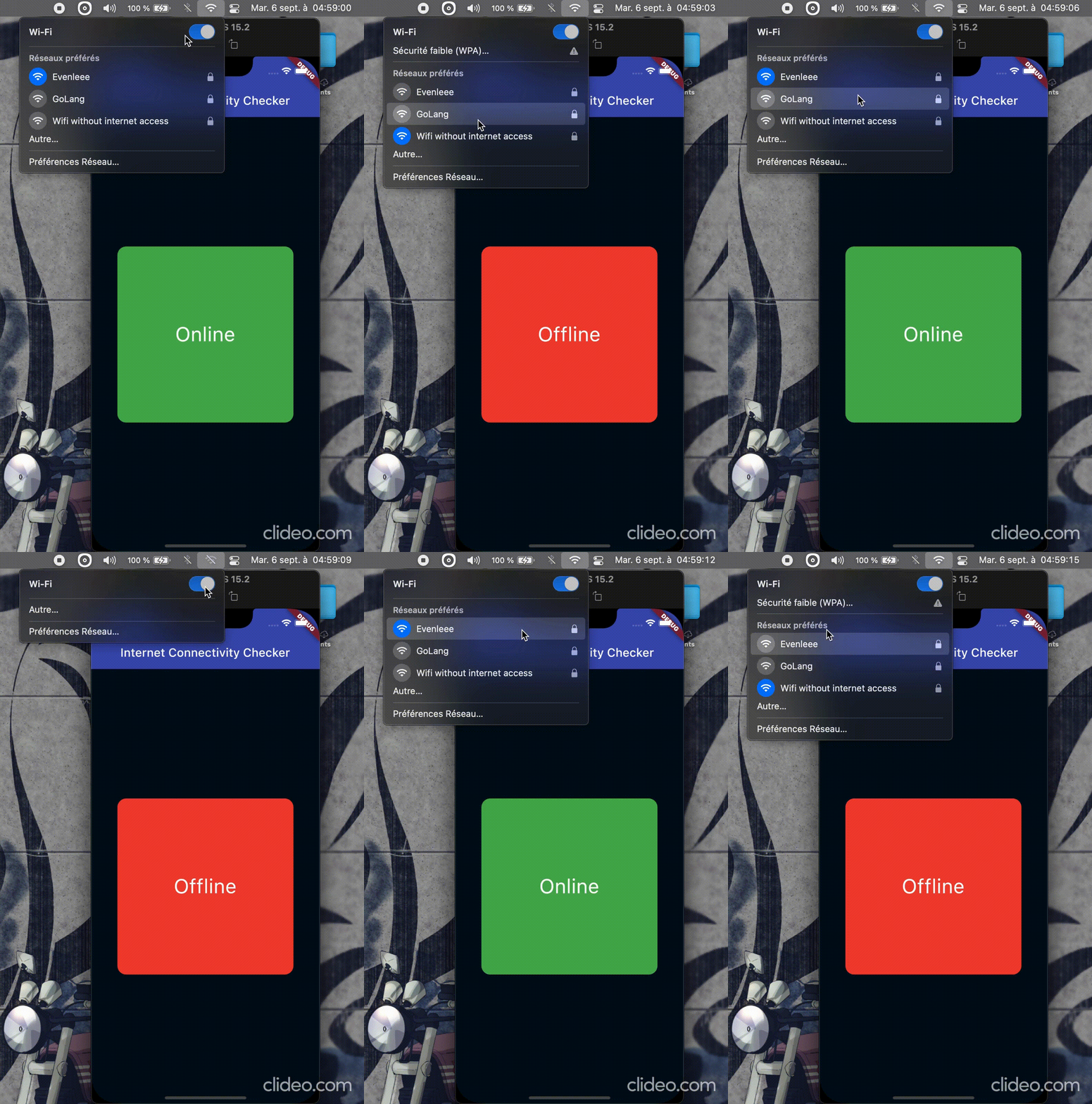
flutter pub add internet_connectivity_checker
Simply import package:internet_connectivity_checker/internet_connectivity_checker.dart' and use
the ConnectivityBuilder widget. It takes a builder and an optional parameter, interval(Duration object)
which is the time interval to wait between each internet connectivity verification; default is 5 seconds.
class Hello extends StatelessWidget {
  const Hello({super.key});

  @override
  Widget build(BuildContext context) {
    return ConnectivityBuilder(
      builder: (status) {
        bool connected = status == ConnectivityStatus.online;
        return Text(connected ? "Online" : "Offline");
      },
    );
  }
}
A more complete example.
ConnectivityBuilder(
  builder: (ConnectivityStatus status) {
    if (status == ConnectivityStatus.online) {
      return Container(
        decoration: BoxDecoration(
          color: Colors.green,
          borderRadius: BorderRadius.circular(15),
        ),
        child: Center(child: Text("Online", style: kTextStyle)),
      );
    } else if (status == ConnectivityStatus.offline) {
      return Container(
        decoration: BoxDecoration(
          color: Colors.red,
          borderRadius: BorderRadius.circular(15),
        ),
        child: Center(child: Text("Offline", style: kTextStyle)),
      );
    } else { // status == ConnectivityStatus.checking
      return const Center(
        child: SizedBox(
          width: 25,
          height: 25,
          child: CircularProgressIndicator(strokeWidth: 2),
        ),
      );
    }
  },
),
You can also use the ConnectivityChecker().stream stream, provided be the package, to handle
the logic yourself.
class Foo extends StatelessWidget {
  const Foo({super.key});

  @override
  Widget build(BuildContext context) {
    return StreamBuilder(
      stream: ConnectivityChecker(interval: const Duration(seconds: 10)).stream,
      builder: (context, snapshot) {
        if (snapshot.hasData && (snapshot.data as bool) == true) {
          return const Text("Online");
        } else if (snapshot.connectionState == ConnectionState.waiting) {
          return const Center(child: CircularProgressIndicator());
        } else {
          return const Text("Offline");
        }
      },
    );
  }
}
Contribute to this project by making a PR ⬆️ or creating a new issue 🐞 on GitHub.
Do not hesitate to let a 🌟 on the repo if you find it useful.
Created & maintained with 💖 by moustapha.dev.
MIT License

Copyright (c) Moustapha Ndoye (@csof3cen), 2023.

Permission is hereby granted, free of charge, to any person obtaining a copy
of this software and associated documentation files (the "Software"), to deal
in the Software without restriction, including without limitation the rights
to use, copy, modify, merge, publish, distribute, sublicense, and/or sell
copies of the Software, and to permit persons to whom the Software is
furnished to do so, subject to the following conditions:

The above copyright notice and this permission notice shall be included in all
copies or substantial portions of the Software.

THE SOFTWARE IS PROVIDED "AS IS", WITHOUT WARRANTY OF ANY KIND, EXPRESS OR
IMPLIED, INCLUDING BUT NOT LIMITED TO THE WARRANTIES OF MERCHANTABILITY,
FITNESS FOR A PARTICULAR PURPOSE AND NONINFRINGEMENT. IN NO EVENT SHALL THE
AUTHORS OR COPYRIGHT HOLDERS BE LIABLE FOR ANY CLAIM, DAMAGES OR OTHER
LIABILITY, WHETHER IN AN ACTION OF CONTRACT, TORT OR OTHERWISE, ARISING FROM,
OUT OF OR IN CONNECTION WITH THE SOFTWARE OR THE USE OR OTHER DEALINGS IN THE
SOFTWARE.
依存関係一覧 3 件
{"sdk":"flutter"}{"sdk":"flutter"}^2.0.0用途で絞り込み、開発状況を比較し、採用前に元のリポジトリで要件を確認しましょう。
“A repository is the most basic element of GitHub.”
GitHub Docs — About repositories ↗