
 v1.3.2
password_strength_checker
セキュアなパスワードを生成し、漏洩したパスワードを確認し、強度の視覚フィードバックを得るか、最小パスワード強度が必要なフォーム検証を行います。
55いいね 357030日間ダウンロード150Pub ポイント
AndroidiOSWebmacOSWindowsLinux
セキュアなパスワードを生成し、漏洩したパスワードを確認し、パスワードの強度に対する視覚的なフィードバックを得るか、最小パスワード強度が必須となるフォーム検証を得ます。

{"sdk":"flutter"}{"sdk":"flutter"}^6.0.0以下は英語原文のスナップショットです。最新版は GitHub をご覧ください。
License Pub Version Pub Likes Pub Points Pub Monthly Downloads GitHub code size in bytes GitHub Repo stars GitHub issues GitHub release (latest by date) GitHub top language CI
Generate secure passwords, check for exposed passwords, get visual feedback for password strength or get form validation with a minimum password strength required.
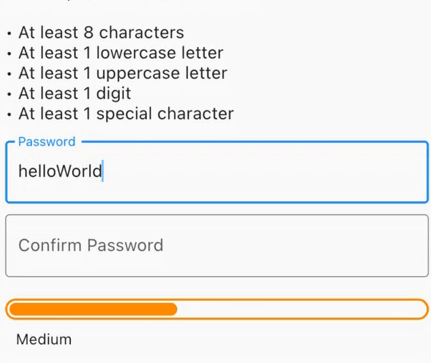
Check the strength of the password in a visual way, with an animation when the strength changes according to the settings given by the user.
Use it also inside a Form to get form validation!
commonDictionary, a map with 10,000 leaked passwords!PasswordStrengthChecker to have a visual feedback.PasswordStrengthFormChecker to have a built-in TextFormField inside the widget and get form validation using a minimumStrengthRequired.PasswordGenerator class to generate a secure random password based on the input configurations (PasswordGeneratorConfiguration).PasswordStrength default enum (see Custom Strength).Demo Form Gif Demo Gif Demo Generator Gif
You can use the PasswordStrengthChecker to only have a visual feedback, for example:
final passNotifier = ValueNotifier<PasswordStrength?>(null);
// ...
PasswordStrengthChecker(
  strength: passNotifier,
),
See the full example here.
You can use the PasswordStrengthFormChecker to have a built-in TextFormField inside the widget and get form validation using a minimumStrengthRequired. For example:
PasswordStrengthFormChecker(
  minimumStrengthRequired: PasswordStrength.secure,
  onChanged: (password, notifier) {
    notifier.value = PasswordStrength.calculate(text: password);
  },
),
See the full example here.
You can use the PasswordGeneratorclass to generate a secure random password based on the configurations. For example:
final config = PasswordGeneratorConfiguration(
  length: 32,
  minUppercase: 8,
  minSpecialChars: 8,
  // ...
);

final passwordGenerator = PasswordGenerator.fromConfig(
  configuration: config,
);

final password = passwordGenerator.generate();
See the full example here.
You can use the default PasswordStrength enum to set the strength of the password, or you can create your own enum that implements PasswordStrengthItem and use it. For example:
enum CustomPassStrength implements PasswordStrengthItem {
  weak,
  medium,
  strong;

  @override
  Color get statusColor => switch (this) {
      CustomPassStrength.weak => Colors.red,
      CustomPassStrength.medium => Colors.orange,
      CustomPassStrength.strong => Colors.green,
    };

  @override
  Widget? get statusWidget => switch (this) {
      CustomPassStrength.weak => const Text('Weak'),
      CustomPassStrength.medium => const Text('Medium'),
      CustomPassStrength.strong => const Text('Strong'),
    };

  @override
  double get widthPerc => switch (this) {
      CustomPassStrength.weak => 0.15,
      CustomPassStrength.medium => 0.4,
      CustomPassStrength.strong => 0.75,
    };

  static CustomPassStrength? calculate({required String text}) {
    // Implement your custom logic here
    if (text.isEmpty) {
      return null;
    }
    // Use the [commonDictionary] to see if a password
    // is in 10,000 common exposed password list.
    if (commonDictionary[text] == true) {
      return CustomPassStrength.weak;
    }
    if (text.length < 6) {
      return CustomPassStrength.weak;
    } else if (text.length < 10) {
      return CustomPassStrength.medium;
    } else {
      return CustomPassStrength.strong;
    }
  }
}
The project is open source and you can contribute to it here -> repository link
Made with ❤️ from dariowskii