
expansion_widget
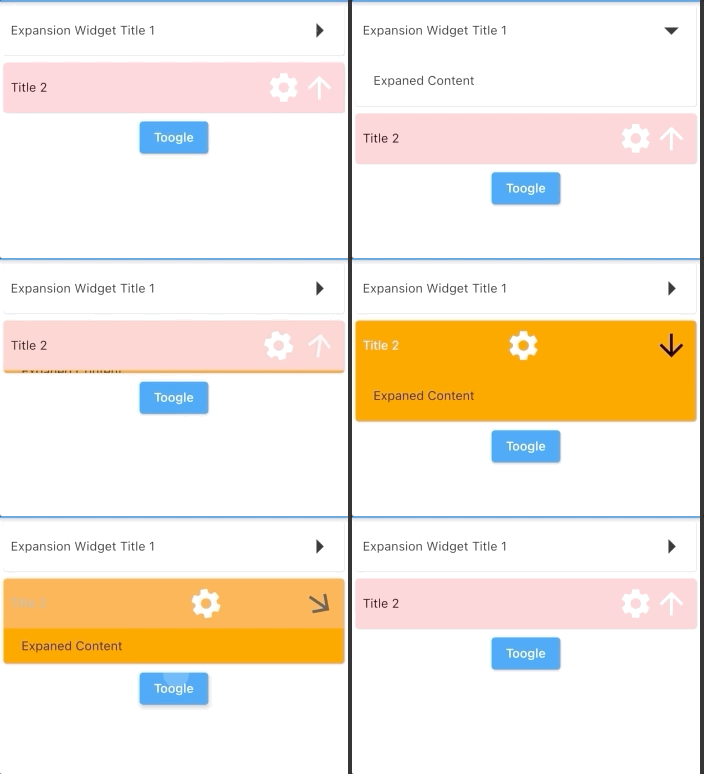
タイルウィジェットとアニメーションをカスタマイズできるようにした、編集されたExpansionTileのバージョンです。

- スター
- 5
- フォーク
- 4
- 最終プッシュ(UTC)
- 2024/04/16
- プロジェクト状態
- 公開中
元の README
以下は英語原文のスナップショットです。最新版は GitHub をご覧ください。
expansion_widget
An edited version of Expansion Tile that allows you customize tile widget and animation.
Parameters
| key | Key? | |
|---|---|---|
| titleBuilder | Widget Function( animationValue, easeInValue, isExpanded, toggleFunction) | required The builder of title. Typically a [Button] widget that call [toggleFunction] when pressed. |
| content | Widget | required The widget that are displayed when the expansionWidget expands. |
| initiallyExpanded | bool | default: false Specifies if the expansionWidget is initially expanded (true) or collapsed (false, the default). |
| maintainState | bool | default: false Specifies whether the state of the content is maintained when the expansionWidget expands and collapses. |
| expandedAlignment | Alignment? | default: Alignment.center Specifies the alignment of [content], which are arranged in a column when the expansionWidget is expanded. |
| onSaveState | Function (bool isExpanded)? | Function to save expansion state Called when expansion state changed |
| onRestoreState | bool? Function()? | default: null function to restore expansion state. Return null if there is no state to store, in this case, [initiallyExpanded] will be used |
| duration | Duration | default: 200 ms The length of time of animation |
| onExpansionWillChange | bool Function(bool)? | default: null Called when the widget will change expanded state. When the widget is going to start expanding/collapsing, this function is called with the value true/false. Return false to prevent expanded state to change. Return true(default) to allow expanded state changing. |
| onExpansionChanged | Function(bool)? | default: null Called when the widget expands or collapses. When the widget starts expanding, this function is called with the value true. When the tile starts collapsing, this function is called with the value false. |
Usage
import 'package:expansion_widget/expansion_widget.dart';
import 'dart:math' as math;

ExpansionWidget(
    initiallyExpanded: true,
    titleBuilder: (double animationValue, _, bool isExpaned, toogleFunction) {
      return InkWell(
          onTap: () => toogleFunction(animated: true),
          child: Padding(
            padding: EdgeInsets.all(8),
            child: Row(
              crossAxisAlignment: CrossAxisAlignment.center,
              children: [
                Expanded(child: Text('Expansion Widget Title 1')),
                Transform.rotate(
                  angle: math.pi * animationValue / 2,
                  child: Icon(Icons.arrow_right, size: 40),
                  alignment: Alignment.center,
                )
              ],
            ),
          ));
    },
    content: Container(
      width: double.infinity,
      color: Colors.grey.shade100,
      padding: EdgeInsets.all(20),
      child: Text('Expaned Content'),
    ))
Or using ExpansionWidget.autoSaveState() to auto save/restore expansion state.

GitHub 作者
datvu7 ↗
言語C++CMakeDartHTMLSwiftCKotlinObjective-C
カテゴリー
使用している依存関係
依存関係一覧 2 件
- flutter
{"sdk":"flutter"} - flutter_test開発用
{"sdk":"flutter"}
プロジェクトに合うリポジトリを選ぶには?
用途で絞り込み、開発状況を比較し、採用前に元のリポジトリで要件を確認しましょう。
- 名前・作者・説明で検索し、技術トピックで絞り込みます。
- スター、フォーク、最近のプッシュを比較します。スターは関心の目安であり、品質の保証ではありません。
- 利用前に GitHub で README、ライセンス、Issues を確認します。
情報源と管理
“A repository is the most basic element of GitHub.”
GitHub Docs — About repositories ↗