
 v2.0.0
direct_select
このパッケージを使用すると、ドロップダウンから直接値をスクロール/選択でき、より少ない労力と時間で済みます。
186いいね 42230日間ダウンロード140Pub ポイント
AndroidiOSWebmacOSWindowsLinux
diegoveloper/flutter_direct_select open-source repository details.

{"sdk":"flutter"}{"sdk":"flutter"}以下は英語原文のスナップショットです。最新版は GitHub をご覧ください。
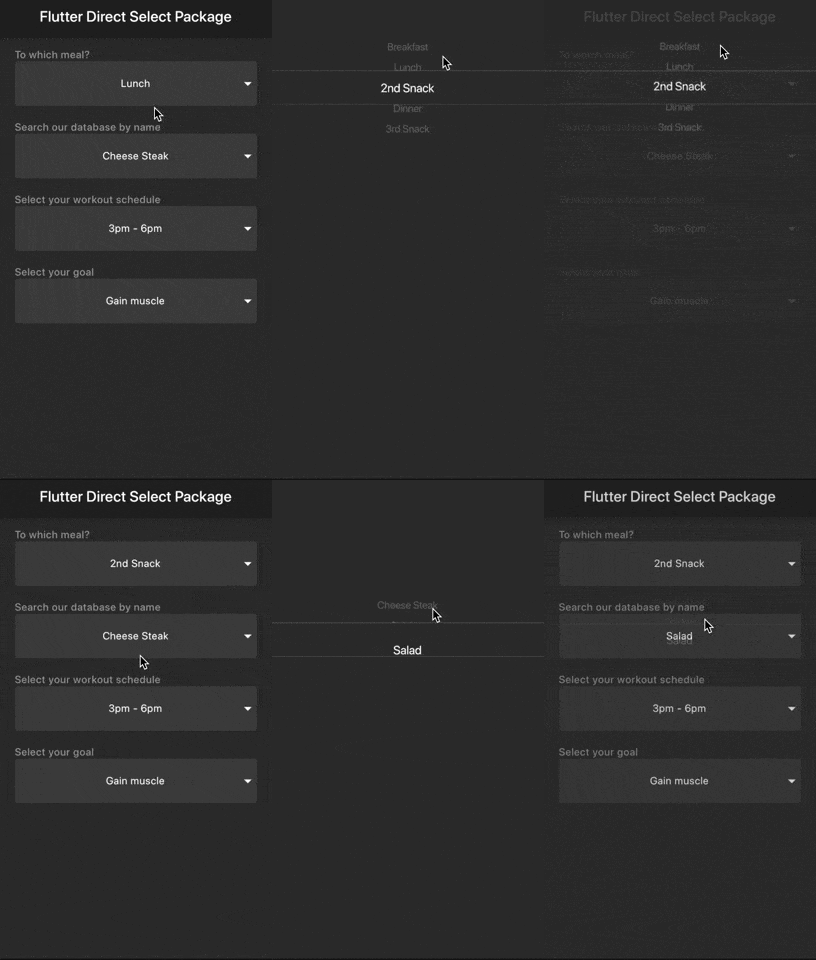
This package allows you to scroll/select the value directly from the dropdown with less effort and time.
Inspired by Virgil Pana shot
Samples
Light
https://media.giphy.com/media/clumgZIjLPQ0a8JnrI/giphy.gif
Dark
https://media.giphy.com/media/joZotn96pULSc7fPPR/giphy.gif
You should ensure that you add the router as a dependency in your flutter project.
dependencies:
  direct_select: "^1.0.3"
You should then run flutter packages upgrade or update your packages in IntelliJ.
There is an example project in the example folder. Check it out. Otherwise, keep reading to get up and running.
import 'package:flutter/material.dart';
import 'package:direct_select/direct_select.dart';

class _MyHomePageState extends State<MyHomePage> {
  final elements1 = [
    "Breakfast",
    "Lunch",
    "2nd Snack",
    "Dinner",
    "3rd Snack",
  ];
  final elements2 = [
    "Cheese Steak",
    "Chicken",
    "Salad",
  ];

  final elements3 = [
    "7am - 10am",
    "11am - 2pm",
    "3pm - 6pm",
    "7pm-10pm",
  ];

  final elements4 = [
    "Lose fat",
    "Gain muscle",
    "Keep in weight",
  ];

  int selectedIndex1 = 0,
      selectedIndex2 = 0,
      selectedIndex3 = 0,
      selectedIndex4 = 0;

  List<Widget> _buildItems1() {
    return elements1
        .map((val) => MySelectionItem(
              title: val,
            ))
        .toList();
  }

  List<Widget> _buildItems2() {
    return elements2
        .map((val) => MySelectionItem(
              title: val,
            ))
        .toList();
  }

  List<Widget> _buildItems3() {
    return elements3
        .map((val) => MySelectionItem(
              title: val,
            ))
        .toList();
  }

  List<Widget> _buildItems4() {
    return elements4
        .map((val) => MySelectionItem(
              title: val,
            ))
        .toList();
  }

  @override
  Widget build(BuildContext context) {
    return Scaffold(
      appBar: AppBar(
        title: Text(widget.title),
      ),
      body: Padding(
        padding: const EdgeInsets.all(15.0),
        child: Center(
          child: Column(
              mainAxisAlignment: MainAxisAlignment.start,
              crossAxisAlignment: CrossAxisAlignment.stretch,
              children: <Widget>[
                Padding(
                  padding: const EdgeInsets.only(left: 10.0),
                  child: Text(
                    "To which meal?",
                    style: TextStyle(
                        color: Colors.grey, fontWeight: FontWeight.w500),
                  ),
                ),
                DirectSelect(
                    itemExtent: 35.0,
                    selectedIndex: selectedIndex1,
                    backgroundColor: Colors.red,
                    child: MySelectionItem(
                      isForList: false,
                      title: elements1[selectedIndex1],
                    ),
                    onSelectedItemChanged: (index) {
                      setState(() {
                        selectedIndex1 = index;
                      });
                    },
                    items: _buildItems1()),
                Padding(
                  padding: const EdgeInsets.only(left: 10.0, top: 20.0),
                  child: Text(
                    "Search our database by name",
                    style: TextStyle(
                        color: Colors.grey, fontWeight: FontWeight.w500),
                  ),
                ),
                DirectSelect(
                    itemExtent: 35.0,
                    selectedIndex: selectedIndex2,
                    child: MySelectionItem(
                      isForList: false,
                      title: elements2[selectedIndex2],
                    ),
                    onSelectedItemChanged: (index) {
                      setState(() {
                        selectedIndex2 = index;
                      });
                    },
                    items: _buildItems2()),
                Padding(
                  padding: const EdgeInsets.only(left: 10.0, top: 20.0),
                  child: Text(
                    "Select your workout schedule",
                    style: TextStyle(
                        color: Colors.grey, fontWeight: FontWeight.w500),
                  ),
                ),
                DirectSelect(
                    itemExtent: 35.0,
                    selectedIndex: selectedIndex3,
                    child: MySelectionItem(
                      isForList: false,
                      title: elements3[selectedIndex3],
                    ),
                    onSelectedItemChanged: (index) {
                      setState(() {
                        selectedIndex3 = index;
                      });
                    },
                    items: _buildItems3()),
                Padding(
                  padding: const EdgeInsets.only(left: 10.0, top: 20.0),
                  child: Text(
                    "Select your goal",
                    style: TextStyle(
                        color: Colors.grey, fontWeight: FontWeight.w500),
                  ),
                ),
                DirectSelect(
                    itemExtent: 35.0,
                    selectedIndex: selectedIndex4,
                    child: MySelectionItem(
                      isForList: false,
                      title: elements4[selectedIndex4],
                    ),
                    onSelectedItemChanged: (index) {
                      setState(() {
                        selectedIndex4 = index;
                      });
                    },
                    items: _buildItems4()),
              ]),
        ),
      ),
    );
  }
}

//You can use any Widget
class MySelectionItem extends StatelessWidget {
  final String title;
  final bool isForList;

  const MySelectionItem({Key key, this.title, this.isForList = true})
      : super(key: key);

  @override
  Widget build(BuildContext context) {
    return SizedBox(
      height: 60.0,
      child: isForList
          ? Padding(
              child: _buildItem(context),
              padding: EdgeInsets.all(10.0),
            )
          : Card(
              margin: EdgeInsets.symmetric(horizontal: 10.0),
              child: Stack(
                children: <Widget>[
                  _buildItem(context),
                  Align(
                    alignment: Alignment.centerRight,
                    child: Icon(Icons.arrow_drop_down),
                  )
                ],
              ),
            ),
    );
  }

  _buildItem(BuildContext context) {
    return Container(
      width: MediaQuery.of(context).size.width,
      alignment: Alignment.center,
      child: Text(title),
    );
  }
}
You can follow me on twitter @diegoveloper