

 v0.1.6
card_stack_widget
Flutterアプリケーション向けの垂直方向にスワイプして非表示可能でカスタマイズ可能なカードスタック
88いいね 28630日間ダウンロード160Pub ポイント
AndroidiOSWebmacOSWindowsLinux
Dart + Flutter で作成されたカードの山

以下は英語原文のスナップショットです。最新版は GitHub をご覧ください。
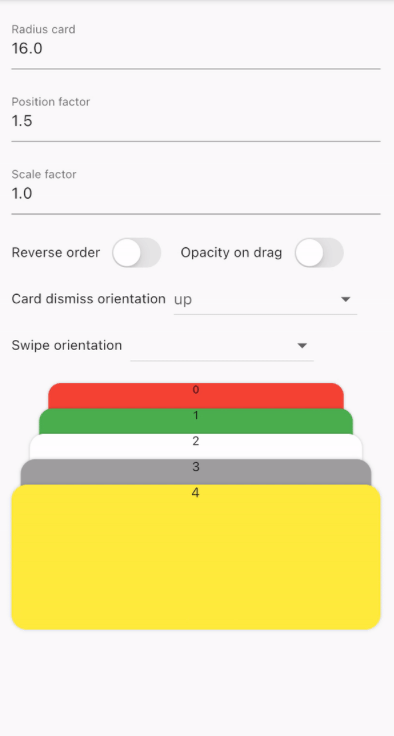
A vertical dismissible and customizable stack of cards for a Flutter application.
CardStackWidget requires a list of CardModel, in order to create a stack of cards. You can
customize their swipe or dismiss orientation, change the scale or the position factor. You can also
apply an opacity, that change on drag movement.
Below, you can find an example of the usage of CardStackWidget and CardModel:
CardStackWidget _buildCardStackWidget(BuildContext context) {
  final mockList = _buildMockList(context, size: 4);

  return CardStackWidget(
    opacityChangeOnDrag: true,
    swipeOrientation: CardOrientation.both,
    cardDismissOrientation: CardOrientation.both,
    positionFactor: 3,
    scaleFactor: 1.5,
    alignment: Alignment.center,
    reverseOrder: true,
    animateCardScale: true,
    dismissedCardDuration: const Duration(milliseconds: 150),
    cardList: mockList,
  );
}

/// Create a mock list of `CardModel` to use inside `CardStackWidget`
_buildMockList(BuildContext context, {int size = 0}) {
  final double containerWidth = MediaQuery
      .of(context)
      .size
      .width - 16;

  var list = <CardModel>[];
  for (int i = 0; i < size; i++) {
    var color = Color((Random().nextDouble() * 0xFFFFFF).toInt() << 0)
        .withOpacity(1.0);

    list.add(
      CardModel(
        backgroundColor: color,
        radius: 8,
        shadowColor: Colors.black.withOpacity(0.2),
        child: SizedBox(
          height: 310,
          width: containerWidth,
          child: Container(), // Whatever you want
        ),
      ),
    );
  }

  return list;
}


CardStackWidget:
CardModel:
依存関係一覧 3 件
{"sdk":"flutter"}{"sdk":"flutter"}^4.0.0用途で絞り込み、開発状況を比較し、採用前に元のリポジトリで要件を確認しましょう。
“A repository is the most basic element of GitHub.”
GitHub Docs — About repositories ↗