
 v0.0.8
simple_sidebar
アイコン、テキスト、ヘッダー、スムージングを備えた非常にシンプルなサイドバー。実装が簡単で使いやすい
5いいね 1430日間ダウンロード150Pub ポイント
AndroidiOSWebmacOSWindowsLinux
https://pub.dev/packages/simple_sidebar のリポジトリ

{"sdk":"flutter"}^4.2.0^2.0.0{"sdk":"flutter"}以下は英語原文のスナップショットです。最新版は GitHub をご覧ください。
Simple and quick to set up sidebar. Soft animations
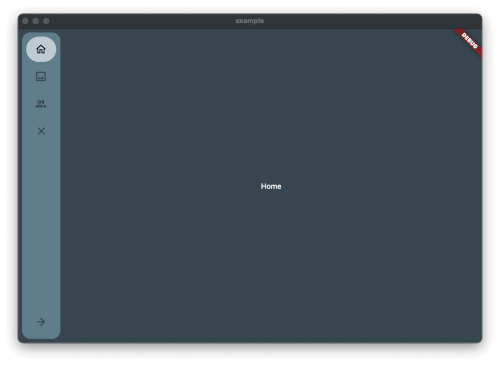
Image from the Package
Just add the package to pubspec.yaml and start using it.
Create Theme & Controller and List of the Item you want to have in the Sidebar
final SimpleSidebarTheme theme = SimpleSidebarTheme()
    ..expandedShape = const BorderRadius.all(Radius.circular(8))
    ..collapsedShape = const BorderRadius.all(Radius.circular(8));
  final List<SimpleSidebarItem> sidebarItems = [
    SimpleSidebarItem(onTap: () {}, title: "Home", leading: Icons.home_outlined),
    SimpleSidebarItem(onTap: () {}, title: "Gallery", leading: Icons.image_outlined),
    SimpleSidebarItem(onTap: () {}, title: "Users", leading: Icons.group_outlined),
    SimpleSidebarItem(onTap: () {}, title: "Extra long name for a menu item", leading: Icons.list),
  ];
  final List<SimpleSidebarItem> footerItems = [
    SimpleSidebarItem(onTap: () {}, title: "Settings", leading: Icons.settings),
    SimpleSidebarItem(onTap: () {}, title: "Logout", leading: Icons.close),
  ];
After this create the Scaffold with the lists
Scaffold(
  backgroundColor: kcBackground,
  body: Row(
    children: [
      SimpleSidebar(
        theme: widget.theme,
        initialExpanded: true,
        initialIndex: 1,
        childrens: widget.sidebarItems,
        footerItems: widget.footerItems,
        onTap: (value) {
          setState(() {
            selected = value;
          });
          log("selected value $value");
        },
      ),
      Expanded(
        child: AnimatedOpacity(
          opacity: isVisible ? 1 : 0,
          duration: const Duration(milliseconds: 300),
          child: Container(
              margin: const EdgeInsets.all(8),
              child: const <Widget>[
                Text("hallo"),
                Text("hallo2"),
                Text("hallo3"),
                Text("hallo4"),
                Text("hallo5"),
                Text("hallo6"),
              ][selected]),
        ),
      ),
    ],
  ),
);
Should there be any questions, wishes mail me: [Contact](mailto:support@glocknerstudios.at)
create an issue on GitHub for bugs. And now have fun with the sidebar