

 v0.3.11+11
responsive
モバイル、デスクトップ、Web向けのFlutterアプリケーションでレスポンシブUIを簡単に構築できる方法を提供し、各画面サイズおよびデバイスの向きに応じてウィジェットのサイズを変更できるようにします。
66いいね 7530日間ダウンロード140Pub ポイント
AndroidiOSWebmacOSWindowsLinux
flutter-es/responsive open-source repository details.

以下は英語原文のスナップショットです。最新版は GitHub をご覧ください。


Provide a easy way to make responsive UI for Flutter Applications in mobile, desktop and web, allow different widget size for each screen size and device orientation..
Made by Marvin Quevedo and [Víctor Guardiola](mailto:victor.guardiola@gmail.com) of FlutterEs Community.
Este paquete ha sido creado por la comunidad de Flutter en Español, si deseas ser parte de nosotros, puedes visitar cualquiera de estos links:


dependencies:
  responsive: 0.2.3
You have two ways of use it:
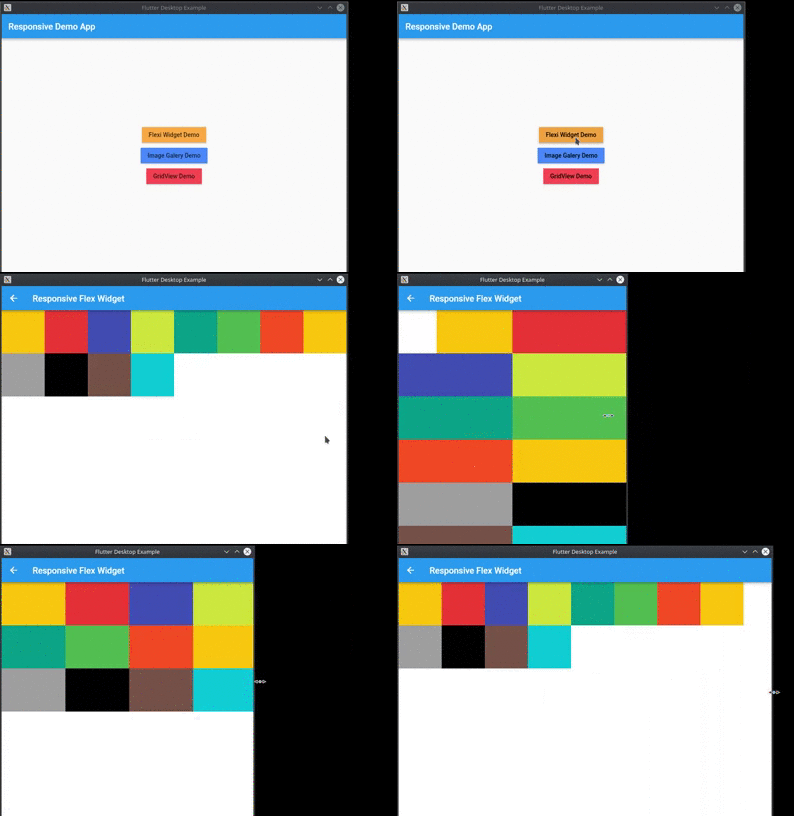
You can use the ReponsiveRow widget and the FlexResponsive widget to make the layout
or
you can use the static method Responsive.calcColumns to assign the correct number of columns to a widget like a GridView.
import 'package:flutter/material.dart';
import 'package:responsive/flex_widget.dart';
import 'package:responsive/responsive_row.dart';

void main() => runApp(MyApp());

class MyApp extends StatelessWidget {
  // This widget is the root of your application.
  @override
  Widget build(BuildContext context) {
    return MaterialApp(
      title: 'Responsive Example',
      theme: ThemeData(
        primarySwatch: Colors.blue,
      ),
      home: Scaffold(
        appBar: AppBar(),
        body: ListView(
          children: <Widget>[
            ResponsiveRow(
              columnsCount: 12,
              crossAxisAlignment: WrapCrossAlignment.center,
              children: <Widget>[
                FlexWidget(
                  child: Container(
                    height: 100,
                    color: Colors.amber,
                  ),
                  xs: 4,
                  xsOffset: 2,
                  sm: 3,
                  md: 2,
                  lg: 1,
                  xsLand: 4,
                  xsLandOffset: 0,
                  smLand: 2,
                  mdLand: 1,
                  lgLand: 1,
                ),
                FlexWidget(
                  child: Container(
                    height: 100,
                    color: Colors.red,
                  ),
                  xs: 6,
                  sm: 3,
                  md: 2,
                  lg: 1,
                  xsLand: 4,
                  smLand: 2,
                  mdLand: 1,
                  lgLand: 1,
                ),
                FlexWidget(
                  child: Container(
                    height: 100,
                    color: Colors.indigo,
                  ),
                  xs: 6,
                  sm: 3,
                  md: 2,
                  lg: 1,
                  xsLand: 4,
                  smLand: 2,
                  mdLand: 1,
                  lgLand: 1,
                ),
                FlexWidget(
                  child: Container(
                    height: 100,
                    color: Colors.lime,
                  ),
                  xs: 6,
                  sm: 3,
                  md: 2,
                  lg: 1,
                  xsLand: 4,
                  smLand: 2,
                  mdLand: 1,
                  lgLand: 1,
                ),
                FlexWidget(
                  child: Container(
                    height: 100,
                    color: Colors.teal,
                  ),
                  xs: 6,
                  sm: 3,
                  md: 2,
                  lg: 1,
                  xsLand: 4,
                  smLand: 2,
                  mdLand: 1,
                  lgLand: 1,
                ),
                FlexWidget(
                  child: Container(
                    height: 100,
                    color: Colors.green,
                  ),
                  xs: 6,
                  sm: 3,
                  md: 2,
                  lg: 1,
                  xsLand: 4,
                  smLand: 2,
                  mdLand: 1,
                  lgLand: 1,
                ),
                FlexWidget(
                  child: Container(
                    height: 100,
                    color: Colors.deepOrange,
                  ),
                  xs: 6,
                  sm: 3,
                  md: 2,
                  lg: 1,
                  xsLand: 4,
                  smLand: 2,
                  mdLand: 1,
                  lgLand: 1,
                ),
                FlexWidget(
                  child: Container(
                    height: 100,
                    color: Colors.amber,
                  ),
                  xs: 6,
                  sm: 3,
                  md: 2,
                  lg: 1,
                  xsLand: 4,
                  smLand: 2,
                  mdLand: 1,
                  lgLand: 1,
                ),
                FlexWidget(
                  child: Container(
                    height: 100,
                    color: Colors.grey,
                  ),
                  xs: 6,
                  sm: 3,
                  md: 2,
                  lg: 1,
                  xsLand: 4,
                  smLand: 2,
                  mdLand: 1,
                  lgLand: 1,
                ),
                FlexWidget(
                  child: Container(
                    height: 100,
                    color: Colors.black,
                  ),
                  xs: 6,
                  sm: 3,
                  md: 2,
                  lg: 1,
                  xsLand: 4,
                  smLand: 2,
                  mdLand: 1,
                  lgLand: 1,
                ),
                FlexWidget(
                  child: Container(
                    height: 100,
                    color: Colors.brown,
                  ),
                  xs: 6,
                  sm: 3,
                  md: 2,
                  lg: 1,
                  xsLand: 4,
                  smLand: 2,
                  mdLand: 1,
                  lgLand: 1,
                ),
                FlexWidget(
                  child: Container(
                    height: 100,
                    color: Colors.cyan,
                  ),
                  xs: 6,
                  sm: 3,
                  md: 2,
                  lg: 1,
                  xsLand: 4,
                  smLand: 2,
                  mdLand: 1,
                  lgLand: 1,
                ),
              ],
            )
          ],
        ),
      ),
    );
  }
}
依存関係一覧 2 件
{"sdk":"flutter"}{"sdk":"flutter"}用途で絞り込み、開発状況を比較し、採用前に元のリポジトリで要件を確認しましょう。
“A repository is the most basic element of GitHub.”
GitHub Docs — About repositories ↗