
google_ml_kit_flutter
GoogleのスタンドアロンML Kitを実装するFlutterプラグイン

- スター
- 1279
- フォーク
- 888
- 最終プッシュ(UTC)
- 2026/09/14
- プロジェクト状態
- 公開中
元の README
以下は英語原文のスナップショットです。最新版は GitHub をご覧ください。
Google's ML Kit for Flutter
Google's ML Kit for Flutter is a set of Flutter plugins that enable Flutter apps to use Google's standalone ML Kit.
Features
Vision APIs


Natural Language APIs
| Feature | Plugin | Source Code | Android | iOS |
|---|---|---|---|---|
| Language Identification | google_mlkit_language_id  |
 |
✅ | ✅ |
| On-Device Translation | google_mlkit_translation  |
|
✅ | ✅ |
| Smart Reply | google_mlkit_smart_reply  |
|
✅ | ✅ |
| Entity Extraction (Beta) | google_mlkit_entity_extraction  |
|
✅ | ✅ |
GenAI APIs
⚠️ Important: GenAI APIs are built on top of AICore and will not support all Android devices. These APIs require devices with AICore support. Please check device compatibility before using these features in production.
⚠️ Production Disclaimer: Using GenAI plugins in production is the responsibility of the developers consuming the plugins, not the authors. The authors provide these plugins as-is and are not responsible for any issues, failures, or compatibility problems that may arise from using these plugins in production environments.


PLEASE READ THIS before continuing or posting a new issue:
-
Google's ML Kit was build only for mobile platforms: iOS and Android apps. Web or any other platform is not supported, you can request support for those platform to Google in their repo.
-
This plugin is not sponsored or maintained by Google. The authors are developers excited about Machine Learning that wanted to expose Google's native APIs to Flutter.
-
Google's ML Kit APIs are only developed natively for iOS and Android. This plugin uses Flutter Platform Channels as explained here.
Messages are passed between the client (the app/plugin) and host (platform) using platform channels as illustrated in this diagram:
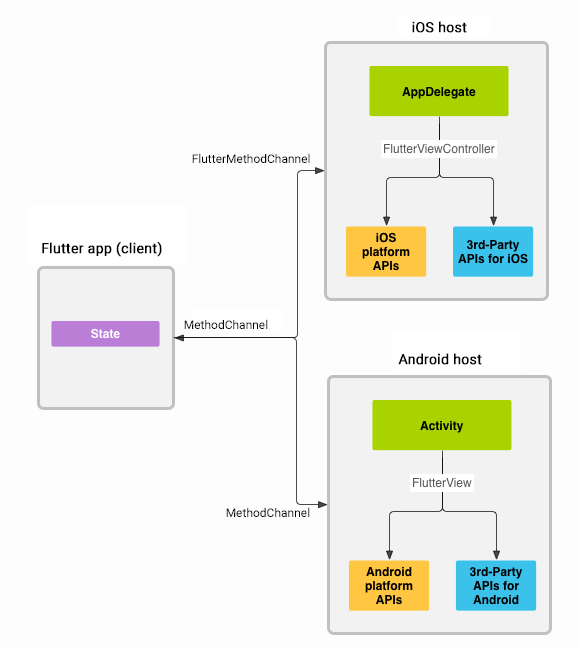
Messages and responses are passed asynchronously, to ensure the user interface remains responsive. To read more about platform channels go here.
Because this plugin uses platform channels, no Machine Learning processing is done in Flutter/Dart, all the calls are passed to the native platform using
MethodChannelin Android andFlutterMethodChannelin iOS, and executed using Google's native APIs. Think of this plugin as a bridge between your app and Google's native ML Kit APIs. This plugin only passes the call to the native API and the processing is done by Google's API. It is important that you understand this concept when it comes to debugging errors for your ML model and/or app. -
Since the plugin uses platform channels, you may encounter issues with the native API. Before submitting a new issue, identify the source of the issue. You can run both iOS and/or Android native example apps by Google and make sure that the issue is not reproducible with their native examples. If you can reproduce the issue in their apps then report the issue to Google. The authors do not have access to the source code of their native APIs, so you need to report the issue to them. If you find that their example apps are okay and still you have an issue using this plugin, then look at our closed and open issues. If you cannot find anything that can help you then report the issue and provide enough details. Be patient, someone from the community will eventually help you.
Migrating from ML Kit for Firebase to the new standalone ML Kit SDK
When Migrating from ML Kit for Firebase to the new standalone ML Kit SDK read this guide.
For Android details read this.
For iOS details read this.
Example app
Find the example app here.
Consuming image streams on Android
Until https://github.com/flutter/flutter/issues/145961 is resolved, the most recent version of the camera package doesn't support the required image formats. To make things work, manually add the legacy plugin via the instructions from https://pub.dev/packages/camera_android.
Contributing
Contributions are welcome. In case of any problems look at existing issues, if you cannot find anything related to your problem then open an issue. Create an issue before opening a pull request for non trivial fixes. In case of trivial fixes open a pull request directly.

flutter-ml ↗
カテゴリー
ランキング
プロジェクトに合うリポジトリを選ぶには?
用途で絞り込み、開発状況を比較し、採用前に元のリポジトリで要件を確認しましょう。
- 名前・作者・説明で検索し、技術トピックで絞り込みます。
- スター、フォーク、最近のプッシュを比較します。スターは関心の目安であり、品質の保証ではありません。
- 利用前に GitHub で README、ライセンス、Issues を確認します。
情報源と管理
“A repository is the most basic element of GitHub.”
GitHub Docs — About repositories ↗