


 v3.1.1
pull_to_refresh_notification
PullToRefreshNotification および PullToRefreshContainer を使用して、プル to リフレッシュ効果を迅速に構築するための Flutter プラグイン。
80いいね 575030日間ダウンロード150Pub ポイント
AndroidiOSWebmacOSWindowsLinux
PullToRefreshNotification および PullToRefreshContainer を使用して、プル to リフレッシュ効果を迅速に構築するための Flutter プラグイン。

以下は英語原文のスナップショットです。最新版は GitHub をご覧ください。


widget to build pull to refresh effects.
Web demo for PullToRefreshNotification
enum RefreshIndicatorMode {
  drag, // Pointer is down.
  armed, // Dragged far enough that an up event will run the onRefresh callback.
  snap, // Animating to the indicator's final "displacement".
  refresh, // Running the refresh callback.
  done, // Animating the indicator's fade-out after refreshing.
  canceled, // Animating the indicator's fade-out after not arming.
  error, //refresh failed
}
build appbar to pull to refresh with PullToRefreshContainer

   Widget build(BuildContext context) {
 return PullToRefreshNotification(
      color: Colors.blue,
      pullBackOnRefresh: true,
      onRefresh: onRefresh,
      child: CustomScrollView(
        slivers: <Widget>[
          PullToRefreshContainer(buildPulltoRefreshAppbar),
          SliverList(
              delegate:
                  SliverChildBuilderDelegate((BuildContext context, int index) {
            return Container(
                padding: EdgeInsets.only(bottom: 4.0),
                child: Column(
                  children: <Widget>[
                    Text(
                      "List item : ${listlength - index}",
                      style: TextStyle(fontSize: 15.0, inherit: false),
                    ),
                    Divider(
                      color: Colors.grey,
                      height: 2.0,
                    )
                  ],
                ));
          }, childCount: listlength)),
        ],
      ),
    );
}

     Widget buildPulltoRefreshAppbar(PullToRefreshScrollNotificationInfo info) {
        var action = Padding(
          child: info?.refreshWidget ?? Icon(Icons.more_horiz),
          padding: EdgeInsets.all(15.0),
        );
        var offset = info?.dragOffset ?? 0.0;
        return SliverAppBar(
            pinned: true,
            title: Text("PullToRefreshAppbar"),
            centerTitle: true,
            expandedHeight: 200.0 + offset,
            actions: <Widget>[action],
            flexibleSpace: FlexibleSpaceBar(
                //centerTitle: true,
                title: Text(
                  info?.mode?.toString() ?? "",
                  style: TextStyle(fontSize: 10.0),
                ),
                collapseMode: CollapseMode.pin,
                background: Image.asset(
                  "assets/467141054.jpg",
                  //fit: offset > 0.0 ? BoxFit.cover : BoxFit.fill,
                  fit: BoxFit.cover,
                )));
      }
build header to pull to refresh with PullToRefreshContainer. and you can easy to handle the status in pulling.

  Widget build(BuildContext context) {
    return PullToRefreshNotification(
       color: Colors.blue,
       onRefresh: onRefresh,
       maxDragOffset: 80.0,
       child: CustomScrollView(
         slivers: <Widget>[
           SliverAppBar(
             pinned: true,
             title: Text("PullToRefreshHeader"),
           ),
           PullToRefreshContainer(buildPulltoRefreshHeader),
           SliverList(
               delegate:
                   SliverChildBuilderDelegate((BuildContext context, int index) {
             return Container(
                 padding: EdgeInsets.only(bottom: 4.0),
                 child: Column(
                   children: <Widget>[
                     Text(
                       "List item : ${listlength - index}",
                       style: TextStyle(fontSize: 15.0, inherit: false),
                     ),
                     Divider(
                       color: Colors.grey,
                       height: 2.0,
                     )
                   ],
                 ));
           }, childCount: listlength)),
         ],
       ),
     );
   }

   Widget buildPulltoRefreshHeader(PullToRefreshScrollNotificationInfo info) {
     var offset = info?.dragOffset ?? 0.0;
     var mode = info?.mode;
     Widget refreshWidget = Container();
     //it should more than 18, so that RefreshProgressIndicator can be shown fully
     if (info?.refreshWidget != null &&
         offset > 18.0 &&
         mode != RefreshIndicatorMode.error) {
       refreshWidget = info.refreshWidget;
     }

     Widget child = null;
     if (mode == RefreshIndicatorMode.error) {
       child = GestureDetector(
           onTap: () {
             // refreshNotification;
             info?.pullToRefreshNotificationState?.show();
           },
           child: Container(
             color: Colors.grey,
             alignment: Alignment.bottomCenter,
             height: offset,
             width: double.infinity,
             //padding: EdgeInsets.only(top: offset),
             child: Container(
               padding: EdgeInsets.only(left: 5.0),
               alignment: Alignment.center,
               child: Text(
                 mode?.toString() + "  click to retry" ?? "",
                 style: TextStyle(fontSize: 12.0, inherit: false),
               ),
             ),
           ));
     } else {
       child = Container(
         color: Colors.grey,
         alignment: Alignment.bottomCenter,
         height: offset,
         width: double.infinity,
         //padding: EdgeInsets.only(top: offset),
         child: Row(
           mainAxisAlignment: MainAxisAlignment.center,
           children: <Widget>[
             refreshWidget,
             Container(
               padding: EdgeInsets.only(left: 5.0),
               alignment: Alignment.center,
               child: Text(
                 mode?.toString() ?? "",
                 style: TextStyle(fontSize: 12.0, inherit: false),
               ),
             )
           ],
         ),
       );
     }

     return SliverToBoxAdapter(
       child: child,
     );
   }
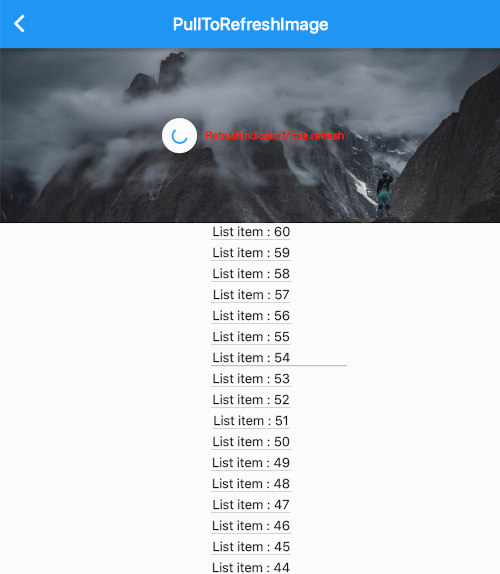
build zoom image to pull to refresh with using PullToRefreshContainer.

 Widget build(BuildContext context) {
     return PullToRefreshNotification(
       color: Colors.blue,
       pullBackOnRefresh: true,
       onRefresh: onRefresh,
       child: CustomScrollView(
         slivers: <Widget>[
           SliverAppBar(
             title: Text("PullToRefreshImage"),
           ),
           PullToRefreshContainer(buildPulltoRefreshImage),
           SliverList(
               delegate:
                   SliverChildBuilderDelegate((BuildContext context, int index) {
             return Container(
                 padding: EdgeInsets.only(bottom: 4.0),
                 child: Column(
                   children: <Widget>[
                     Text(
                       "List item : ${listlength - index}",
                       style: TextStyle(fontSize: 15.0, inherit: false),
                     ),
                     Divider(
                       color: Colors.grey,
                       height: 2.0,
                     )
                   ],
                 ));
           }, childCount: listlength)),
         ],
       ),
     );
   }

   Widget buildPulltoRefreshImage(PullToRefreshScrollNotificationInfo info) {
     var offset = info?.dragOffset ?? 0.0;
     Widget refreshWidget = Container();
     if (info?.refreshWidget != null) {
       refreshWidget = Material(
         type: MaterialType.circle,
         color: Theme.of(context).canvasColor,
         elevation: 2.0,
         child: Padding(
           padding: EdgeInsets.all(12),
           child: info.refreshWidget,
         ),
       );
     }

     return SliverToBoxAdapter(
       child: Stack(
         alignment: Alignment.center,
         children: <Widget>[
           Container(
               height: 200.0 + offset,
               width: double.infinity,
               child: Image.asset(
                 "assets/467141054.jpg",
                 //fit: offset > 0.0 ? BoxFit.cover : BoxFit.fill,
                 fit: BoxFit.cover,
               )),
           Center(
             child: Row(
               mainAxisAlignment: MainAxisAlignment.center,
               children: <Widget>[
                 refreshWidget,
                 Container(
                   padding: EdgeInsets.only(left: 5.0),
                   alignment: Alignment.center,
                   child: Text(
                     info?.mode?.toString() ?? "",
                     style: TextStyle(fontSize: 12.0, inherit: false),
                   ),
                 )
               ],
             ),
           )
         ],
       ),
     );
   }
build candies animation to pull to refresh with using PullToRefreshContainer.

  Widget build(BuildContext context) {
    return Material(
      child: Stack(
        children: <Widget>[
          PullToRefreshNotification(
            color: Colors.blue,
            onRefresh: onRefresh,
            maxDragOffset: maxDragOffset,
            armedDragUpCancel: false,
            key: key,
            child: CustomScrollView(
              ///in case list is not full screen and remove ios Bouncing
              physics: AlwaysScrollableClampingScrollPhysics(),
              slivers: <Widget>[
                SliverAppBar(
                  title: Text("PullToRefreshCandies"),
                ),
                PullToRefreshContainer((info) {
                  var offset = info?.dragOffset ?? 0.0;
                  Widget child = Container(
                    alignment: Alignment.center,
                    height: offset,
                    width: double.infinity,
                    child: RefreshLogo(
                      mode: info?.mode,
                      offset: offset,
                    ),
                  );

                  return SliverToBoxAdapter(
                    child: child,
                  );
                }),
                SliverList(
                    delegate: SliverChildBuilderDelegate(
                        (BuildContext context, int index) {
                  return Container(
                      padding: EdgeInsets.only(bottom: 4.0),
                      child: Column(
                        children: <Widget>[
                          Text(
                            "List item : ${listlength - index}",
                            style: TextStyle(fontSize: 15.0),
                          ),
                          Divider(
                            color: Colors.grey,
                            height: 2.0,
                          )
                        ],
                      ));
                }, childCount: listlength)),
              ],
            ),
          ),
          Positioned(
            right: 20.0,
            bottom: 20.0,
            child: FloatingActionButton(
              child: Icon(Icons.refresh),
              onPressed: () {
                key.currentState.show(notificationDragOffset: maxDragOffset);
              },
            ),
          )
        ],
      ),
    );
  }
Show how to use pull to refresh notification for reverse list like chat list.
        PullToRefreshNotification(
          onRefresh: onRefresh,
          maxDragOffset: 48,
          armedDragUpCancel: false,
          reverse: true,
          child: Column(
            children: <Widget>[
              PullToRefreshContainer(
                  (PullToRefreshScrollNotificationInfo info) {
                final double offset = info?.dragOffset ?? 0.0;

                //loading history data
                return Container(
                  height: offset,
                  child: const RefreshProgressIndicator(
                    valueColor: AlwaysStoppedAnimation<Color>(Colors.blue),
                    strokeWidth: 2.0,
                  ),
                );
              }),
              Expanded(
                child: ExtendedListView.builder(
                  ///in case list is not full screen and remove ios Bouncing
                  physics: const AlwaysScrollableClampingScrollPhysics(),
                  reverse: true,
                  extendedListDelegate:
                      const ExtendedListDelegate(closeToTrailing: true),
                  itemBuilder: (BuildContext context, int index) {
                    List<Widget> children = <Widget>[
                      Text('$index. ${chats[index]}'),
                      Image.asset(
                        'assets/avatar.jpg',
                        width: 30,
                        height: 30,
                      ),
                    ];
                    if (index % 2 == 0) {
                      children = children.reversed.toList();
                    }
                    return Row(
                      mainAxisAlignment: index % 2 == 0
                          ? MainAxisAlignment.start
                          : MainAxisAlignment.end,
                      children: children,
                    );
                  },
                  itemCount: chats.length,
                ),
              )
            ],
          ),
        ),
  final GlobalKey<PullToRefreshNotificationState> key =
      new GlobalKey<PullToRefreshNotificationState>();

        PullToRefreshNotification(
          key: key,
if you define pull Container hegith with dragOffset, you need set notificationDragOffset when refresh.
key.currentState.show(notificationDragOffset: maxDragOffset);
依存関係一覧 2 件
{"sdk":"flutter"}{"sdk":"flutter"}用途で絞り込み、開発状況を比較し、採用前に元のリポジトリで要件を確認しましょう。
“A repository is the most basic element of GitHub.”
GitHub Docs — About repositories ↗