
 v0.9.1
flutter_blurhash
画像のプレースホルダーのコンパクトな表現。Mediumが使用するように、30文字未満のぼかし画像をエンコードして即時表示
1720いいね 27.8万30日間ダウンロード160Pub ポイント
AndroidiOSWebmacOSWindowsLinux
画像のプレースホルダーのコンパクトな表現。Mediumが使用するように、30文字未満のぼやけた画像をエンコードして即時表示します。
以下は英語原文のスナップショットです。最新版は GitHub をご覧ください。


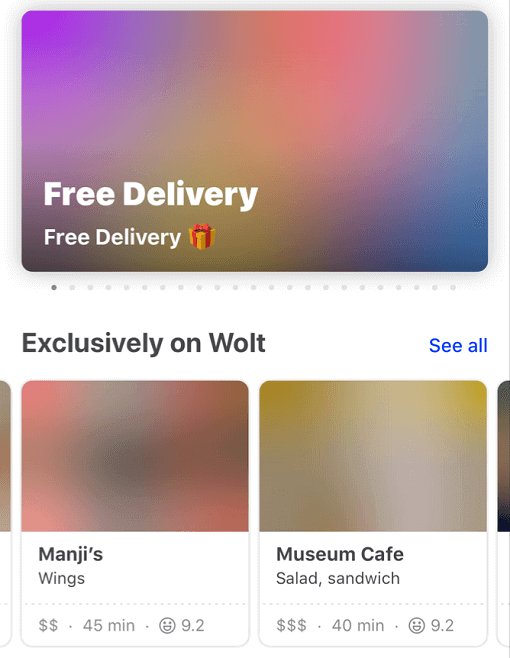
Blurhash is compact representation of a blurred image. It's often used as a placeholder while waiting for a full image to load.
This package implements the blurhash-decoding algorithm in pure Dart.
It also provides the BlurHash widget that displays the blurhash and can transition into the actual image once it is loaded.
Currently, it doesn't support encoding an image into a blurhash.
A fast and easy way to get a blurhash for your image is to upload it to https://blurha.sh.

Constrain your widget's render area and let BlurHash fill the pixels.
class ExampleApp extends StatelessWidget {
  const ExampleApp({super.key});

  @override
  Widget build(BuildContext context) {
    return MaterialApp(
      home: Scaffold(
        appBar: AppBar(title: const Text("BlurHash")),
        body: const SizedBox.expand(
          child: Center(
            child: AspectRatio(
              aspectRatio: 1.6,
              child: BlurHash(hash: "L5H2EC=PM+yV0g-mq.wG9c010J}I"),
            ),
          ),
        ),
      ),
    );
  }
}
BlurHashOptimizationMode.none): The original algorithm, provided for backward compatibility.BlurHashOptimizationMode.standard): Optimized decoding with better cache locality and performance.BlurHashOptimizationMode.approximation): Fastest mode with an approximated sRGB conversion that produces slightly darker results but significantly improves performance.class BlurHashApp extends StatelessWidget {
const BlurHashApp({Key? key}) : super(key: key);
@override
Widget build(BuildContext context) => MaterialApp(
home: Scaffold(
appBar: AppBar(title: const Text("BlurHash")),
body: const SizedBox.expand(
child: Center(
child: AspectRatio(
aspectRatio: 1.6,
child: BlurHash(
hash: "L5H2EC=PM+yV0g-mq.wG9c010J}I",
optimizationMode: BlurHashOptimizationMode.approximation,
),
),
),
),
),
);
}

依存関係一覧 3 件
{"sdk":"flutter"}—{"sdk":"flutter"}用途で絞り込み、開発状況を比較し、採用前に元のリポジトリで要件を確認しましょう。
“A repository is the most basic element of GitHub.”
GitHub Docs — About repositories ↗