
 v2.0.3
ansicolor
ターミナルログに色を加えたいですか?`ansicolor` は xterm-256 カラー対応ライブラリで、テキストの前面および背面の色を変更できます。
169いいね 269万30日間ダウンロード160Pub ポイント
AndroidiOSWebmacOSWindowsLinux
google/ansicolor-dart open-source repository details.

以下は英語原文のスナップショットです。最新版は GitHub をご覧ください。
Feel like you're missing some color in your terminal programs? Use AnsiPen to add ANSI color codes to your log messages.
Easy to disable for production, just set color_disabled = true and all codes will be empty - no re-writing debug messages.
Note: color_disabled is a global variable for all pen colors.
Note: Be mindful of contrasting colors. If you set "bright white" foreground and don't adjust the background, you'll have a bad time with lighter terminals.
Foreground to bright white with default background:
AnsiPen pen = AnsiPen()..white(bold: true);
print(pen("Bright white foreground") + " this text is default fg/bg");
Background as a peach, foreground as white:
AnsiPen pen = AnsiPen()..white()..rgb(r: 1.0, g: 0.8, b: 0.2, bg: true);
print(pen("White foreground with a peach background"));
If color isn't working for you; try setting ansiColorDisabled = false;. We're relying on the stdio object to inform us of ANSI terminal support. Sometimes this is wrong.
Prior versions of this library just turned on color by default.
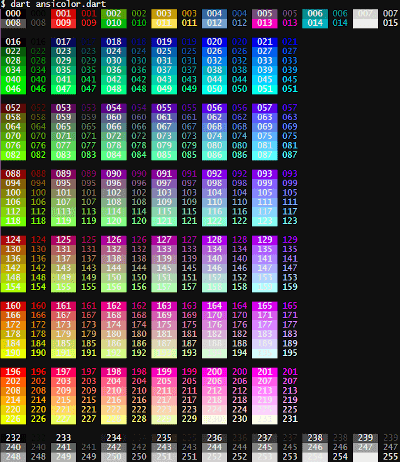
If you want a specific color, you can call the xterm() with the index listed in the rainbow below. To show the rainbow on your own terminal, pub run examples/ansicolor.dart
alt tag