
win32_gamepad
Windowsマシンに接続されたゲームパッドにアクセスするための現代的で型安全なDart APIです。

- スター
- 25
- フォーク
- 2
- 最終プッシュ(UTC)
- 2026/02/26
- プロジェクト状態
- アーカイブ済み
元の README
以下は英語原文のスナップショットです。最新版は GitHub をご覧ください。
This package has moved
The package can now be found at https://github.com/halildurmus/win32/tree/main/packages/win32_gamepad.


A modern, type-safe Dart API for accessing gamepads connected to a Windows machine.
This package builds on top of the package:win32 and provides a high-level abstraction over native gamepad APIs. It eliminates the need to work directly with FFI, raw pointers, or low-level Win32 calls while preserving performance and correctness.
✨ Features
- Connect up to 4 gamepads — supports all four XInput controller slots
- Poll buttons, triggers & thumbsticks — full access to every input via a
clean
GamepadStateobject - Rumble motor control — independently set left and right vibration motor speeds
- Battery information — query battery level and type for wireless controllers
🚀 Getting Started
Add the package to your pubspec.yaml:
dependencies:
  win32_gamepad: ^1.0.10
Then import it:
import 'package:win32_gamepad/win32_gamepad.dart';
⚡ Quick Example
Create a Gamepad instance by passing the controller index (0–3):
final gamepad = Gamepad(0); // primary controller
Windows supports up to four gamepads simultaneously. Poll the gamepad by calling
updateState() in your game loop, then inspect the
state object for buttons, triggers, and thumbstick values.
Rumble motors can be activated with the vibrate method.
import 'dart:io';

import 'package:win32_gamepad/win32_gamepad.dart';

void main() {
  // Check which controllers are connected.
  for (var idx = 0; idx < 4; idx++) {
    final gamepad = Gamepad(idx);
    final connectionStatus = gamepad.isConnected ? 'connected' : 'disconnected';
    print('Gamepad $idx is $connectionStatus.');
  }

  final gamepad = Gamepad(0);
  if (!gamepad.isConnected) {
    print('No gamepad connected on slot 0.');
    return;
  }

  // Read battery information.
  final GamepadBatteryInfo(:batteryLevel, :batteryType) =
      gamepad.gamepadBatteryInfo;
  print('Battery type is ${batteryType.name}.');
  print('Battery level is ${batteryLevel.name}.');

  // Test vibration motors.
  print('Vibrating left motor (half intensity).');
  gamepad.vibrate(leftMotorSpeed: 32767);
  sleep(const .new(milliseconds: 1000));

  print('Vibrating right motor (half intensity).');
  gamepad.vibrate(rightMotorSpeed: 32767);
  sleep(const .new(milliseconds: 1000));

  print('Vibrating both motors (full intensity).');
  gamepad.vibrate(leftMotorSpeed: 65535, rightMotorSpeed: 65535);
  sleep(const .new(milliseconds: 1000));

  print('Turning off vibration.');
  gamepad.vibrate();
}
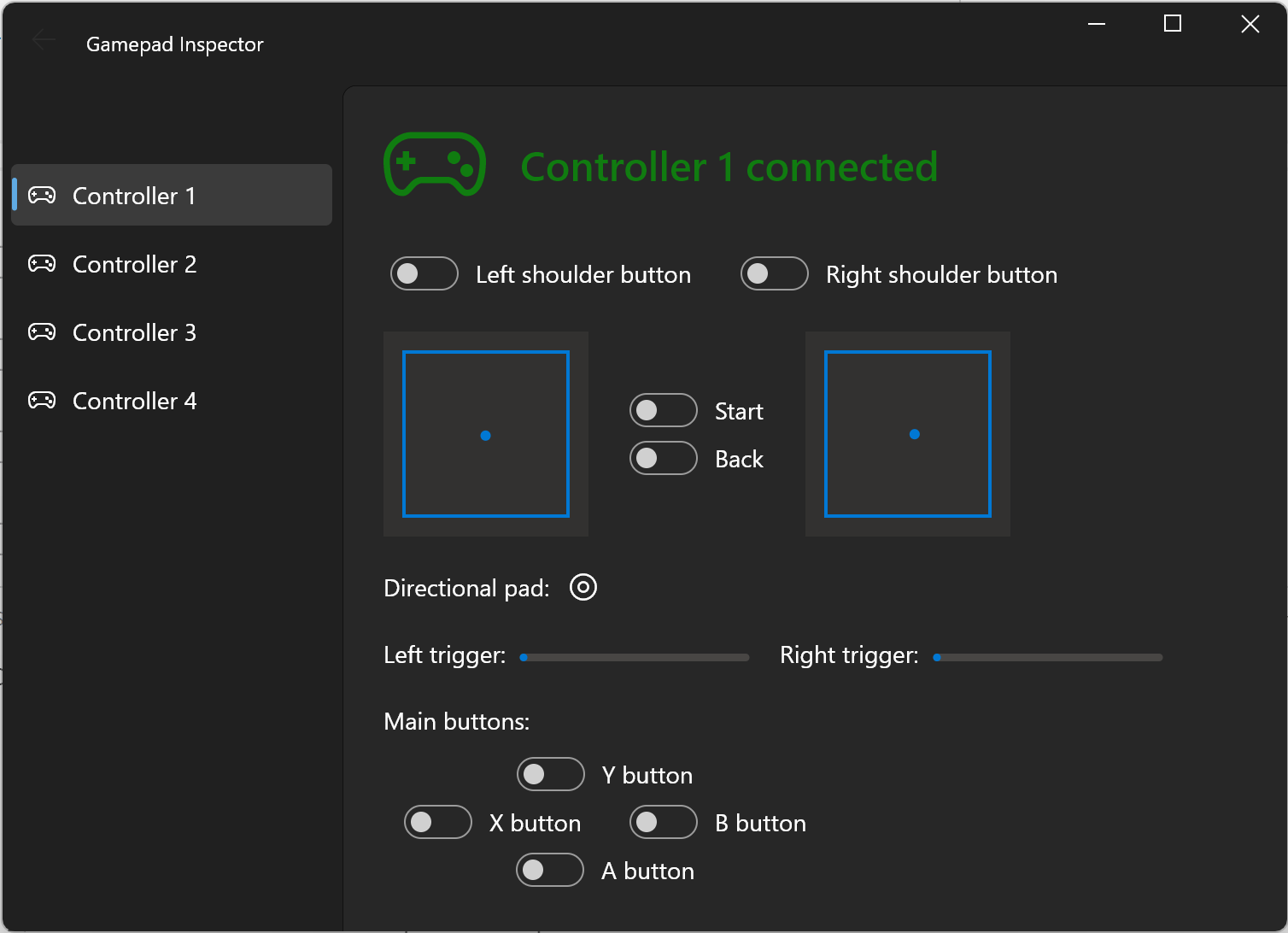
🖥️ Flutter Inspector Demo
A full Flutter example app is available in the example/inspector/ directory.
It demonstrates how to build a live gamepad monitor with button highlights,
trigger bars, and thumbstick visualisations inside a game loop:
📝 Documentation
Full API reference is available here:
Additional usage examples are located in the [example] directory.
🐞 Features and Bugs
If you encounter bugs or need additional functionality, please file an issue.

Halil Durmus ↗
カテゴリー
使用している依存関係
プロジェクトに合うリポジトリを選ぶには?
用途で絞り込み、開発状況を比較し、採用前に元のリポジトリで要件を確認しましょう。
- 名前・作者・説明で検索し、技術トピックで絞り込みます。
- スター、フォーク、最近のプッシュを比較します。スターは関心の目安であり、品質の保証ではありません。
- 利用前に GitHub で README、ライセンス、Issues を確認します。
情報源と管理
“A repository is the most basic element of GitHub.”
GitHub Docs — About repositories ↗