
css_text_for_flutter
このFlutterライブラリを使用すると、テキストにCSSを使ってスタイルを適用できます
- スター
- 56
- フォーク
- 16
- 最終プッシュ(UTC)
- 2023/05/26
- プロジェクト状態
- 公開中
元の README
以下は英語原文のスナップショットです。最新版は GitHub をご覧ください。
CSS Text
This library makes it easy for you to convert HTML and CSS content into RichText widgets. It supports most CSS properties that are relevant to text content, except those related to text alignment.
Here's some sample HTML content with inline CSS styles:
<body>
<p style="font-size:2.5em;color:darkseagreen">This is a test</p>
<p style="font-size:1.8em;color:#ff3311">So is this</p>
<p style="font-size:45px;background:#3311ff;color:yellow">And this!</p>
<br/>
<br/>
<p style="font-size:1.5em">
Hello <b style="font-style:italic;color:#bb0000;background:#eeff00">World</b>!!
<br/>
How are you <span style="font-family:RobotoBlack;color:#ff0000;">today?</span>
<br/>
<b>But</b> why are you doing <a href="https://google.com">this?</a><br/>
<br/>
<span style="text-decoration: underline wavy; font-size:2em">Can you tell <del>me</del>?</span>
<br/>
Multiple <span style="font-weight:100">font</span>
<span style="font-weight:600">weights</span><br/><br/>
Please visit <a style="font-weight:bold;" href="https://docs.flutter.io">Flutter docs</a>
<br/>
<br/>
<span style="color:#990000ff;background:#4400ff00">
This text is slightly transparent, and has a slightly transparent background too.
</span>
</p>
</body>
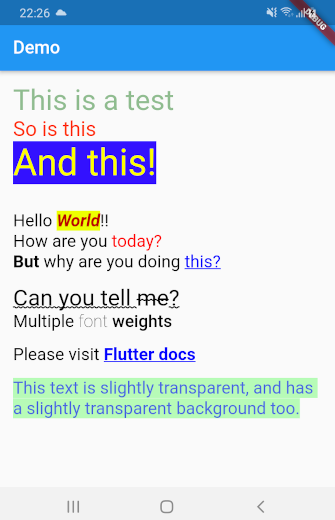
This library can automatically convert all the HTML content above into a TextSpan object or a RichText widget. Here's what the rendered HTML will look like:
Getting Started
Using css_text is extremely easy. First import the library in your Dart code:
import 'package:css_text/css_text.dart';
You can then create RichText widget from any HTML content by calling the HTML.toTextSpan() method.
String htmlContent = """
<p style="font-size:1.5em;color:#99ff0011">Hello <b>World</b>
""";

var myRichText = RichText(text: HTML.toTextSpan(context, htmlContent));
As a shortcut, you can also use the HTML.toRichText() method.
myRichText = HTML.toRichText(context, htmlContent);
Handling Links
Your HTML content can have links. To handle them, you must use the linksCallback optional parameter.
String htmlContent = """<span style="font-size:2em">
Please click <a href="https://pub.dartlang.org">here</a> or
<a href="https://old.reddit.com">here</a>.<br/>
<br/>
Go ahead! Try it.
</span>""";

var myRichText = HTML.toRichText(context, htmlContent, linksCallback: (link) {
    // You can now use the url_launcher library to open the link.
    // Or you can handle the link in your app itself. This gives you
    // complete control over your links.
    // For now, let's just print it
    print(link);
});

Ashraff Hathibelagal ↗
カテゴリー
使用している依存関係
依存関係一覧 2 件
- flutter
{"sdk":"flutter"} - xml
^6.3.0
プロジェクトに合うリポジトリを選ぶには?
用途で絞り込み、開発状況を比較し、採用前に元のリポジトリで要件を確認しましょう。
- 名前・作者・説明で検索し、技術トピックで絞り込みます。
- スター、フォーク、最近のプッシュを比較します。スターは関心の目安であり、品質の保証ではありません。
- 利用前に GitHub で README、ライセンス、Issues を確認します。
情報源と管理
“A repository is the most basic element of GitHub.”
GitHub Docs — About repositories ↗