

 v0.6.0
seo_renderer
SEO目的でテキストウィジェットをHTMLとしてレンダリングするためのFlutterプラグイン。
281いいね 208030日間ダウンロード130Pub ポイント
AndroidiOSWebmacOSWindowsLinux
SEO目的でTextウィジェットをHTMLとして表示するためのFlutter Webプラグイン

以下は英語原文のスナップショットです。最新版は GitHub をご覧ください。

A flutter plugin (under development) to render text, link, image widgets as html elements for SEO purpose.
Created specifically for issue https://github.com/flutter/flutter/issues/46789
It will automatic detect the crawler using regex and navigator userAgent and add the HtmlElement you choose to the DOM.
All PR's are welcome :)
Add this to your pubspec.yaml
dependencies:
  seo_renderer: ^0.6.0
Get the package from Pub:
flutter packages get
Import it in your file
import 'package:seo_renderer/seo_renderer.dart';
It's required to add a RobotDetector to detect if page is visited by a robot and add seoRouteObserver to observe when widgets change their visibility. To do this simply wrap MaterialApp within RobotDetector and add seoRouteObserver in navigatorObservers:
runApp(
  RobotDetector(
    debug: true, // you can set true to enable robot mode
    child: MaterialApp(
      home: MyApp(),
      navigatorObservers: [seoRouteObserver],
    ),
  ),
);
For more complex projects it's recommended to add these lines in index.html which will force html web renderer in case robot is detected. It's because canvaskit has some stricter limits and potenitally can break.
<body>
  ...
  <script>
    const regExp = new RegExp("bot|google|baidu|bing|msn|teoma|slurp|yandex", "i");
    if (regExp.test(navigator.userAgent)) {
      window.flutterWebRenderer = "html";
    }
  </script>
  ...
</body>
To render html text element above a child you pass Text, RichText as the child or simply set the text.
TextRenderer(
  child: Text(
    'Lorem Ipsum is simply dummy text of the printing and typesetting industry.',
  ),
)

TextRenderer(
  text: 'Lorem Ipsum is simply dummy text of the printing and typesetting industry.',
  child: CustomWidget(),
)
Optionally you can change the html element between <h1> to <h6> and <p> by setting style. Default value is TextRendererStyle.paragraph.
TextRenderer(
  style: TextRendererStyle.paragraph,
  child: Text(
    'Lorem Ipsum is simply dummy text of the printing and typesetting industry.',
  ),
)

TextRenderer(
  style: TextRendererStyle.header1,
  child: Text(
    'Lorem Ipsum is simply dummy text of the printing and typesetting industry.',
  ),
)
To render html link element above a child set text and href.
LinkRenderer(
  text: 'Try Flutter',
  href: 'https://www.flutter.dev',
  child: ...,
)
To render html image element above a child set alt and pass Image.network(...), Image.asset(...), Image.memory(...) as the child or simply set the src.
ImageRenderer(
  alt: 'Network Image',
  child: Image.network('https://fakeimg.pl/300x300/?text=Network'),
)

ImageRenderer(
  alt: 'Network Image',
  src: 'https://fakeimg.pl/300x300/?text=Network',
  child: CustomWidget(),
)
Live example https://seo-renderer.netlify.app/
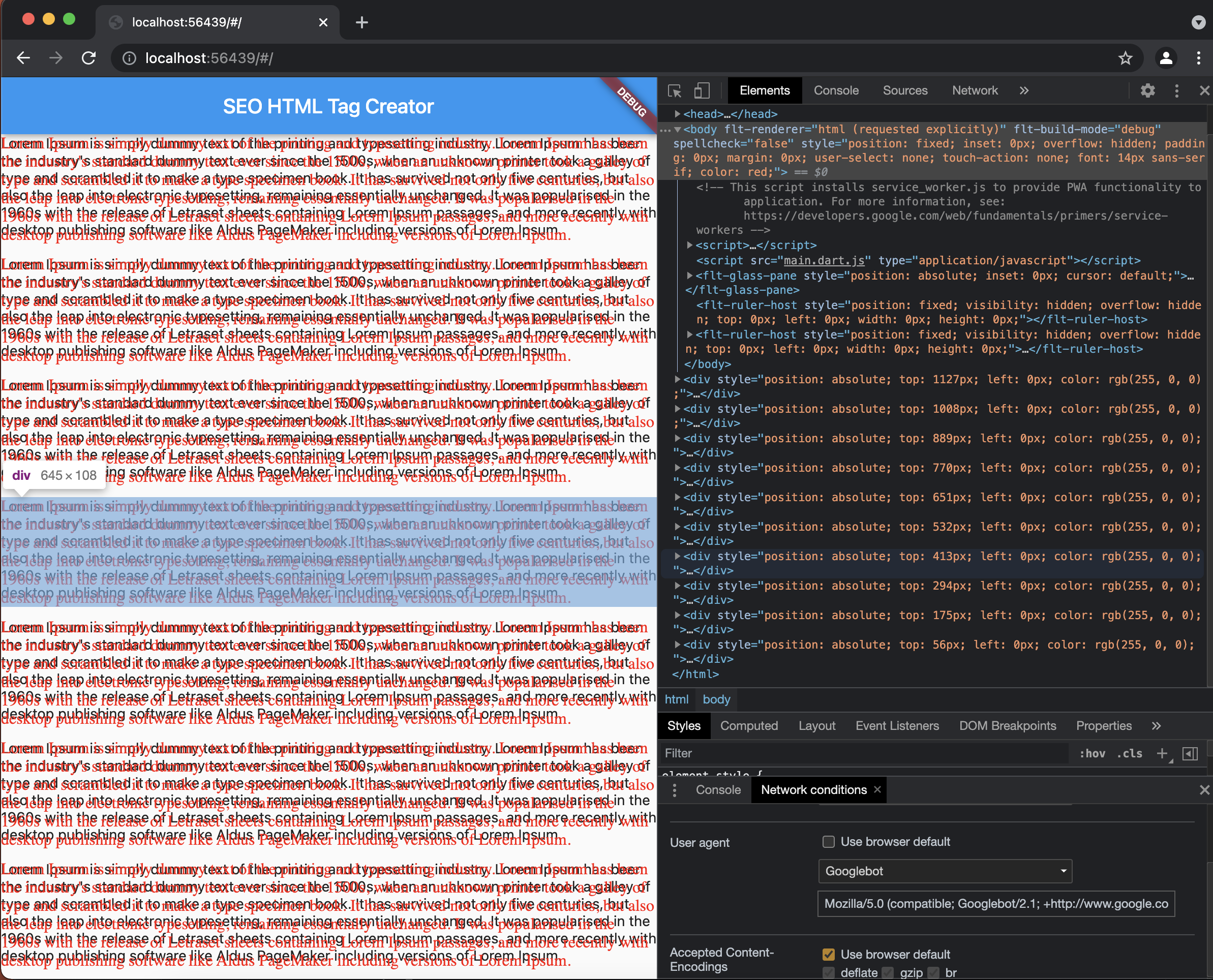
Select GoogleBot here's how as userAgent in Network Condition and refresh the page to see created Div Elements.
MIT License

Copyright (c) 2021 Sahdeep Singh

Permission is hereby granted, free of charge, to any person obtaining a copy
of this software and associated documentation files (the "Software"), to deal
in the Software without restriction, including without limitation the rights
to use, copy, modify, merge, publish, distribute, sublicense, and/or sell
copies of the Software, and to permit persons to whom the Software is
furnished to do so, subject to the following conditions:

The above copyright notice and this permission notice shall be included in all
copies or substantial portions of the Software.

THE SOFTWARE IS PROVIDED "AS IS", WITHOUT WARRANTY OF ANY KIND, EXPRESS OR
IMPLIED, INCLUDING BUT NOT LIMITED TO THE WARRANTIES OF MERCHANTABILITY,
FITNESS FOR A PARTICULAR PURPOSE AND NONINFRINGEMENT. IN NO EVENT SHALL THE
AUTHORS OR COPYRIGHT HOLDERS BE LIABLE FOR ANY CLAIM, DAMAGES OR OTHER
LIABILITY, WHETHER IN AN ACTION OF CONTRACT, TORT OR OTHERWISE, ARISING FROM,
OUT OF OR IN CONNECTION WITH THE SOFTWARE OR THE USE OR OTHER DEALINGS IN THE
SOFTWARE.
This project is created by Sahdeep Singh
If you appreciate my work you can connect and endorse me on LinkedIn to keep me motivated :)
Don't forget to check out these AWESOME contributors

依存関係一覧 2 件
{"sdk":"flutter"}{"sdk":"flutter"}用途で絞り込み、開発状況を比較し、採用前に元のリポジトリで要件を確認しましょう。
“A repository is the most basic element of GitHub.”
GitHub Docs — About repositories ↗