
scroll_to_animate_tab
ishafiul/scroll_to_animate_tab open-source repository details.

- スター
- 3
- フォーク
- 1
- 最終プッシュ(UTC)
- 2026/04/10
- プロジェクト状態
- 公開中
元の README
以下は英語原文のスナップショットです。最新版は GitHub をご覧ください。
scroll_to_animate_tab
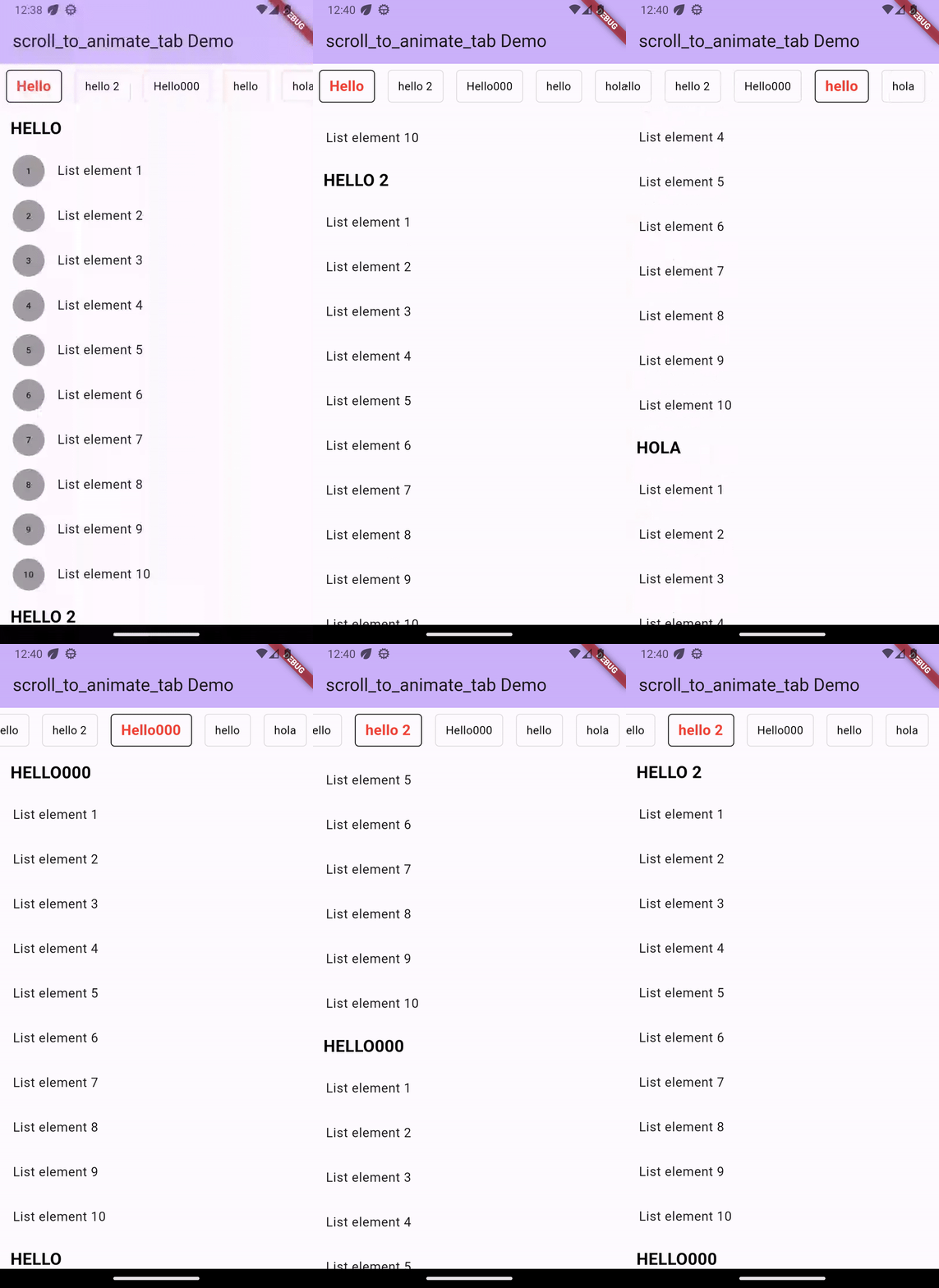
A Flutter widget that is customizable and syncs the ScrollView with the tabs. Create distinct tabs that are coordinated with the internal ScrollView. The tabs come after the index of the scroll view.
Demo
Installation
Add dependency for package on your pubspec.yaml:
    dependencies:
	    scroll_to_animate_tab: latest
or
flutter pub add scroll_to_animate_tab
API
ScrollToAnimateTab
| Parameter | Definition |
|---|---|
List<ScrollableList> tabs |
List of tabs to be rendered |
double tabHeight |
Height of the tab at the top of the view |
Duration? tabAnimationDuration |
[Optional] Duration of tab change animation |
Duration? bodyAnimationDuration |
[Optional] Duration of tab change animation |
Curve? tabAnimationCurve |
[Optional] Animation curve used when animating tab change |
Curve? bodyAnimationCurve |
[Optional] Animation curve used when changing index of inner [ScrollView]s |
Color? backgroundColor |
[Optional] This property will help you to change the background color of tab bar |
TabDecoration? activeTabDecoration |
[Optional] Change active tab decoration |
TabDecoration? inActiveTabDecoration |
[Optional] Change inactive tab decoration |
TabDecoration
| Parameter | Definition |
|---|---|
| TextStyle textStyle | TextStyle for tab label |
| Decoration? decoration | decoration for tabs |
ScrollableList
| Parameter | Definition |
|---|---|
| String label | A String for tab label and as headline of [ScrollableList.body] |
| Widget? bodyLabelDecoration | A widget label for decorate body widget. by default its a Text widget as context [ScrollableList.label] with color: Colors.black,fontWeight: FontWeight.bold,fontSize: 21 |
| Widget body | A single widget in the scrollable tab list. You can use [Column] or any single scrollable widget. If you want to use [ScrollView] ([ListView]) then we suggest make sure that [body] is created with [ScrollView.shrinkWrap] = true and [ScrollView.physics] = [NeverScrollableScrollPhysics]. |
inside this [TabDecoration], it gives us textStyle property which is required that helps us to
change tab label style and other is optional named decoration property which helps us to decorate
our tab.
How to use
Basic Example ->
ScrollToAnimateTab(
    activeTabDecoration: TabDecoration(
        textStyle: const TextStyle(
          color: Colors.red, fontWeight: FontWeight.bold, fontSize: 18),
        decoration: BoxDecoration(
            border: Border.all(color: Colors.black),
            borderRadius: const BorderRadius.all(Radius.circular(5))
        )
    ),
    inActiveTabDecoration: TabDecoration(
        textStyle: const TextStyle(color: Colors.black),
        decoration: BoxDecoration(
            border: Border.all(color: Colors.black12),
            borderRadius: const BorderRadius.all(Radius.circular(5))
        )
    ),
    tabs: [
        ScrollableList(
            label: "Hello",
            body: ListView.builder(
                shrinkWrap: true,
                physics: const NeverScrollableScrollPhysics(),
                itemCount: 10,
                itemBuilder: (_, index) => ListTile(
                title: Text('List element ${index + 1}'),
                ),
            )
        ),
        ScrollableList(
            label: "hello 2",
            body: Column(
                children: List.generate(
                    10,
                    (index) => ListTile(
                    title: Text('List element ${index + 1}'),
            )),
            )
        ),
  ]
)

GitHub 作者
Safiul islam ↗
言語C++CMakeDartHTMLSwiftCKotlinObjective-C
使用している依存関係
依存関係一覧 5 件
- flutter
{"sdk":"flutter"} - scrollable_positioned_list
^0.3.8 - flutter_test開発用
{"sdk":"flutter"} - mocktail開発用
^0.3.0 - very_good_analysis開発用
^5.0.0
プロジェクトに合うリポジトリを選ぶには?
用途で絞り込み、開発状況を比較し、採用前に元のリポジトリで要件を確認しましょう。
- 名前・作者・説明で検索し、技術トピックで絞り込みます。
- スター、フォーク、最近のプッシュを比較します。スターは関心の目安であり、品質の保証ではありません。
- 利用前に GitHub で README、ライセンス、Issues を確認します。
情報源と管理
“A repository is the most basic element of GitHub.”
GitHub Docs — About repositories ↗