
 v0.0.2
rolling_switch
魅力的なアニメーション付きのカスタムスイッチボタン。色、アイコン、その他の装飾的なコンテンツをカスタマイズできます。
59いいね 17930日間ダウンロード150Pub ポイント
AndroidiOSWebmacOSWindowsLinux
Flutterアプリ用の完全にカスタマイズ可能なローリングスイッチウィジェット

{"sdk":"flutter"}^0.0.1{"sdk":"flutter"}^1.5.3以下は英語原文のスナップショットです。最新版は GitHub をご覧ください。
Rolling Switch Package
Full customizable rolling switch widget for flutter apps forked from this library
Custom Switch button with attractive animation,
made to allow you to customize colors, icons, custom widget and other cosmetic content.
Manage the widget states in the same way you do with the classical material's switch widget.
style: lint https://img.shields.io/github/license/jamescardona11/rolling_switch https://img.shields.io/pub/v/rolling_switch
Import this library into your project:
roling_switch: ^latest_version
RollingSwitch.icon(
  onChanged: (bool state) {
    print('turned ${(state) ? 'on' : 'off'}');
  },
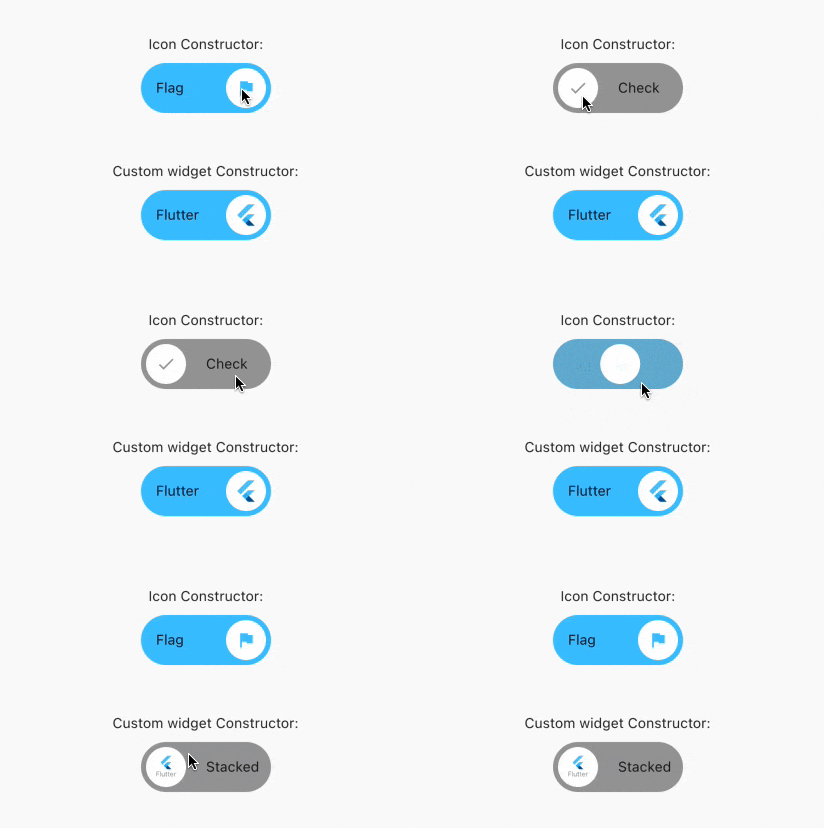
  rollingInfoRight: const RollingIconInfo(
    icon: Icons.flag,
    text: Text('Flag'),
  ),
  rollingInfoLeft: const RollingIconInfo(
    icon: Icons.check,
    backgroundColor: Colors.grey,
    text: Text('Check'),
  ),
),
const RollingWidgetInfo(icon: FlutterLogo())
RollingSwitch.icon(
  rollingInfoRight: const RollingIconInfo(
    backgroundColor: Colors.green,
  ),
  rollingInfoLeft: const RollingIconInfo(
    backgroundColor: Colors.grey,
  ),
)
RollingSwitch.icon(
  ...
  circularColor: (icon: FlutterLogo())
)
RollingSwitch.icon(
  rollingInfoRight: const RollingIconInfo(
    text: Text('Flag'),
  ),
  rollingInfoLeft: const RollingIconInfo(
    text: Text('Stack'),
  ),
)
RollingSwitch.icon(
  ...
  enableDrag: true
)
https://github.com/jamescardona11/rolling_switch/blob/main/img/example.gif?raw=true