

v2.1.1
get_storage
Dartで完全に書かれた高速で非常に軽量かつ同期的なキー値ストレージ
1880いいね 21.2万30日間ダウンロード130Pub ポイント
AndroidiOSWebmacOSWindowsLinux
Get フレームワーク用の高速で非常に軽量かつ同期的なキー値ストレージ

以下は英語原文のスナップショットです。最新版は GitHub をご覧ください。
A fast, extra light and synchronous key-value in memory, which backs up data to disk at each operation. It is written entirely in Dart and easily integrates with Get framework of Flutter.
Supports Android, iOS, Web, Mac, Linux, and fuchsia and Windows**. Can store String, int, double, Map and List
dependencies:
  get_storage:
You can install packages from the command line:
with Flutter:
$ flutter packages get
Now in your Dart code, you can use:
import 'package:get_storage/get_storage.dart';
main() async {
  await GetStorage.init();
  runApp(App());
}
GetStorage().read('key')final box = GetStorage();
write :box.write('quote', 'GetX is the best');
read:print(box.read('quote'));
// out: GetX is the best
remove:box.remove('quote');
listen:Function? disposeListen;
disposeListen = box.listen((){
print('box changed');
});
disposeListen?.call();
listenKey:box.listenKey('key', (value){
print('new key is $value');
});
box.erase();
GetStorage g = GetStorage('MyStorage');
await GetStorage.init('MyStorage');
class MyPref {
  static final _otherBox = () => GetStorage('MyPref');

  final username = ''.val('username');
  final age = 0.val('age');
  final price = 1000.val('price', getBox: _otherBox);

  // or
  final username2 = ReadWriteValue('username', '');
  final age2 = ReadWriteValue('age', 0);
  final price2 = ReadWriteValue('price', '', _otherBox);
}

...

void updateAge() {
  final age = 0.val('age');
  // or
  final age = ReadWriteValue('age', 0, () => box);
  // or
  final age = Get.find<MyPref>().age;

  age.val = 1; // will save to box
  final realAge = age.val; // will read from box
}
GetStorage is not fast, it is absurdly fast for being memory-based. All of his operations are instantaneous. A backup of each operation is placed in a Container on the disk. Each container has its own file.
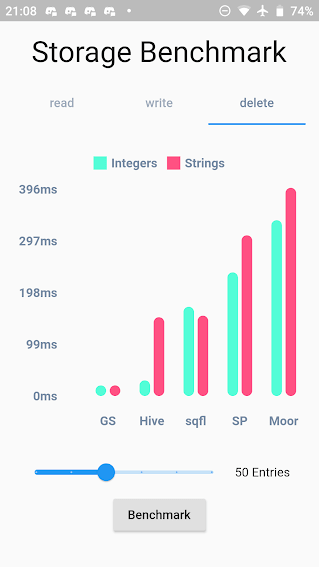
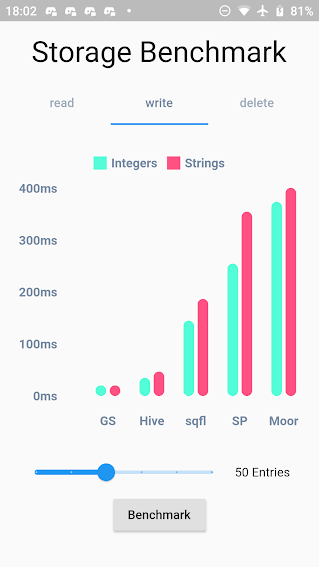

Persistent key/value storage for Android, iOS, Web, Linux, Mac and Fuchsia and Windows, that combines fast memory access with persistent storage.
A database. Get is super compact to offer you a solution ultra-light, high-speed read/write storage to work synchronously. If you want to store data persistently on disk with immediate memory access, use it, if you want a database, with indexing and specific disk storage tools, there are incredible solutions that are already available, like Hive and Sqflite/Moor.
As soon as you declare "write" the file is immediately written in memory and can now be accessed immediately with box.read(). You can also wait for the callback that it was written to disk using await box.write().
依存関係一覧 4 件
{"sdk":"flutter"}>=4.0.0 <6.0.0^2.0.1{"sdk":"flutter"}用途で絞り込み、開発状況を比較し、採用前に元のリポジトリで要件を確認しましょう。
“A repository is the most basic element of GitHub.”
GitHub Docs — About repositories ↗