

v2.0.0
import_lint
Import Lintパッケージは、インポートLintルールを定義し、Dartコード内で発見されたLintを報告します。
28いいね 1.1万30日間ダウンロード150Pub ポイント
AndroidiOSmacOSWindowsLinux
Import Lintパッケージは、インポートLintルールを定義し、Dartコード内で発見されたLintを報告します。

以下は英語原文のスナップショットです。最新版は GitHub をご覧ください。


The import_lint package defines rules to restrict imports and performs static analysis. It was inspired by eslint/no-restricted-paths.
flutter pub add --dev import_lint

or

dart pub add --dev import_lint
analysis_options.yaml file at the root of your project.Example of analysis_options.yaml
plugins:
  import_lint: <version number>

import_lint:
  rules:
    example_rule:
      target: "package:example/target/*.dart"
      from: "package:example/from/*.dart"
      except: ["package:example/from/except.dart"]
    self_rule:
      target: "package:example/self/*.dart"
      from: "package:example/self/*.dart"
      except: []
    only_rule:
      target: "package:example/*[!only]/*.dart"
      from: "package:example/only_from/*.dart"
      except: []
    package_rule:
      target: "package:example/**/*.dart"
      from: "package:import_lint/*.dart"
      except: []
    # add custom rules...
Note:
import_lintrequires Dart 3.10 or later (analyzer plugin support was added in Dart 3.10 / Flutter 3.38). The top-levelplugins:section is the new analyzer plugin system. After any change to theplugins:section, the Dart Analysis Server must be restarted to see the effects (VS Code: Dart: Restart Analysis Server).
By adding import_lint plugin to get the warnings directly in your IDE by configuring.
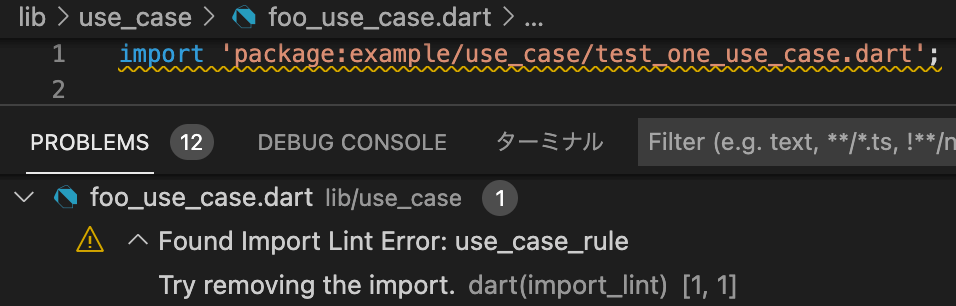
flutter run import_lint
or
dart run import_lint
plugins:
  import_lint:
    path: ..

import_lint:
  rules:
    example_rule:
      target: "package:example/target/*.dart"
      from: "package:example/from/*.dart"
      except: ["package:example/from/except.dart"]
    self_rule:
      target: "package:example/self/*.dart"
      from: "package:example/self/*.dart"
      except: []
    only_rule:
      target: "package:example/*[!only]/*.dart"
      from: "package:example/only_from/*.dart"
      except: []
    package_rule:
      target: "package:example/**/*.dart"
      from: "package:import_lint/*.dart"
      except: []
files
output
$ dart run import_lint

Analyzing...
   warning • /example/lib/not/1.dart:1:8 • package:example/only_from/1.dart • only_rule
   warning • /example/lib/target/1.dart:2:8 • package:example/from/test.dart • example_rule
   warning • /example/lib/self/1.dart:1:8 • package:example/self/2.dart • self_rule
   warning • /example/lib/package/1.dart:1:8 • package:import_lint/import_lint.dart • package_rule

4 issues found.
To change the severity of a rule, add a severity key to the rule configuration.
warning (default)error (exit code 1 when lint is found)import_lint:
severity: "error"
rules: ...
Note on IDE severity: The
severity: "error"setting is honored bydart run import_lint(exit code 1). In the IDE,analysis_server_pluginregisters a fixedwarningseverity. To see import_lint errors as errors in the IDE, add this toanalysis_options.yaml:analyzer: errors: import_lint: error
Welcome PRs!
To develop locally, clone the repo and enable the plugin from a local path in
your host project's analysis_options.yaml:
plugins:
  import_lint:
    path: /path/to/your/import-lint
    diagnostics:
      import_lint: true
For CLI use (dart run import_lint), also add it under dev_dependencies:
dev_dependencies:
  import_lint:
    path: /path/to/your/import-lint
Then run dart pub get in the host project and restart the Dart Analysis
Server. No separate tools/analyzer_plugin directory is needed — the plugin
entry point is lib/main.dart in this package.
用途で絞り込み、開発状況を比較し、採用前に元のリポジトリで要件を確認しましょう。
“A repository is the most basic element of GitHub.”
GitHub Docs — About repositories ↗